

Tutoring centre management software for multi-tutor centres
Running a centre on spreadsheets for students, Zoom for classes, WhatsApp for coordination and a shared Drive for everything else stops working at about the third tutor. Teamlilit gives your centre one system where the timetable, the classroom, attendance, notes and invoices are the same records rather than five copies of them.
What the Academy plan includes
No interpretation, just the numbers you are buying. Centre software is usually priced per tutor, which charges you for hiring. Teamlilit prices the workspace and lets you add the two things that actually scale with a centre, staff seats and concurrent rooms, when you need them.
| Included with Academy | How it grows | |
|---|---|---|
| Staff seats (tutor logins) | 4 | Add more with the Staff Seat extension |
| Concurrent live sessions | 4 | Add more with the Concurrency extension |
| Students in one session | Up to 100 | Fixed on this plan |
| Students on your roster | Unlimited | No per-student pricing, ever |
| Storage | 50 GB | Add more with the Storage extension |
| AI session summaries | Around 60 hours a month | Top up with the AI Credits extension |
Four rooms running at once matches the four included seats, so every tutor can teach the same evening slot without queuing for a room. Parallel sessions are enabled on Academy, so a full timetable is a question of seats and rooms rather than a different product tier. See pricing for the current figures in your currency.
One thing to know before you start the free trial: it runs on the Pro feature set, not Academy. Pro gives you one staff seat, one live room and groups of up to 25, which is enough to judge the scheduling, the classroom and the student records, but not enough to run a four-tutor evening. Academy is a direct subscription, so the seats and rooms in the table above start when you subscribe.
One centre, three views
The same workspace looks different depending on who signs in, which is what stops a centre becoming a group chat with a spreadsheet attached.
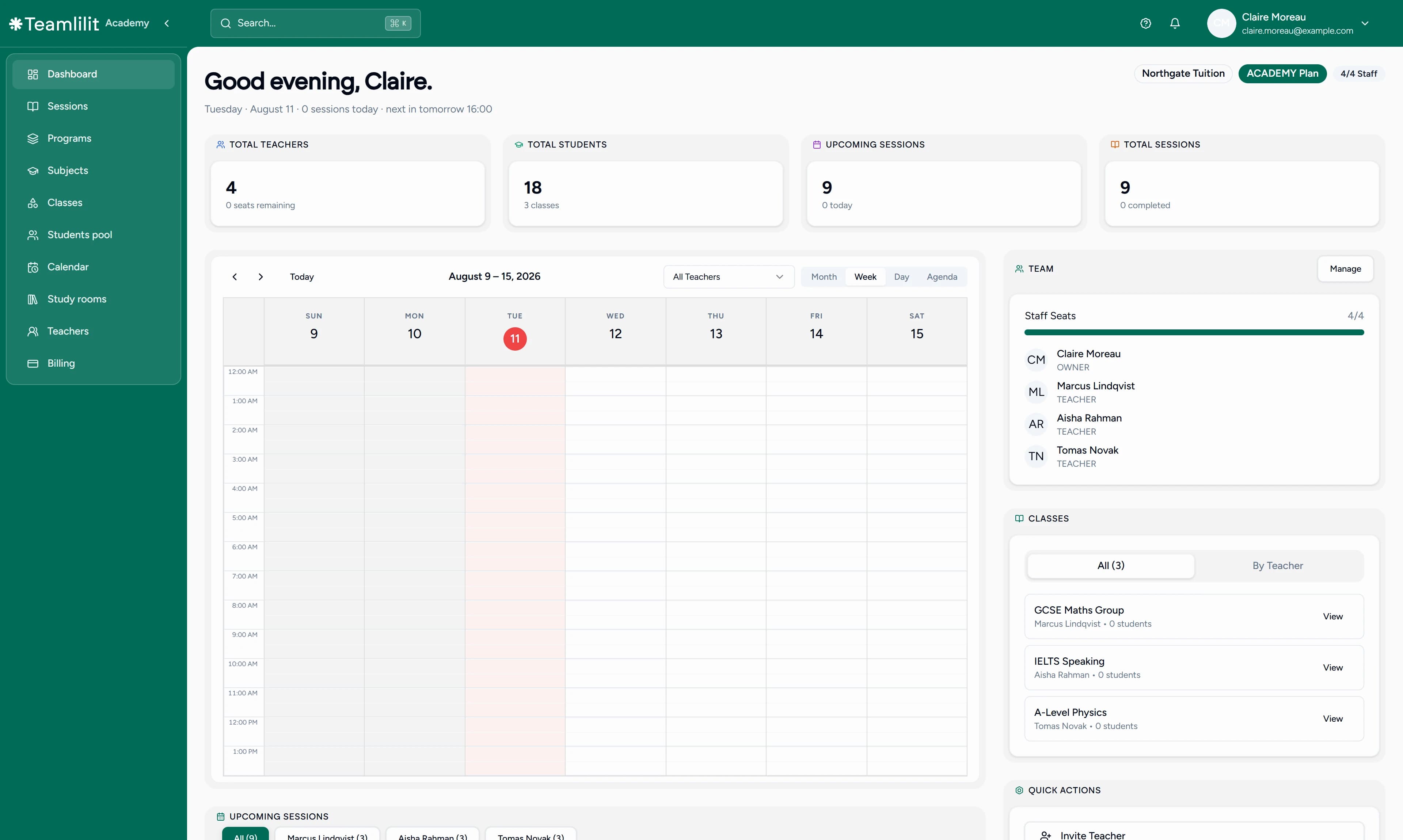
You, as owner or admin. The academy dashboard is the centre-wide view: every tutor's classes and schedule on one calendar, the staff list with each member's role and seat, per-session attendance and time recorded per student, and the roll-up counts above it. You see what is happening without asking anyone for an update.
Your tutors. Each staff seat is a real account with its own dashboard, timetable and classes. A tutor manages their own sessions, runs the lesson, marks nothing by hand because attendance records itself, and writes the wrap-up. They do not see the centre's billing, and they do not need to.
Your students and their families. Students sign in, see their classes, join the live classroom, and open their materials. Families can be given a read-only link showing that student's recent lessons, attendance and invoices, so the routine questions answer themselves instead of arriving as messages on a Sunday.
A Tuesday at 16:00
The difference between a centre system and a stack of tools is what happens automatically between those three views. One slot, two tutors:
- 16:00. Tutor A starts GCSE Maths with six students. Tutor B starts IELTS speaking with four. Both rooms run at once, because Academy includes four.
- During the lesson. Each student's join and leave time is stamped as they arrive, so late arrivals and early leavers are on the record rather than in someone's memory.
- 17:00. Both tutors close their sessions. Each writes a wrap-up, drafted by AI from what they explained during the lesson, then reviewed and edited before it saves.
- Afterwards. You open the academy dashboard and see both sessions, who attended, how long each student was actually there, and the notes attached to their records.
- At the end of the month. The invoices build from those same sessions rather than from a separate tally, so what you bill is what was taught.
Nothing in that chain is a second data entry. The attendance record, the session history and the invoice are the same event seen from different angles.
Centre-wide scheduling
Coordinating several tutors' weeks is the job that breaks first, and it is the reason most centres start shopping. Tutoring centre scheduling software has to do three things a personal calendar does not:
- One shared timetable across every tutor, so two people cannot take the same slot and you can see the whole week at a glance rather than opening four calendars.
- Per-tutor views under central oversight, so each tutor works from their own timetable while you keep the centre-wide picture.
- Recurring term schedules, built once for the term instead of rebuilt every week across the team, with students booking open slots themselves into each tutor's availability.
Students are organised into classes by subject, level or schedule, and the centre timetable connects to attendance so the record fills itself in. The mechanics live on the scheduling page rather than being repeated here. Starting from a blank week? How to create a tutoring timetable. Tutors each arrived with their own booking link? The tutoring appointment app comparison. More than one site? Academic scheduling platforms that prevent double-booking across campuses covers which tool owns the room clash and which owns the teaching.
The same standard from every tutor
Consistency is the quiet problem in a centre. Some tutors write detailed notes, some write nothing, and families notice the difference long before you do. Four things close that gap without turning "write your notes" into a management battle:
- Attendance records itself. Per-session join and leave times, per student, across every tutor and class. It is also the record that lets you reduce no-shows centre-wide, and centres running clubs and enrichment blocks get the same records through after school attendance software.
- Session notes live on the student, not in a tutor's notebook. Dated, attached to the right student, still there when that student changes tutor.
- AI-assisted wrap-ups. The tutor's explanations during the lesson become a draft they review and edit before it saves, with notes and homework per student, so every report stays accurate and in their own voice.
- Progress that reads back as a trend. Because the notes are dated and attached, a term of them reads as a trajectory rather than a search through someone's inbox.
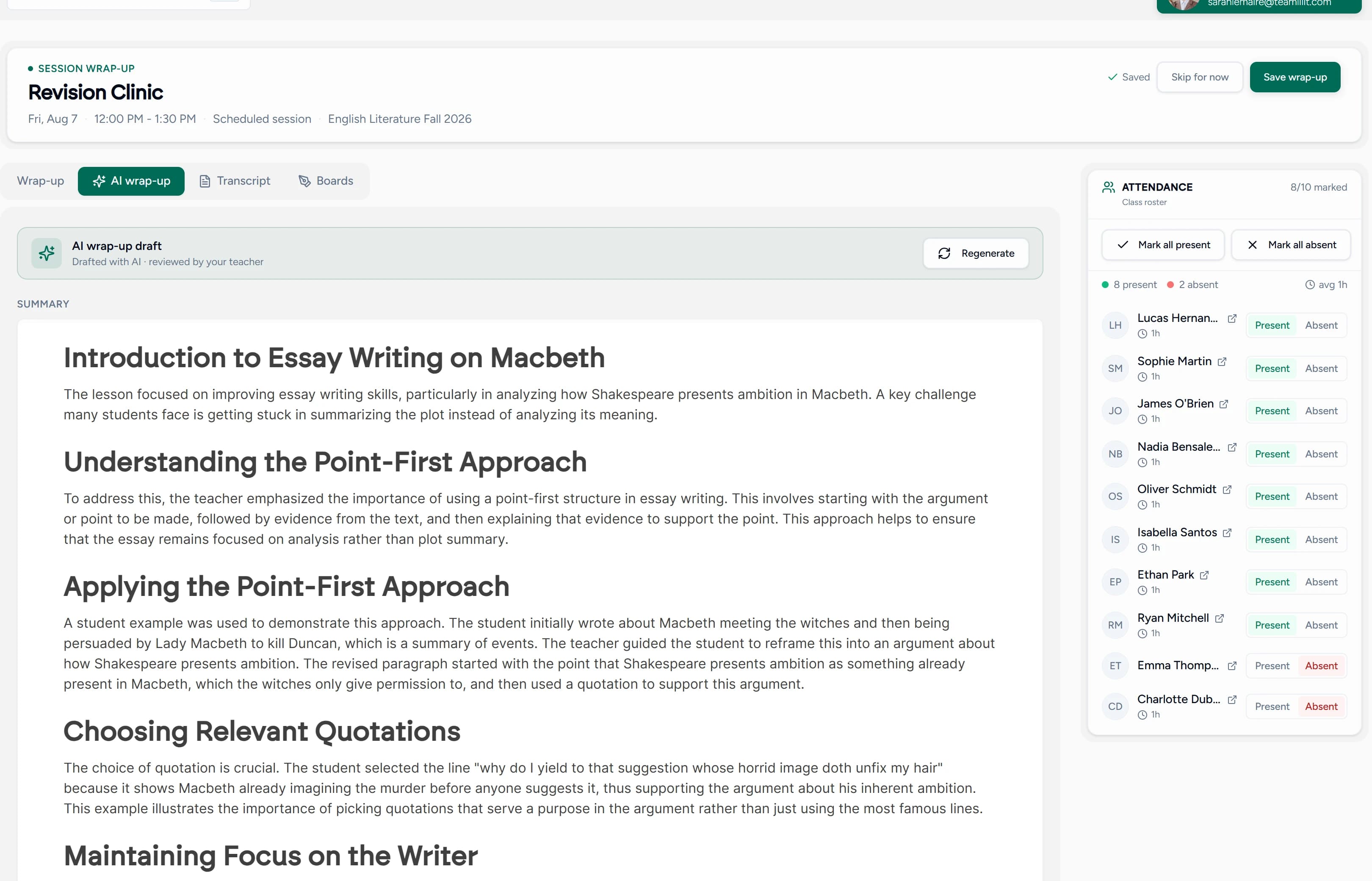
AI wrap-ups are available on Pro and Academy, with credits you can top up as your centre grows.
Tutoring centre billing and invoicing
Most centre tools stop at scheduling and leave you to invoice families from somewhere else. Because every session is already tracked, invoices build from the lessons you actually taught rather than from a separate count:
- Consolidated family invoices. One bill to the paying parent covering several children, each child's lessons listed separately, so a family pays once and can still see what they paid for.
- Per-student rates. Different subjects, levels and tutors can carry different rates without a spreadsheet holding the pricing.
- Attendance-driven amounts. What was taught is what appears on the invoice, including a late cancellation charged under your own policy.
- Payment tracking. Every payment is recorded against its invoice, so what is outstanding is a number rather than an inbox search. VAT and automatic late fees apply themselves once configured.
Teamlilit prepares and sends the bill; the payment goes directly to you. The full billing workflow, including recurring invoices, credit notes and statements, is on the invoicing page. If you are pricing across subjects and levels, how much to charge for online tutoring benchmarks rates by region and level.
Moving your centre across
Most centres arrive from somewhere: a spreadsheet that outgrew itself, or a platform that charges per student lesson. Here is what that move actually involves, without pretending it is one button.
What you can import. Students come in by CSV, up to 2,000 rows per file. You map your own column headings onto Teamlilit's fields, so an export from your current tool rarely needs reshaping first: name, email, phone, school, year group, lead source, and guardian name, email and phone. One column has to be the student's email, because that is what an account is keyed on. Import runs a dry run first that shows you, row by row, what would be created, linked to an existing account, skipped as a duplicate or rejected as an error, so you see the outcome before anything is written. CSV import is available on Pro and Academy.
What you set up rather than import. Your tutors are invited as staff seats rather than imported. Classes, the term timetable and your rates are built in Teamlilit, because they are structure rather than records, and a centre usually wants to tidy them on the way across instead of copying last term's mess. Historical invoices stay where they are; new billing starts here.
When to do it. Between terms: roster first, timetable second. Still comparing? Teamlilit vs TutorCruncher on commission pricing, vs Teachworks on per-student-lesson billing, vs TutorBird, vs Class Manager, and timetable software vs spreadsheet.
Where your centre's data lives
A centre holds more children's data than a solo tutor does, so this belongs next to the buying decision rather than in a footer. Teamlilit runs on European infrastructure: DigitalOcean's Frankfurt and Amsterdam regions, with recordings in EU object storage. A GDPR Article 28 data processing agreement is available on request from support@teamlilit.com. Recordings can only be started by a teacher, and every participant sees an indicator while one is running. Our trust page and the FAQ set out hosting, retention and deletion in full.
Who this is for
- Tutoring centres moving online or going hybrid
- Academies with 2 to 10 tutors
- Learning centres, test prep and exam prep centres
- Language schools and multi-subject academies
- Education entrepreneurs building a tutoring business
A tutoring centre is the multi-tutor case of tutoring management software, and most centres do not begin as centres: if you are still the only tutor, tutoring business software covers the solo-to-team path. See also student management and the program builder.
Frequently asked questions
Is Teamlilit a tutoring center management system?
Yes. It combines the pieces a center normally splits across tools: student records and enrollment, tutor accounts with their own dashboards, a center-wide scheduling system, automatic attendance tracking, and the live classroom where lessons actually happen.
Does it include a scheduling system for tutoring centers?
Yes. Every tutor has their own timetable with 1:1, group, and recurring sessions, students can book open slots themselves, and admins see and manage every tutor's schedule from the academy dashboard.
Can AI help my tutors with session reports?
Yes. On Pro and Academy plans, Teamlilit drafts a session wrap-up with AI from what the tutor explained during the lesson. The tutor reviews and edits the draft before it is saved, so reports stay accurate while taking minutes instead of an evening.
Is this only for online tutoring centers?
Teamlilit is built for online teaching, but many centers use it alongside in-person sessions to manage schedules, students, and records in one place.
How many tutors can I add?
The Academy plan includes 4 staff seats by default. You can add more with the Staff Seat extension.
Can I try the Academy plan before subscribing?
The 14-day free trial runs on the Pro feature set and needs no card, so you can test the scheduling, the classroom, attendance and student records with one tutor account. The 4 staff seats, 4 concurrent rooms and 100-student sessions on Academy are not part of the trial, because Academy is a direct subscription rather than a trial tier. If you need to see a multi-tutor timetable before you commit, get in touch first.
Can each tutor manage their own classes?
Yes. Each tutor has their own dashboard to manage classes, sessions, and students, while you keep oversight from the academy dashboard.
Do students get their own accounts?
Yes. Students create accounts, join classes, attend sessions, and access their materials, all from their own dashboard. An account is not required just to sit in a lesson: you can send a single-use link from inside the room and the student joins by typing a name. Guests join as listeners, so speaking, camera, chat and drawing need a free account.
Can I bill parents and collect tuition through Teamlilit?
Yes. Teamlilit builds invoices from the lessons you have already tracked, adds VAT or late fees automatically, and records each payment against its invoice so you always know what is outstanding. You can send single, recurring, or consolidated monthly invoices that cover a whole family, and record every payment against the right student.
Can Teamlilit handle tutoring centre billing and invoicing?
Yes. Invoices build from the sessions your tutors already taught, so what you bill matches what was delivered. You can send one consolidated invoice per family covering several children, set different rates per student, subject or tutor, and apply VAT and late fees automatically. Every payment is recorded against its invoice, so what is outstanding is a number rather than an inbox search. Teamlilit prepares and sends the bill and the payment goes directly to you.
Can I import our student list from a spreadsheet?
Yes, by CSV, up to 2,000 rows per file. You map your own column headings onto Teamlilit's fields, including name, email, phone, school, year group, lead source and guardian details, and one column has to be the student's email because that is what an account is keyed on. A dry run shows you row by row what would be created, linked to an existing account, skipped as a duplicate or rejected, before anything is written. CSV import is available on Pro and Academy. Tutors are invited as staff seats rather than imported, and classes, the term timetable and your rates are set up in Teamlilit.
Can I run a learning center or test prep center with it?
Yes. Teamlilit works for any multi-tutor teaching business, including learning centers, test and exam prep centers, and language schools. You manage students, tutors, classes, schedules, attendance, and billing from one academy workspace instead of stitching separate tools together.
Can I oversee every tutor from one dashboard?
Yes. The academy dashboard gives you a center-wide view of every tutor's classes, schedule, and sessions, with per-session attendance and time recorded for each student. Each tutor runs their own classes while you keep oversight, so nothing depends on chasing people for updates.
How many students can be in one class?
Up to 100 students in a single live session on the Academy plan. Your total roster is unlimited on every plan, so the 100 is a per-session limit, not a cap on how many students your center can have. Academy also runs sessions in parallel, so four tutors can teach different classes in the same time slot.
What if I outgrow the seats or rooms included?
You add them rather than changing plan. Academy includes 4 staff seats and 4 concurrent live sessions; the Staff Seat and Concurrency extensions add more of each, and Storage and AI Credits work the same way. Pricing follows the size of your center instead of charging you per student lesson. See pricing for what each extension costs.
