

Tutoring Management Software for Tutors and Tuition Centres
If your tutoring business runs on WhatsApp messages, a spreadsheet, a calendar, and a separate video app, you are doing the same work several times and still losing track. Teamlilit is tutoring management software that puts the whole operation in one platform: scheduling, attendance, online lessons, student records, billable hours, cancellations, and invoices, all connected to the same lesson. For the wider picture of teaching online, see our guide on the virtual classroom for tutors.
Your current stack

Who this is for
- Solo and independent tutors who want a professional setup instead of a patchwork of apps
- Tutoring agencies and small academies coordinating several tutors and dozens of students
- Tuition centres running fixed weekly timetables across subjects and levels
- Language schools and exam prep centres (IELTS, TOEFL, GCSE, and more)
What is tutoring management software?
Tutoring management software runs the day-to-day operation of a tutoring business from one place, instead of stitching together a calendar, a spreadsheet, a video tool, and a notebook. It knows what a lesson actually is: a student (or a group), at a time, for a duration, with attendance, materials, and a record afterwards.
That is the difference between generic tools and a real tutoring system. A calendar blocks time but does not know a lesson from a dentist appointment. A spreadsheet stores numbers but does not connect them to who showed up. Teamlilit ties it all to the session, so the booking becomes the class becomes the attendance becomes the billable record with nothing re-entered.
Tutoring management software vs spreadsheets
A spreadsheet feels free until you count the hours it costs and the money it leaks. Every lesson is a row you have to remember to fill in, every change is manual, and nothing is connected to the actual class.
| Task | Spreadsheet + apps | Teamlilit |
|---|---|---|
| Schedule lessons | Manual calendar entries | Recurring sessions with students assigned |
| Track attendance | Separate sheet, filled by hand | Automatic, per session |
| Track billable hours | End-of-month reconstruction | Per student, recorded from the live class |
| Run the lesson | Send a Zoom link | Built-in classroom, wired to the schedule |
| Keep student records | Tabs that drift out of date | One profile per student, always current |
| Handle cancellations | Easy to forget | Linked to attendance and policy notes |
| Send invoices | Copy/paste from the sheet | Ready from lesson history |
For a deeper look at where a spreadsheet stops paying off, read our guide on tutor timetable software vs spreadsheet, or see how tutoring timetable management software keeps the weekly grid maintaining itself.
For private tutors vs tutoring centres
The same platform solves two different problems. A private tutor is protecting and filling their own week; a tutoring centre is coordinating many weeks at once without collisions. Teamlilit handles both.
| Private tutor | Tutoring centre | |
|---|---|---|
| Who's on the timetable | Just you, one schedule | Multiple tutors, rooms, and groups in one view |
| Students | Your own roster and records | Shared records with per-tutor and admin access |
| Booking | Students self-book your open slots | Students self-book; admins assign across tutors |
| Billing | Your hours, ready to invoice | Every tutor's hours in one place for billing |
| The main win | Get your week off WhatsApp | Run the whole centre from one dashboard |
For a solo tutor, start on the Solo or Pro plan. For a multi-tutor centre, the Academy plan for multi-tutor centres adds multi-tutor timetables, group enrolment, and admin oversight. There are dedicated pages for running a tutoring centre, a tutoring business, and an online language school.
For UK tuition businesses with more than one tutor
For a tuition business with more than one tutor, that job belongs to tutoring centre management software: every tutor's timetable, students, attendance, and billable hours in one place, with admins overseeing the whole centre from a single dashboard. It fits how UK tuition centres actually run, term-time recurring timetables, fixed after-school and weekend blocks, and multiple subjects and tutors in one view, so the centre's records stay consistent no matter which tutor is teaching.
Scheduling and attendance
Scheduling is the spine of the system. Build your week once with recurring 1:1 and group lessons, let students self-book your open slots inside your availability rules, and sync everything to Google Calendar automatically. No more "are you free at 5pm?" ping-pong. If you are comparing standalone bookers first, our tutoring appointment app roundup covers seven of them and where each stops.
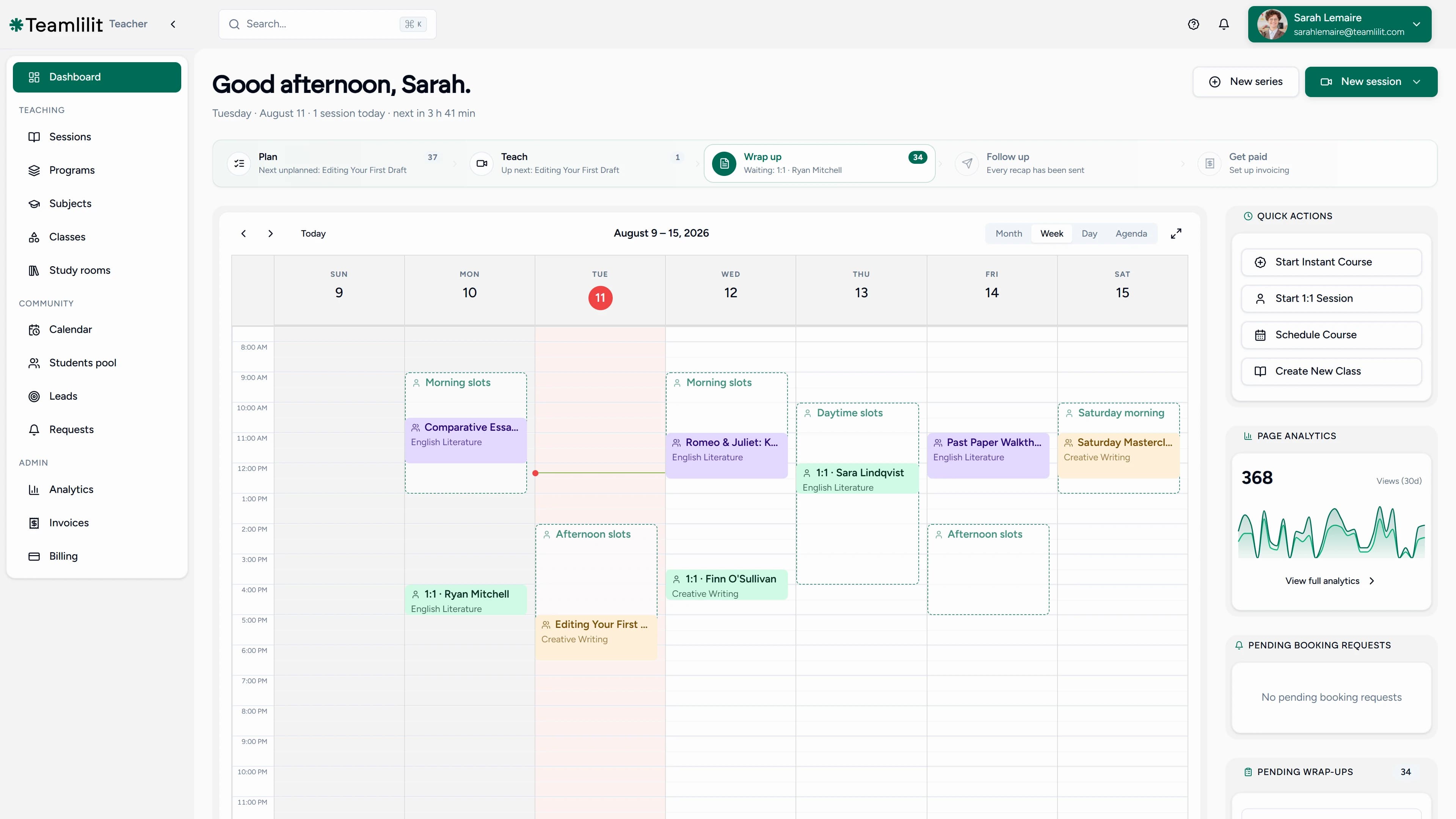
When a session runs, attendance is tracked automatically with join and leave times per student, not ticked off by hand afterwards. The booking flows straight into the attendance record, so your timetable always reflects what actually happened, and the same system works as after school attendance software for clubs and programs running recurring groups. Starting from a blank week? See our guide on how to create a tutoring timetable.
Student records and lesson history
Every student has one profile: contact details, notes, the groups they belong to, and a full history of their sessions with attendance and time in class. Because the record is built from the lessons themselves, it is always current, so you can answer "how is this student doing and how much have they had?" without hunting through three apps. For tutors who run their practice around relationships and follow-ups, the same records power a proper tutor CRM, and if you are weighing what such a tool should cost, our guide to an affordable class management CRM compares the categories on price as well as features.
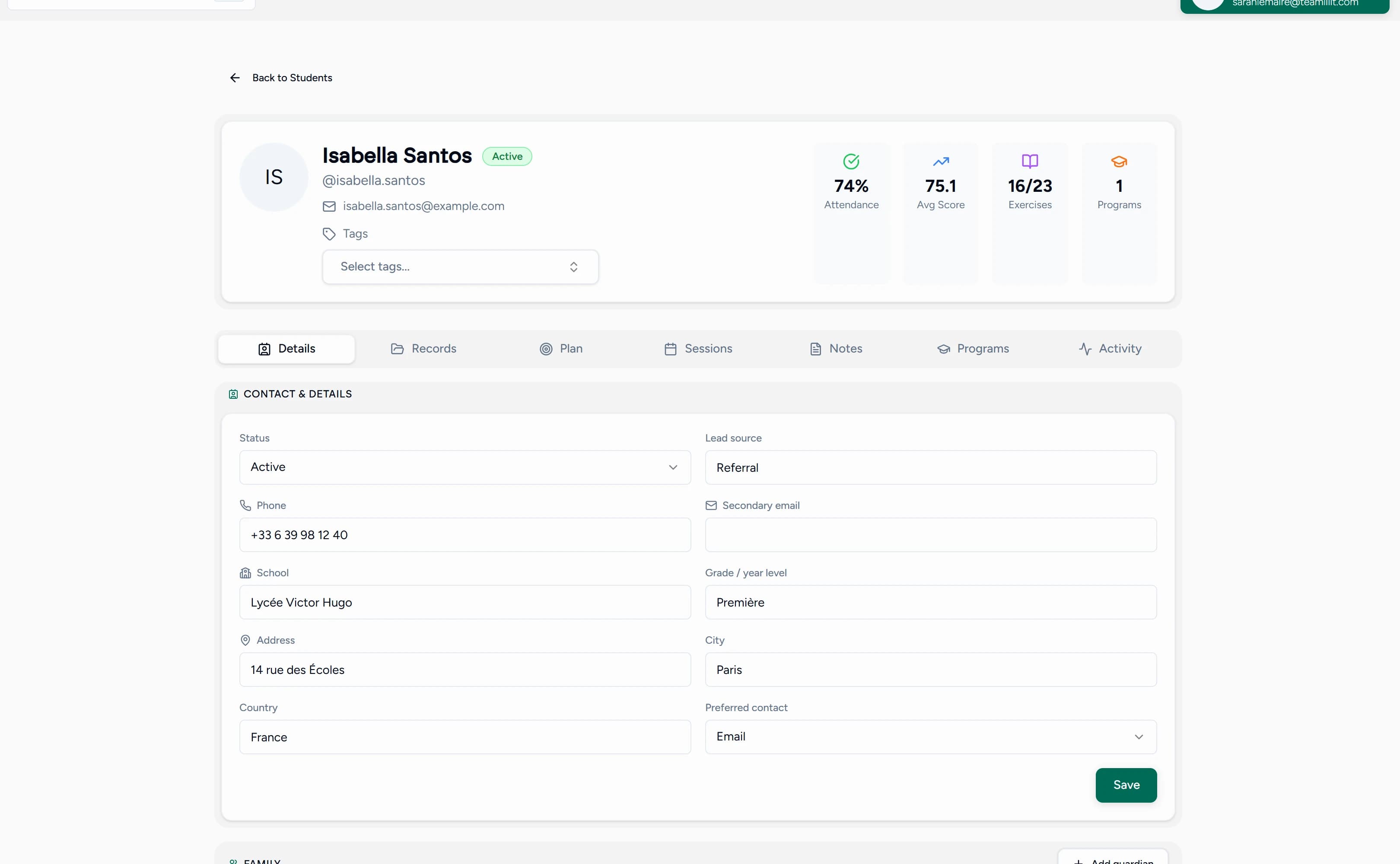
If you are still piecing this together by hand, our guide on how to organise private tutoring students walks through the system, tutor CRM vs spreadsheet covers when to switch, and what student records private tutors should keep explains what to record and what to leave out. Running an exam-prep program is where these records earn their keep: our guide on planning effective lessons for entrance exam preparation shows how diagnostic scores, topic tags and lesson history drive a week-by-week plan.
Student profiles, parent contacts, and lesson notes
A student record is only useful if it holds the right things in one place. In Teamlilit, every student profile keeps three together:
- The profile: name, year group, subject, exam board, goals, strengths, and weak areas, so you open one place and know exactly who you are teaching and what they are working towards.
- Parent and guardian contacts: name, email, phone, preferred contact method, and a separate billing contact, so important communication about cancellations, payments, and progress stays linked to the student instead of buried in a chat thread.
- Lesson notes: a short note after each lesson, what was covered, what went well, what needs practice, and the homework set, sitting on the profile and ready to review before the next session.
Want to build one before you sign up? Our free student profile template for tutors lays out every one of these fields with a worked example, and how to organise private tutoring students explains the habit behind keeping them current.
Billable hours and invoices
Billable hours are not the same as hours taught: a full lesson is billable, a late-cancelled one may be under your policy, and a group class where one student arrived late and another left early is several different numbers on several different invoices. Teamlilit can connect online lesson attendance, billable minutes, and invoices, so you do not have to calculate lesson time by hand after each session. If a student joins late, leaves early, misses a session, or attends only part of a group lesson, the billing record should reflect what actually happened. It keeps them straight because per-student time is recorded against each lesson alongside attendance.
Generate from tracked sessions
Pick a student and a billing period
3 attended sessions found
- Algebra, GCSE higherTue 3 June, 16:001.5h
- Calculus revisionTue 10 June, 16:00Estimated1.0h
- Exam practice paperTue 17 June, 16:002.0h
When invoicing day comes, you do not reconstruct anything. Read the period's sessions and durations off the student's profile and turn them into a professional PDF with the free tutor invoice maker. Inside your workspace, attendance-based invoicing goes further and builds each bill straight from the attendance and time already recorded against every lesson, so getting paid is part of the same connected system. Not sure what those hours should be worth? Our guide on how to price online tutoring sessions benchmarks 2026 rates by region and level. Our guides on how tutors can track billable hours and how to invoice tutoring students cover the full workflow.
For billing workflows, Teamlilit also includes invoicing software for tutoring centres and private tutors, connecting lessons, attendance, and billable teaching time so invoicing stays closer to real teaching activity. For the full setup, from discounted packages and per-student rates to payment tracking, see our guide to billing and CRM for your tutoring business, or the tutor billing software page for the whole cycle from per-student rates to payment tracking.
Cancellations and no-shows
No-shows are the quiet tax on a tutoring business: an hour you planned, prepared, and reserved, gone with no notice. Teamlilit reduces them in three ways: automatic reminders cut the accidental ones, self-booking makes students more likely to attend a slot they chose, and automatic attendance turns repeat absences into a pattern you can act on early.
For the deliberate cancellations, you need a policy. Pair the system with a clear private tutor cancellation policy so late cancellations have agreed consequences, and read our playbook on reducing student no-shows.
Online tutoring and virtual classroom
Lessons run inside the built-in virtual classroom: HD video, an interactive whiteboard, screen sharing, and chat, with no "send the Zoom link" chaos. Because the classroom is wired into the schedule, attendance and time are captured from the live class itself, and the session history lands on the student's record the moment the lesson ends. 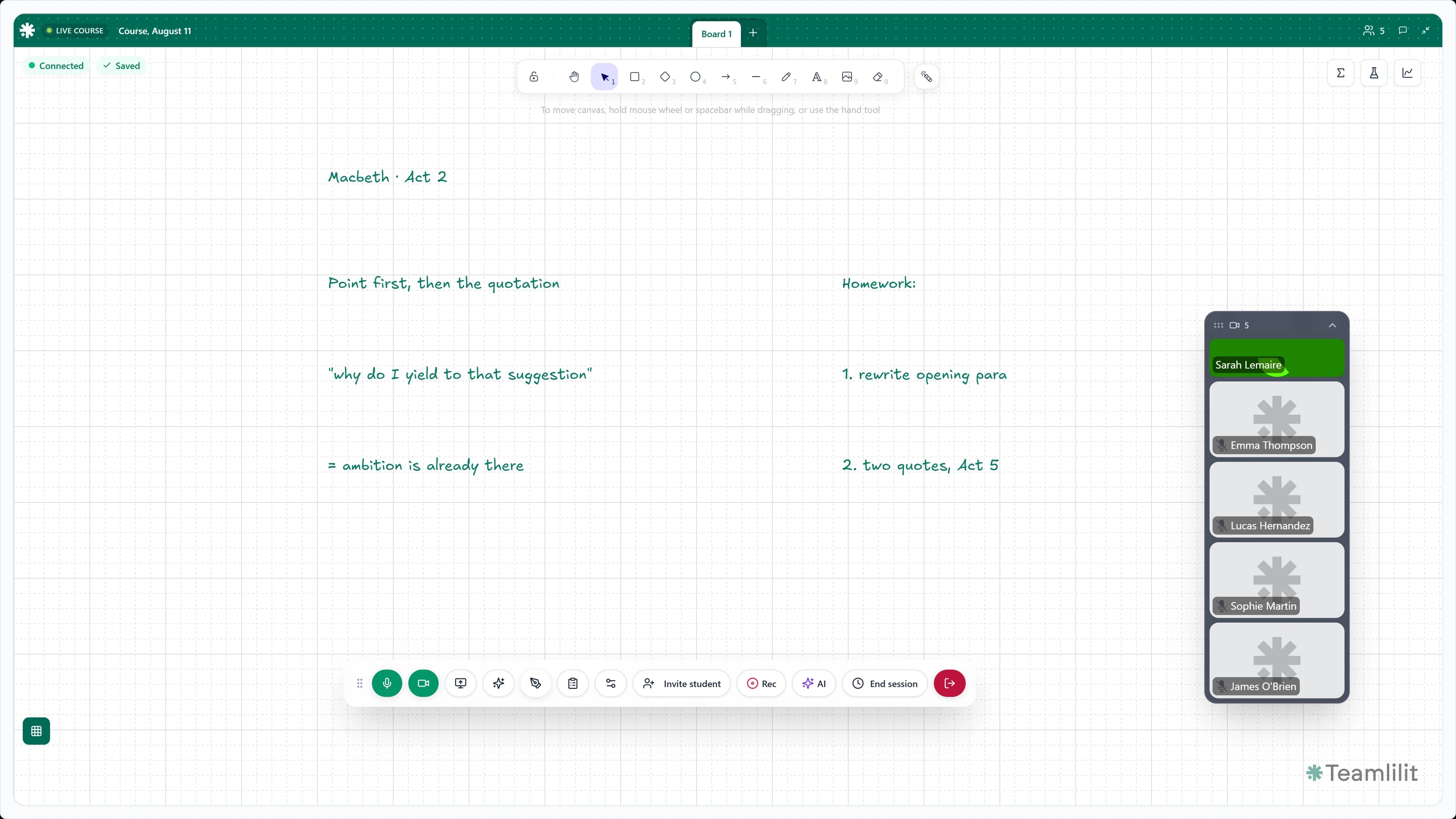
It is the whole reason tutors move off Zoom; here is why and how Teamlilit works as a complete online tutoring platform.
Free tools for tutors
You can start getting organised before you sign up. These free tools, with no signup required, plug straight into the workflow Teamlilit automates:
- Free student profile template for tutors: build one clear profile per student with details, parent contacts, goals, lesson notes, and admin, then export to PDF, CSV, or print
- Free tutoring hours tracker: log lesson time, attendance, billable hours, cancellation fees, and weekly earnings, then export to a spreadsheet or invoice
- Free tutor invoice maker: turn lesson history into a professional, UK-compliant invoice PDF in minutes
- Tutoring attendance sheet template: a printable register for tracking who attended
- Private tutor cancellation policy template: set notice periods and late-cancellation fees
- Free tutor timetable template: sketch your weekly schedule before you build it
Deciding which apps to pair with these templates? Our roundup of the best online tutor tools compares the video, scheduling, whiteboard, and payment options, with three ready-made stacks and what each really costs per month. And once the admin runs itself, growth becomes the next job: our playbook of the best marketing for tutors covers filling the calendar this software manages, channel by channel.
Core capabilities
- Scheduling with recurring sessions, calendar views, and student self-booking
- Automatic attendance tracking per session, with join and leave times
- Per-student time tracking and billable-hours records on every profile
- Student management with profiles, groups, notes, and session history
- Built-in virtual classroom with HD video, whiteboard, chat, and screen sharing
- 1:1 and group lessons, plus structured curricula with the program builder
- Cancellation handling, reminders, and invoicing from lesson history
- Multi-tutor management for tutoring centres on the Academy plan
How it works
- Create your tutoring or centre workspace
- Add your students, tutors, and groups
- Set availability and schedule sessions, one-time or recurring
- Run lessons in the live classroom and track attendance automatically
- Read off billable hours and send invoices with the invoice maker
Frequently asked questions
What is tutoring management software?
Tutoring management software runs the whole operation of a tutoring business in one place: scheduling lessons, recording attendance, running online classes, keeping student records, tracking billable hours, handling cancellations, and sending invoices. Instead of a calendar, a spreadsheet, a video app, and a notebook that drift out of sync, every lesson flows through one system so the booking becomes the class becomes the record becomes the invoice.
Who is tutoring management software for?
It is for anyone running tutoring as a business: solo and independent tutors who want a professional setup, tutoring centres and agencies coordinating several tutors, and tuition centres running fixed term-time timetables. Teamlilit scales from one tutor to a multi-tutor centre on the Academy plan without rebuilding your process.
How is this different from a calendar and a spreadsheet?
A calendar blocks time and a spreadsheet stores numbers, but neither knows what a lesson is. Tutoring management software connects them: the scheduled session carries the student, the attendance, the time in class, and the lesson history, so nothing is re-entered between tools and nothing falls through the gaps.
Does it track attendance and billable hours?
Yes. Attendance and per-student time are recorded automatically when each session runs, with join and leave times. That record is exactly what hourly billing needs, so billable hours are ready on each student's profile instead of reconstructed at the end of the month.
Does it handle cancellations and no-shows?
Yes. Automatic reminders cut accidental no-shows, attendance tracking surfaces repeat absences as a pattern, and a clear cancellation policy sets out notice periods and late-cancellation fees so held hours are accounted for instead of quietly lost.
Does it replace Zoom or Google Meet?
For most tutoring flows, yes. Teamlilit includes a built-in virtual classroom with HD video, whiteboard, screen sharing, and chat, wired straight into your schedule, so there are no meeting links to send and attendance and time are tracked from the live class itself.
Can I start solo and scale to a centre later?
That is the point. Start on the Solo plan, upgrade to Pro as you grow, and move to the Academy plan for tutoring centres when you add other tutors. Your students, classes, and history carry over, and admins manage every tutor's timetable from one dashboard. See pricing for details.
What does Teamlilit cover for a tuition business with several tutors?
A multi-tutor tuition business needs scheduling, student records, attendance-based invoicing, and a live classroom so a centre runs from one place instead of a pile of spreadsheets. Teamlilit provides exactly that on the Academy plan: unified scheduling across tutors, guardian and student records, automatic attendance tracking, invoices built from each lesson, and a built-in live classroom.
Is this suitable for a UK tuition centre?
Yes. Teamlilit fits how UK tuition centres run: term-time recurring timetables, fixed after-school and weekend blocks, multiple tutors and subjects in one view, and per-student attendance, time, and billing records ready to share with parents, from a single-room centre to a team of tutors. Academy means many tutors in one organisation rather than many sites: Teamlilit does not model separate branches and does not book physical rooms.
Tutoring management guides and resources
Build the habits that make a connected student record useful:
- Communicate with parents as a private tutor: write updates from clear lesson evidence.
- Organise private tutoring students: give each learner one structured profile.
- Keep lesson notes for tutoring students: record what happened, homework and the next focus.
- Progress report examples for parents: turn several lessons into a useful progress summary.
- Retain tutoring students: use attendance, progress and follow-up to support continuity.
Next step
Run tutoring like a business, not a chat group. Set up your Teamlilit workspace, add your students, and publish your first schedule. See pricing for plan details.
