

Tutor Scheduling Software: Availability, Reschedules and Cancellations
If you're still coordinating lessons through WhatsApp messages, Google Calendar links, and memory, you're losing hours every week. Teamlilit is a tutor scheduling tool built for how tutors actually teach, not generic meetings: publish the hours you are free, move a lesson without a calendar conflict, and keep attendance and per-student time attached to every change. For solo tutors and tuition centres alike. For the bigger picture of running lessons online, see our guide on the virtual classroom for tutors.
Tutoring scheduling software is a cloud tool for the moving parts of your teaching week: publishing tutor availability, sending lesson reminders, and absorbing reschedules and cancellations without a calendar conflict. It replaces the WhatsApp-and-calendar juggle for 1:1 lessons, group classes, and multi-tutor centres alike.
Two neighbouring jobs have pages of their own. The recurring weekly lesson pattern is covered by tutoring timetable management software, which handles recurring lesson operations, attendance, and taught hours. The public link a student claims a slot through is covered by tutor booking software. Scheduling is how the week changes. Timetable management is how the week is built and recorded. Booking is how a student takes a place in it.
Sofia M.
sofia.m@email.com
Pick a time
60 min · Private lesson
A scheduling system, not just a calendar
Generic calendar tools show you blocks of time. Teamlilit is a full tutoring scheduling system that knows who's teaching, which students are assigned, which group meets when, and who still needs reminding, whether you're a solo tutor or coordinating availability across a centre's staff. The bookings, the reschedules, the reminders, and the student records are one connected system.
Who this tutor scheduling tool is for
- Solo and independent tutors tired of back-and-forth scheduling
- Tutoring centres and agencies managing multiple tutors and dozens of students
- Tuition centres running fixed weekly schedules across subjects and levels
- Language schools and test prep centres (IELTS, TOEFL, and more)
Feature checklist: the core of a tutor scheduling tool
Before comparing tools, it helps to know what a purpose-built tutor scheduling tool should actually do. Here is the checklist tutors ask for most, and whether Teamlilit covers it:
| What tutors ask for | Teamlilit |
|---|---|
| Availability rules (buffers, daily limits, minimum notice, blocked dates) | Yes |
| Public booking page students can book from | Yes |
| Booking requests you approve before they confirm | Yes |
| Google Calendar sync for every session | Yes |
| Cancellation policies attached to bookings | Yes |
| Attendance recorded on the session, not a separate sheet | Yes |
| Invoicing that draws from tracked attendance | Yes |
| Per-student rates and lesson notes tied to the schedule | Yes |
The gap between this and a generic scheduler is the tutoring-specific half. A tool like Calendly or Google Calendar handles a booking or a time block, but neither knows a student's rate, keeps lesson notes, records who attended, or turns a taught hour into an invoice. That is the part a real tutor scheduling management system adds, and it is why the schedule connects to the rest of your tutoring management software instead of sitting on its own. Turning that taught hour into a bill is its own discipline, and our guide on how to invoice your tutoring students covers what the invoice needs, when to send it, and how to chase a late payer without damaging the relationship.
A tutor scheduling tool for 1:1 and group lessons
Every kind of session a tutor actually runs, in one calendar:
- 1:1 sessions: book individual lessons with specific students
- Group sessions: schedule classes for entire groups at once
- Recurring sessions: set it once, it repeats every week with no manual re-creation
- Instant sessions: start a lesson right now, no scheduling needed
- Student self-booking: students book available slots themselves, no back-and-forth
- Reschedules & cancellations: handle changes without the chaos
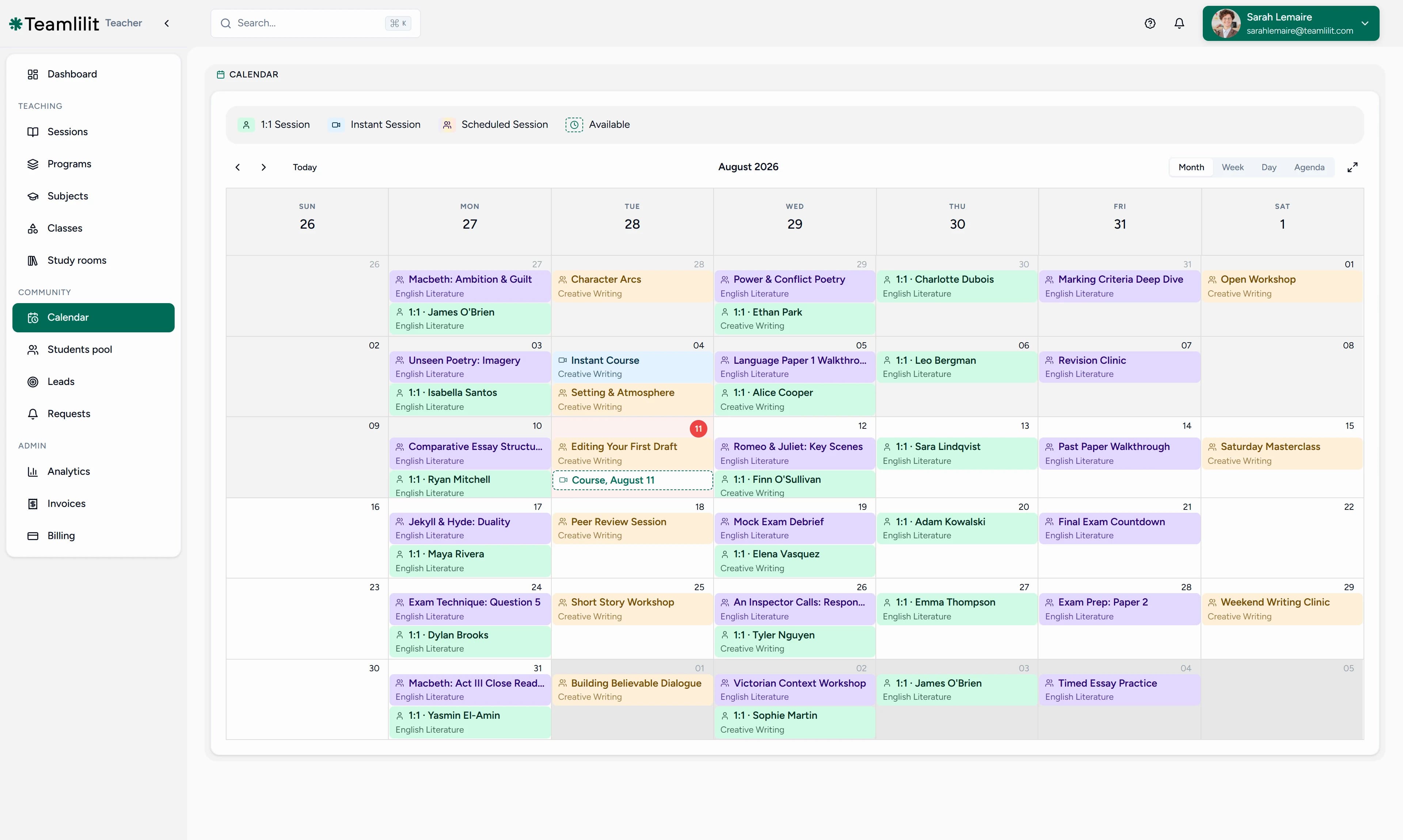
This is the difference between a tutor scheduling tool and a generic calendar app: it understands lessons, students, and groups, not just empty blocks of time.
Recurring sessions: set the week once
Most tutoring weeks look the same: Emma on Mondays at 5pm, the IELTS group on Wednesdays at 6pm. Teamlilit lets you set that week up once and repeat it automatically, weekly or on a custom interval, with the right students already assigned. No re-creating sessions, no forgotten lessons, no copy-paste calendar events.
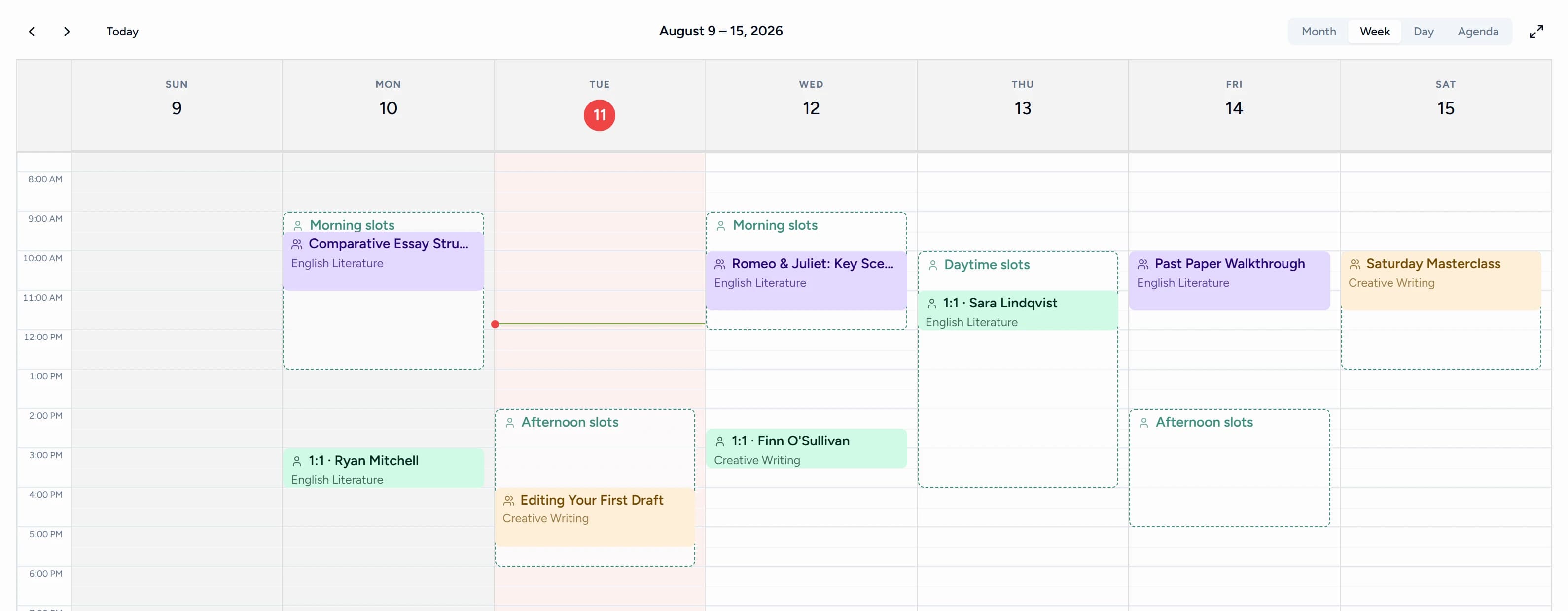
Your sessions also sync to your Google Calendar automatically, so your tutoring schedule shows up alongside the rest of your life without double entry. Recurring sessions are ideal for a fixed-length prep block: our guide on planning effective lessons for entrance exam preparation shows how to schedule a whole six-week exam roadmap as recurring events with practice-test slots built in.
From booked lesson to billable hours
Your schedule should not only show what was planned. It should help tutors understand what actually happened.
With Teamlilit, scheduled lessons connect to attendance and per-student time tracking, so tutors can see who attended, how long they stayed, and which lessons may need to be invoiced. If a student arrived late or left early, the record shows the time they were really there, and in a group lesson each student's attendance can differ. From there, attendance data pre-fills the invoice ready for a one-click send, since every booked session already carries the actual lesson time and the student it belongs to. Per-student rates and sibling discounts flow from the student record onto the invoice automatically, so a family with two children is billed correctly without you doing the maths.
The rest of the billing edge cases are handled by the same tutor billing software rather than a separate spreadsheet. Late-fee automation adds a charge after your chosen grace period, so overdue invoices chase themselves. Credit notes handle refunds and adjustments cleanly when a package changes or a lesson is written off. And VAT fields and rates are built in, so tax is calculated on each invoice and you can export VAT-ready invoices to upload to your accounting software. Our guide to setting up billing and CRM for a tutoring business walks through packages, rates, and payment tracking end to end.
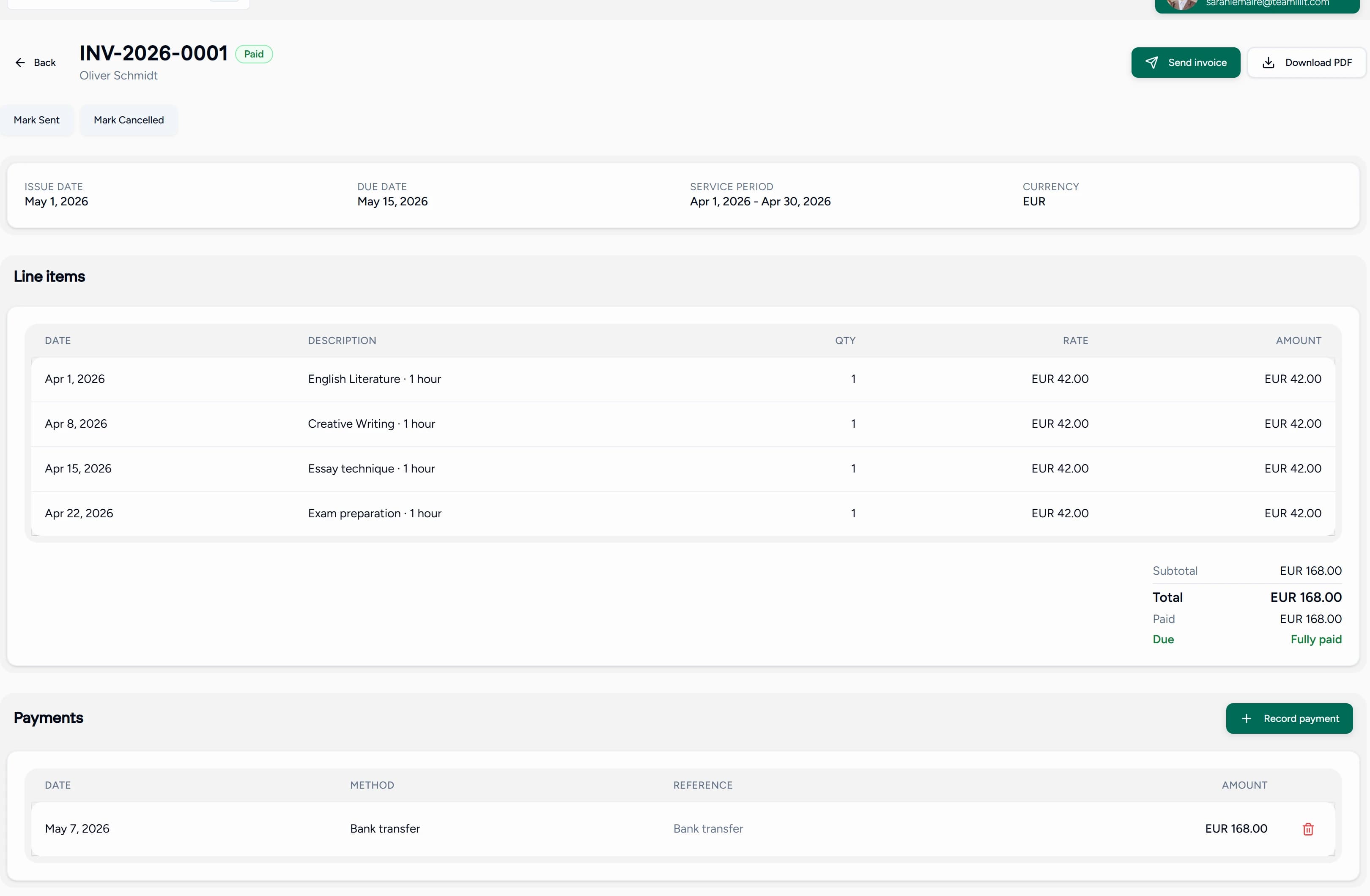
If you are still calculating hours manually at the end of the week, read our guide on how tutors can track billable hours or try the free tutoring hours tracker.
Availability rules: what is bookable, and when
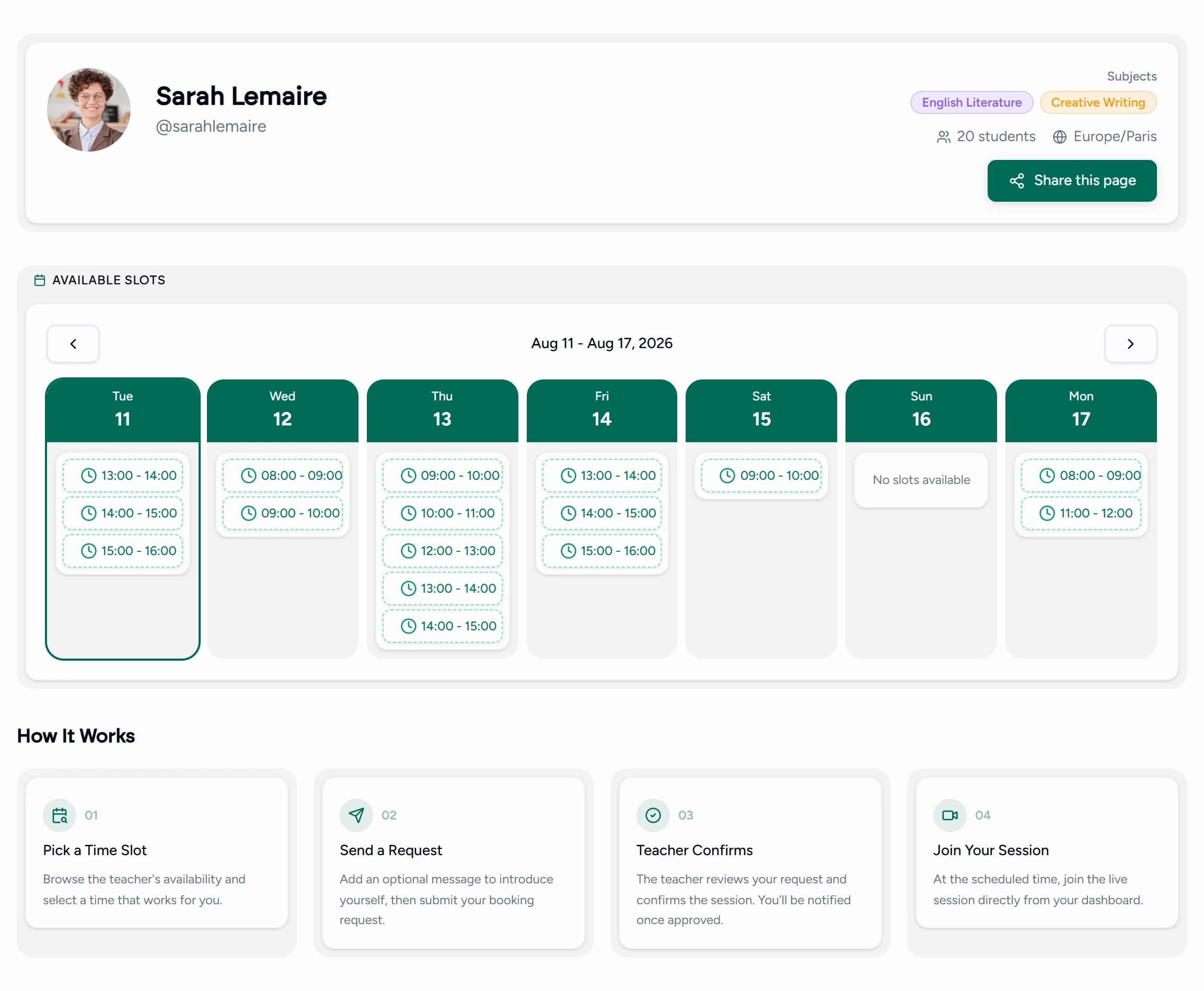
Set your weekly availability once and let students book lessons themselves from your open slots. The availability rules below decide what's bookable, what needs your approval, and how far ahead students can reach.
Weekly template
Booking rules
Preview · April 2026
Bookings from your existing students inside your set availability are confirmed automatically. Anything outside it, including requests from new students through your public booking page, arrives as a request you approve first. Either way, your week fills up without a single "are you free at 5pm?" message, and you never lose control of your week.
Running a tutoring centre? Manage multiple tutors, students and recurring lessons
One tutor with 5 students? Fine. Three tutors with 50 students across 10 groups? Also fine. On the Academy plan for tutoring centres, Teamlilit works as tutoring centre scheduling software and tuition centre scheduling software: manage every tutor's schedule from one dashboard, assign students to the right groups, and keep oversight of the whole centre.

- One shared schedule across every tutor, so nothing double-books
- Per-tutor views: each tutor sees only their own schedule and bookings
- Admin oversight: see who teaches which group, when, and how full each class is
- Group enrolment: assign students to recurring classes once, not week by week
- Unlimited student pool and guardian records: add as many students as you need with no platform limit, and keep a parent or guardian on each child's record so reception can see who belongs to whom at a glance
Billing a centre is where families with several children usually get messy, so Teamlilit keeps it on the same records. Consolidated invoices bill multiple students from one family on a single invoice, and an account credit wallet holds prepaid balances or credit from a changed package, applied automatically to the next bill. For a tuition centre running fixed weekly blocks across subjects, the recurring schedule does the heavy lifting: build the term once, and every tutor's week is already laid out. That is tutor scheduling management handled by the schedule itself, not by a coordinator merging spreadsheets every Sunday.
Tuition Centre Scheduling Software for UK Tutoring Businesses
UK tuition centres run on a rhythm: term-time weeks, fixed after-school and weekend blocks, and parents who expect to know exactly when their child is being taught. Teamlilit is tuition centre scheduling software built for that rhythm.
- Term-time recurring schedules: set up your weekly blocks for the term and they repeat automatically, so Year 6 SATs prep on Tuesdays and GCSE maths on Saturdays are already in place
- After-school and weekend slots: model the hours UK tuition centres actually run, with availability rules and buffers between sessions, and pair them with after school attendance software so every block keeps its own register automatically
- Multiple tutors and subjects in one view: see every tutor and group across the whole centre without double-booking
- Per-student records for parent updates: attendance and time logged on each session, ready to share with parents at the end of a block
Whether you run a single-room tuition centre or a team of tutors sharing one full timetable, the schedule, bookings, and student records live in one place instead of across a wall planner, a spreadsheet, and a group chat.
Scheduling for private tutors vs. tutoring centres
The same software has to solve two different scheduling problems. A private tutor is optimising their own week; a tutoring centre is coordinating many weeks at once without collisions. Teamlilit handles both from one schedule.
| Private tutor | Tutoring centre | |
|---|---|---|
| Who's on the schedule | Just you, one week to protect | Multiple tutors, rooms, and groups in one view |
| Booking | Students self-book your open slots | Students self-book; admins assign and reassign across tutors |
| Recurring sessions | Your weekly 1:1s and groups, set once | Term-time blocks built once for the whole centre |
| Visibility | Your full week at a glance | Per-tutor views plus central admin oversight |
| The main risk | Overbooking yourself, no buffer time | Two tutors on one slot, a student in two places |
For a solo tutor, the win is getting your week off WhatsApp and onto a schedule that books and reminds on its own. For a centre, the win is running every tutor's schedule from one dashboard on the Academy plan instead of merging spreadsheets. If you're starting from a blank week either way, run recurring tutoring sessions covers the structural side in depth.
How does tutoring scheduling software reduce no-shows?
Tutoring scheduling software reduces no-shows in three ways: automatic reminders before every session, self-booking so students commit to slots they chose themselves, and attendance records that surface repeat absences early. No-shows are the quiet tax on a tutoring business; here is how each one works.
- Automatic reminders. Students and parents are notified before each session, so the most common no-show cause, simply forgetting, stops happening. No manual "see you at 5pm?" messages.
- Self-booking commitment. When a student books their own slot inside your published availability, they're far more likely to show than when a time was assigned for them. The booking is theirs.
- Attendance patterns you can act on. Because attendance is tracked automatically on every session, repeat absences show up as a pattern, not a vague feeling, so you can step in before a student quietly drops out.
Reminders and records reduce the accidental no-shows. For the deliberate ones, you need a policy: pair your scheduling with a clear private tutor cancellation policy so late cancellations have agreed consequences. Our guide on how to reduce student no-shows in online tutoring covers the full playbook.
Cancellations and rescheduling that update the schedule
Lessons move. A parent asks to shift Thursday to Friday, a student is ill on the morning of a session, and a recurring slot has to skip half term. On a calendar plus a chat thread, every one of those becomes an admin task you do twice: once in the calendar, once in your head at invoicing time.
In Teamlilit, recurring lesson scheduling and the moves that follow live on the same record. A student can request a new time inside your published availability, or you can move the session yourself, and the schedule, the student's record, and the billing all follow. Each session carries its own status, attended, cancelled in time, late cancellation, no-show, or rescheduled, so your cancellation policy decides what is billable instead of you relitigating it per parent. If you would rather no student moved a lesson without asking, student rescheduling is a policy switch you can turn off.
From a claimed slot to attendance and lesson history
Scheduling, attendance, and lesson history are usually separate tools that drift out of sync. Teamlilit keeps them on the same record, so the booking becomes the lesson becomes the history with nothing re-entered.
- Booking: students book open slots inside your availability rules, confirmed automatically or held for your approval.
- Attendance: recorded automatically when the session runs, with join and leave times per student, not ticked off by hand afterwards.
- Notes: one click from the lesson card opens the notes editor, where AI-assisted note editing tidies your rough bullets and automatic lesson summaries draft a clean recap you can send to parents.
- Lesson tracking: per-student time and full session history land on each student's record, searchable by student tag so a review meeting or a progress check pulls up the right history in seconds. Sketch a profile first with the free student profile template for tutors.
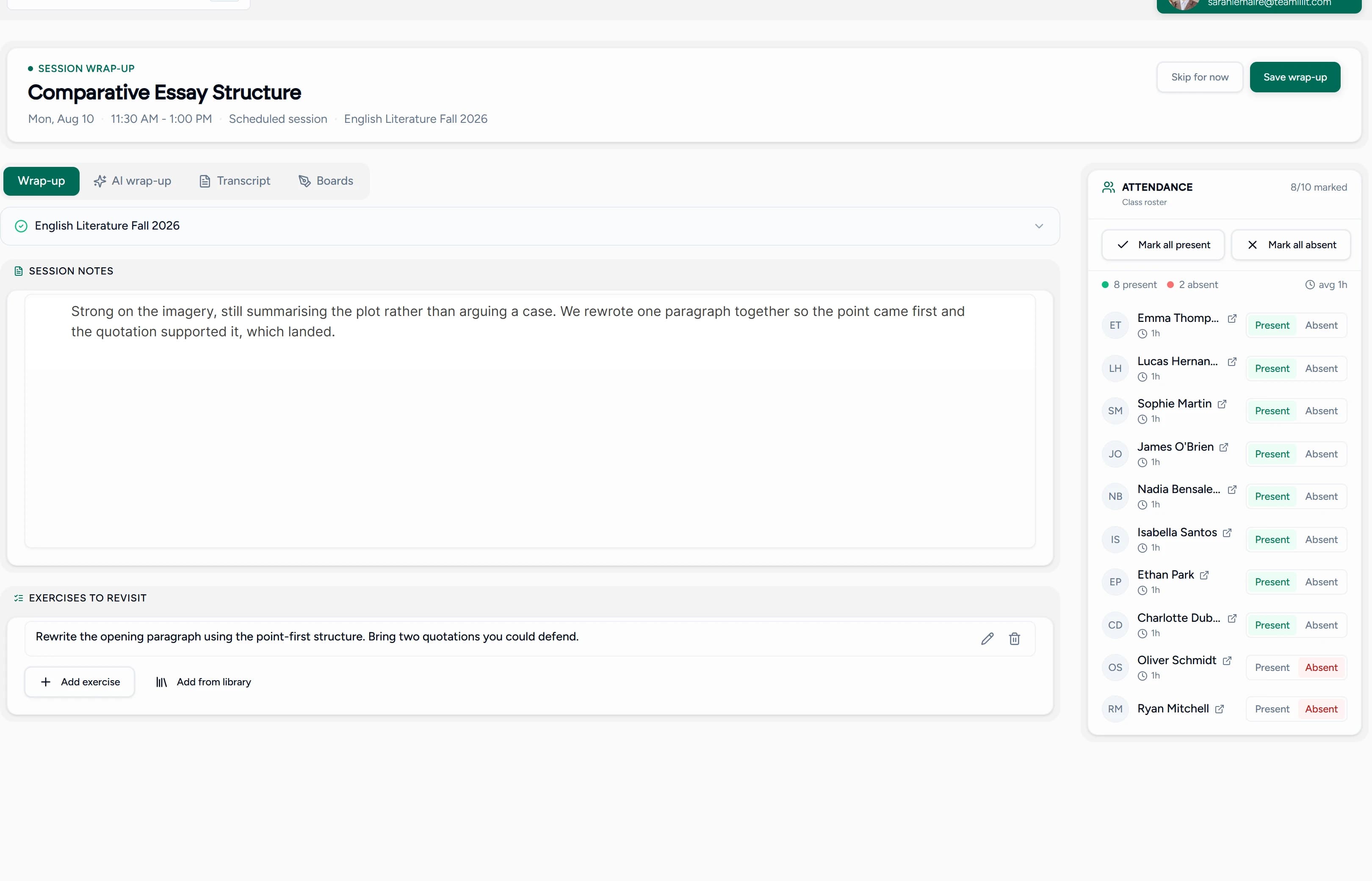
One booking flows into one attendance record into one lesson history. That's the loop a calendar plus a spreadsheet can't close. Scheduling is only the start; here is how tutors can track billable hours after lessons actually happen, what to charge for those hours in our guide to online tutoring rates, how to organise private tutoring students once their records start piling up, what student records private tutors should keep as that history grows, and tutor CRM vs spreadsheet on when to move off the sheet entirely. If cost is the deciding factor, our guide to affordable tools for class calendars and cancellations compares a free scheduler stack against a flat-rate tutor platform.
Tutor appointment scheduling that becomes a lesson
Generic appointment scheduling software stops at the booking: you get a meeting link, then you're on your own. Teamlilit treats every appointment as a lesson. When a session starts, the live class, attendance tracking, and materials are all in one place, and the session history lands on the student's record afterwards.
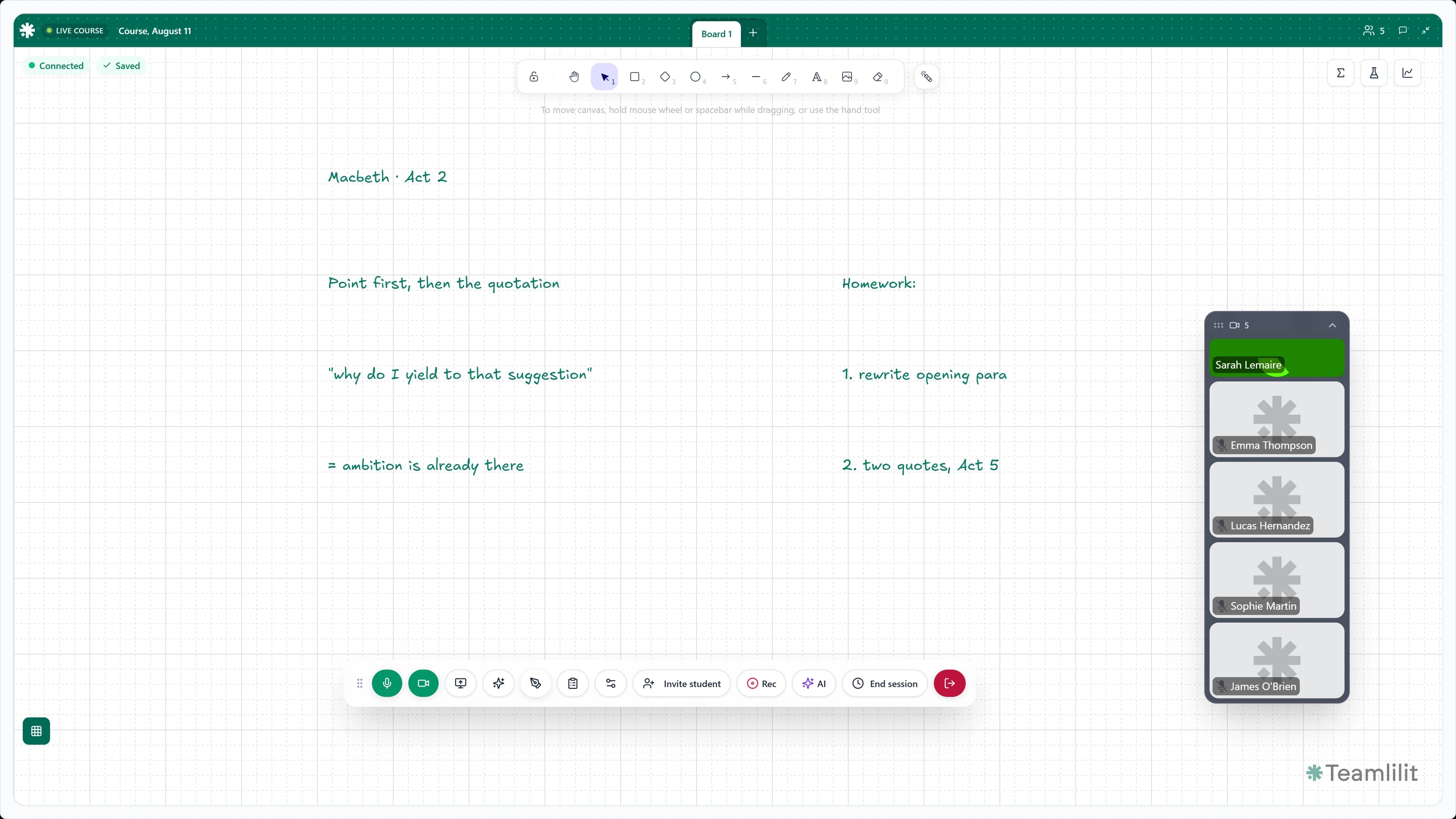
That's the difference between scheduling meetings and running a tutoring business.
Tutoring with vs. without real scheduling software
| Without dedicated tools | With Teamlilit |
|---|---|
| "Are you free at 5pm?" messages across WhatsApp, email, and DMs | Students self-book from your open slots, no back-and-forth |
| Rebuilding the same week from scratch | Recurring sessions repeat automatically with students assigned |
| Attendance and time tracked in a separate spreadsheet | Attendance and per-student time recorded on the session itself |
| Each tutor keeps their own calendar in their own app | One shared schedule for the whole tutoring centre |
| A meeting link, then you're on your own | Live class, materials, and student record connected to the session |
Still weighing whether to make the move? Our guide on when to move beyond a tutoring spreadsheet walks through exactly when the sheet stops paying off.
Tutor Scheduling Software vs Google Calendar, WhatsApp, Excel and Calendly
Most tutors don't start with dedicated software. They stitch together the tools they already have, and it works right up until it doesn't. Here's how purpose-built tutor scheduling software compares to the usual stack:
| Google Calendar | Excel / Sheets | Calendly | Teamlilit | ||
|---|---|---|---|---|---|
| Recurring tutoring sessions | Basic | No | Manual | Limited | Yes, with students assigned |
| Student self-booking | No | No | No | Yes | Yes, with approval rules |
| Knows which students belong to a lesson | No | No | Manual | No | Yes |
| Attendance tracking | No | No | Manual | No | Automatic, per session |
| Per-student time tracking | No | No | Manual | No | Yes |
| Multiple tutors on one schedule | Shared calendars | No | Painful | Per-seat add-on | Built in (Academy plan) |
| Built-in live classroom | No | Video calls | No | No | Yes |
Google Calendar is fine for blocking time, but it doesn't know a "lesson" from a dentist appointment, and it won't track attendance or who's in a group. WhatsApp is where the "are you free at 5pm?" chaos lives. Excel can model your week, but every change is manual and nothing is connected to the actual lesson. Calendly handles the booking but stops there, with no students, no attendance, no classroom. Zoom runs the call but knows nothing about your week; here is why tutors move off Zoom. Teamlilit replaces the whole stack with one online tutoring platform built for tutoring, with a live classroom wired straight into the schedule. Still weighing up standalone schedulers first? Our tutoring appointment app comparison ranks seven of them honestly, and our roundup of tutor scheduling tools covers the free and paid options side by side.
Key features
- Session calendar with day/week/month views
- 1:1 and group session scheduling
- Recurring session setup (weekly, custom intervals)
- Instant session creation
- Student self-booking from tutor availability
- Availability rules: buffers, daily limits, minimum notice, blocked dates
- Google Calendar sync for scheduled sessions
- Automatic attendance tracking per session
- Per-student time tracking across all sessions
- Session history and student records
- Multi-tutor schedule management for tuition centres and academies (Academy plan)
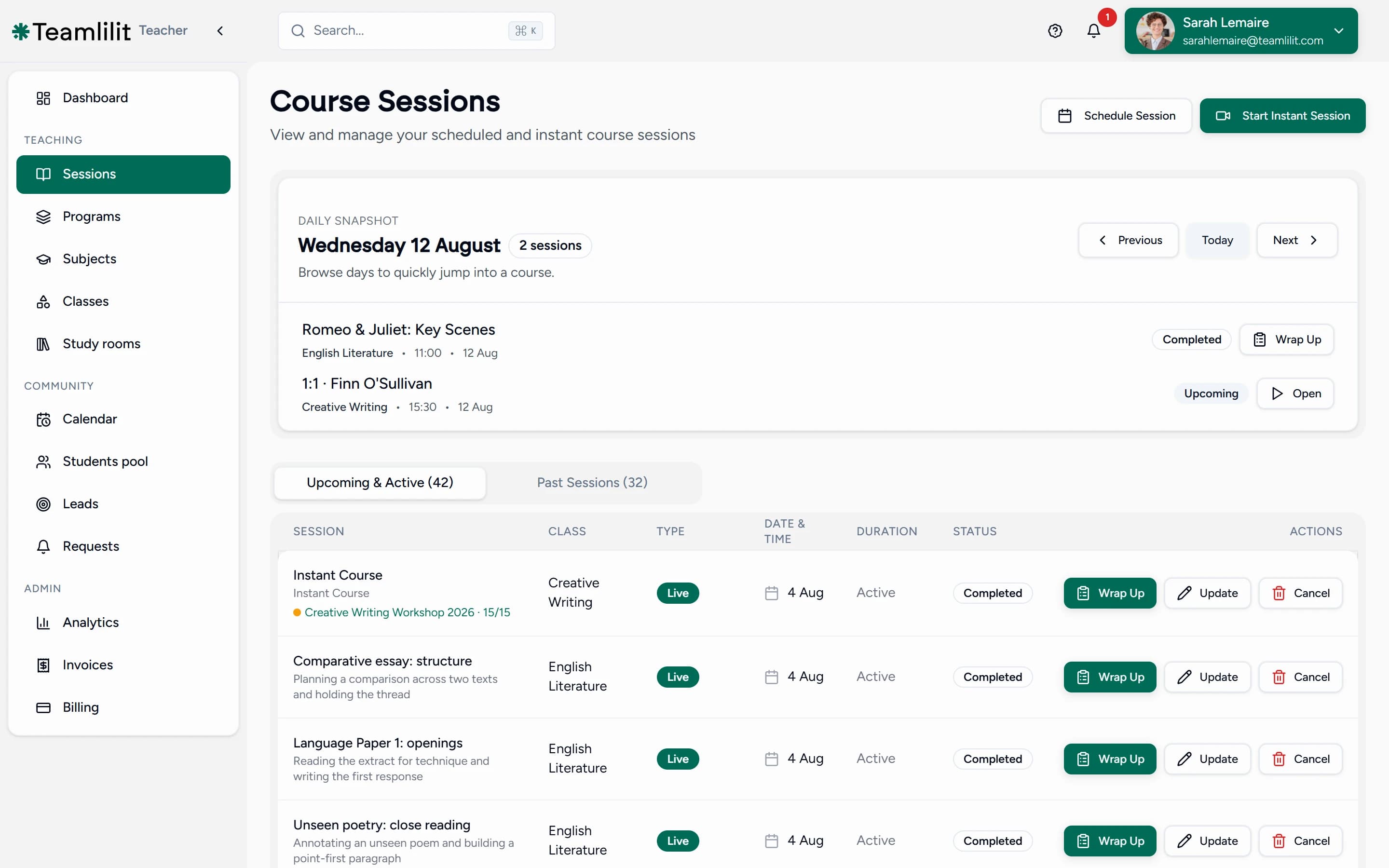
How it works
- Create your tutoring workspace
- Add your students and groups
- Set your weekly availability and booking rules
- Schedule sessions, one-time or recurring, or let students book open slots themselves
- Students get notified and join when it's time
- Track attendance and review session history
Frequently asked questions
What is tutor scheduling software?
Tutor scheduling software organises your teaching schedule, not just your time. It handles recurring lessons, 1:1 and group sessions, student bookings, attendance, and multi-tutor schedules in one system. Unlike a generic tutor calendar, it knows which students belong to which lesson and what repeats every week, so your schedule stays connected to your student records.
What is the best tutor scheduling tool for independent tutors?
The best tutor scheduling tool depends on how you teach, but independent tutors usually need three things: recurring sessions, student self-booking, and attendance records in one place. Teamlilit combines all three with a built-in virtual classroom for tutors, so your schedule, lessons, and student records stay connected instead of spread across separate apps.
Is Teamlilit a tutor scheduling system or just a booking tool?
Both, in one place. As a tutor scheduling system it handles the management side: recurring lessons, groups, attendance, per-student time, and multi-tutor schedule management for centres. As a booking tool it lets students fill your open slots themselves. The two share one schedule, so nothing is copied between apps.
What's the difference between a tutor scheduling system and tutor management software?
A tutor scheduling system covers the schedule itself: sessions, availability, bookings, and who teaches when. Tutor management software covers the operation around the schedule: student records, billing, and reports. Teamlilit does both in one platform: this page covers the scheduling side, and the same system handles the management side, so the schedule and the records stay connected instead of split across tools.
Can I control when students are able to book?
Yes, completely. Availability rules cover buffers between lessons, daily limits, minimum notice, and blocked dates, and students only ever book inside the hours you publish. Bookings from existing students inside your availability confirm automatically; anything outside it arrives as a request you approve first.
Does this work as tutoring centre scheduling software?
Yes. On the Academy plan for tuition centre scheduling, Teamlilit works as tutoring centre and tuition centre scheduling software: manage every tutor's schedule from one dashboard, assign students to groups, and keep oversight of the whole centre. Each tutor sees only their own schedule and bookings, while admins see everything.
Can students book lessons themselves?
Yes. Set your availability and students can book lessons directly from your open slots, with no back-and-forth messages. You stay in control of when you're bookable, and every booked session lands on your schedule automatically. You can still create and assign sessions manually whenever you prefer.
Can I manage recurring tutoring sessions?
Yes. Set up weekly or custom recurring sessions so you don't have to rebuild your week from scratch. This is especially useful for group classes that meet on the same day and time, with the right students already assigned.
Is there a free tutor schedule template I can start from?
Yes. Our free tutor schedule template is an interactive builder: add your students, subjects, and hourly rates, then download the schedule as a PDF or Excel file, free and with no signup. A template is a good starting plan; when you want it to take bookings and track attendance on its own, move it into Teamlilit as recurring sessions.
Can a tutoring centre manage several tutors from one dashboard?
Yes. On the Academy plan for centre administrators, a tutoring centre can manage every tutor's schedule from one dashboard. Each tutor sees their own schedule and bookings while admins keep oversight of the whole centre, including who teaches which group and when.
Does Teamlilit track tutoring time per student?
Yes. Time in class is recorded for each student session, alongside attendance. Every student's profile shows the time spent on each of their sessions, useful for billing, parent updates, and package tracking.
Can students reschedule or cancel a lesson themselves?
Yes, if you want them to. A student can request a new time inside your published availability, and you can switch student-initiated rescheduling off in your policy settings if you would rather move lessons yourself. Either way the session moves on the schedule rather than living in a message thread, the original booking stays linked to the new one, and your cancellation policy decides whether a late move is still billable.
What happens when a student misses a session?
Attendance is tracked automatically. You can see who joined, who was absent, and follow up accordingly. Every student's profile keeps a complete attendance history across all their sessions.
Does scheduling software help reduce no-shows?
Yes. Automatic reminders cut the accidental no-shows where a student or parent simply forgot, and self-booking makes students more likely to attend a slot they chose themselves. Because attendance is recorded on every session, repeat absences surface as a pattern you can act on early. For deliberate cancellations, pair it with a clear private tutor cancellation policy; our guide on reducing student no-shows covers the full approach.
How is this different from generic appointment scheduling software?
Generic appointment scheduling software stops at the booking: you get a meeting link, then you're on your own. Teamlilit treats every appointment as a lesson, so the live class, attendance, materials, and student record are all connected to the session. That's the difference between scheduling meetings and running a tutoring business.
How does this compare to Google Calendar, WhatsApp, Excel, or Calendly?
Those tools each do one piece. Google Calendar blocks time but doesn't know a lesson from any other appointment. WhatsApp is where back-and-forth scheduling happens. Excel can model your week but every change is manual. Calendly handles the booking but stops there, with no students, attendance, or classroom. Teamlilit replaces the whole stack with one system that handles recurring lessons, student self-booking, attendance, per-student time, multi-tutor schedules, and a built-in live classroom.
Is this suitable for a UK tuition centre?
Yes. Teamlilit fits how UK tuition centres run: term-time recurring schedules, fixed after-school and weekend blocks, multiple tutors and subjects in one view, and per-student attendance and time records ready to share with parents. It works for a single-room tuition centre or a whole team of tutors, with one shared schedule instead of a wall planner and a spreadsheet. Academy means many tutors in one organisation rather than many sites: Teamlilit does not model separate branches and does not book physical rooms, so a centre running more than one building should weigh that gap before switching. See the Academy plan for multi-tutor centres.
Does Teamlilit sync with Google Calendar?
Yes, one way. Every session you schedule in Teamlilit is written to your Google Calendar automatically, then updated or removed there when you reschedule or cancel, so your teaching blocks show up alongside the rest of your life. Inside Teamlilit, a new booking is checked against the tutor's and the student's existing sessions and a clash is refused. Appointments that live only in Google Calendar do not flow back, so Teamlilit stays the single source of truth for your teaching time.
Can I charge different rates for different students?
Yes. Per-student billing rates are stored on each student's record and flow automatically onto their invoices, so a beginner, an exam-prep student, and a group seat can each carry a different rate without you recalculating anything.
How long does it take to set up?
Most tutors are up and running within their first hour: import your students, set your weekly availability, and publish your booking page. You do not have to migrate everything at once, and recurring sessions plus templates take care of the repetitive setup.
Quick start: your first week on Teamlilit
You do not need to migrate everything at once. Most tutors are up and running within their first hour by working through four steps:
- Import your students. Add your students and groups, uploading a list if you already keep one, so the schedule has people on it.
- Set your weekly availability. Publish the hours you are bookable and the rules around them: buffers, daily limits, minimum notice, and blocked dates.
- Share your booking link. Send your public booking page to existing students, or embed it, so they fill your open slots without a back-and-forth message.
- Take your first attendance. Run a session and mark who attended. That single record is what later feeds your invoices and each student's history.
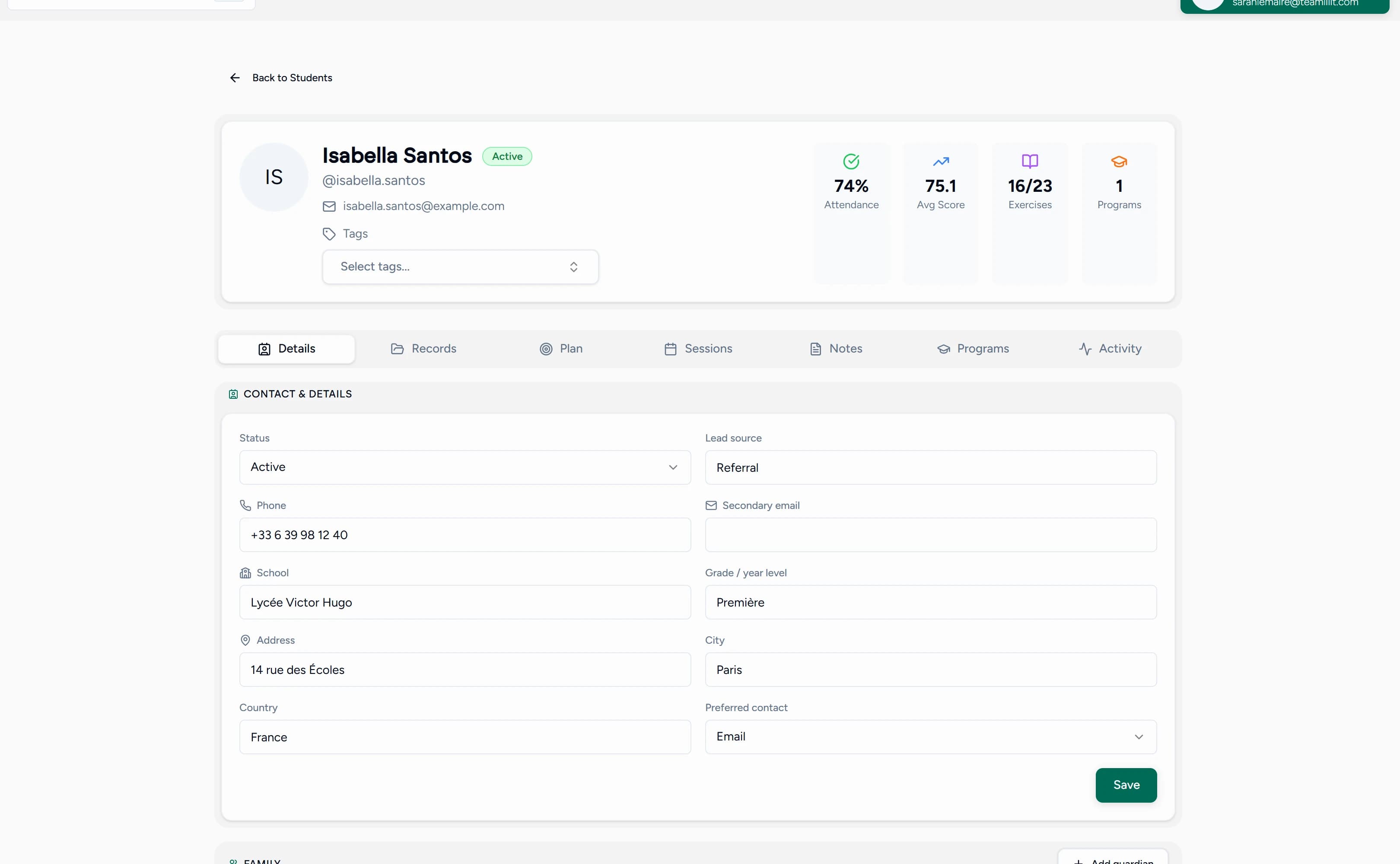
From there the system compounds: recurring sessions build the rest of your week, attendance builds your billing, and lesson notes build each student's record. New to it? How to organise tutoring sessions walks through the structure step by step. Once the week runs itself, the next question is how to fill it: our rundown of the best marketing for tutors ranks the nine channels by return on a tutor's time.
Next step
Stop losing time to scheduling. Start your 14-day free trial of Teamlilit and publish your booking page today. See pricing for plan details.
