teamlilit logo
How it works

One lesson,from booking to invoice.

Because you teach inside Teamlilit, Teamlilit knows what happened. The booking, the classroom, the attendance, the write-up and the invoice are not five tools talking to each other. They are five views of the same lesson.

14-day free trial · No credit card required · Cancel anytime

One lesson, end to end

Because you teach inside Teamlilit, Teamlilit knows what happened.

Book it, teach it, and most of the admin is already done. Follow the same lesson through all five stages.

Book
The Teamlilit booking dialog, scheduling a lesson for a class at a chosen time and duration

Stage 1 of 5

Book

A student books an open slot on your page, or you schedule the lesson yourself. Reminders go out on their own.

Hands forward: a session that already knows the class, the student and the subject.

The lesson starts life as a real session, not a calendar entry with a link pasted next to it.

The same lesson, five times over.

Each stage hands the next one everything it needs. Nothing is retyped, exported or matched up by hand.

Book

1. It gets booked

A student picks an open slot on your booking page, or you drop the lesson straight into your calendar. Either way it becomes a session that already carries the class, the student, the subject and the length, and the reminders go out without you touching them.

That matters more than it sounds. A calendar entry is a note to yourself. A session is an object the rest of the product can act on.
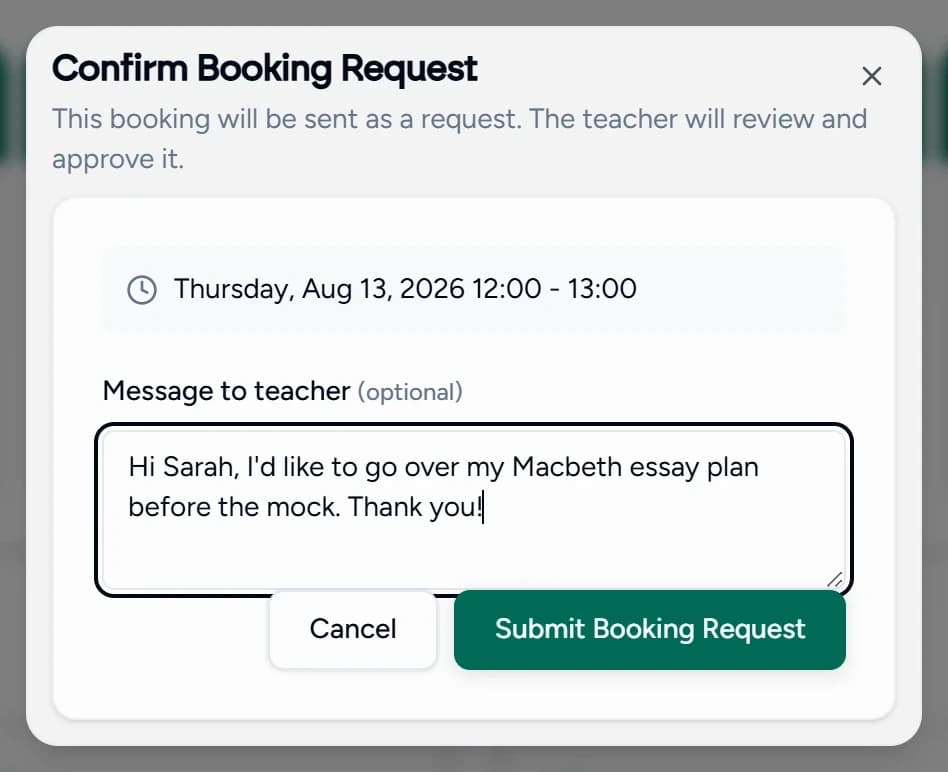
The Teamlilit booking dialog, scheduling a lesson for a class at a chosen time and duration

Hands forward: a session that already knows the class, the student and the subject.
Teach

2. You teach it, here

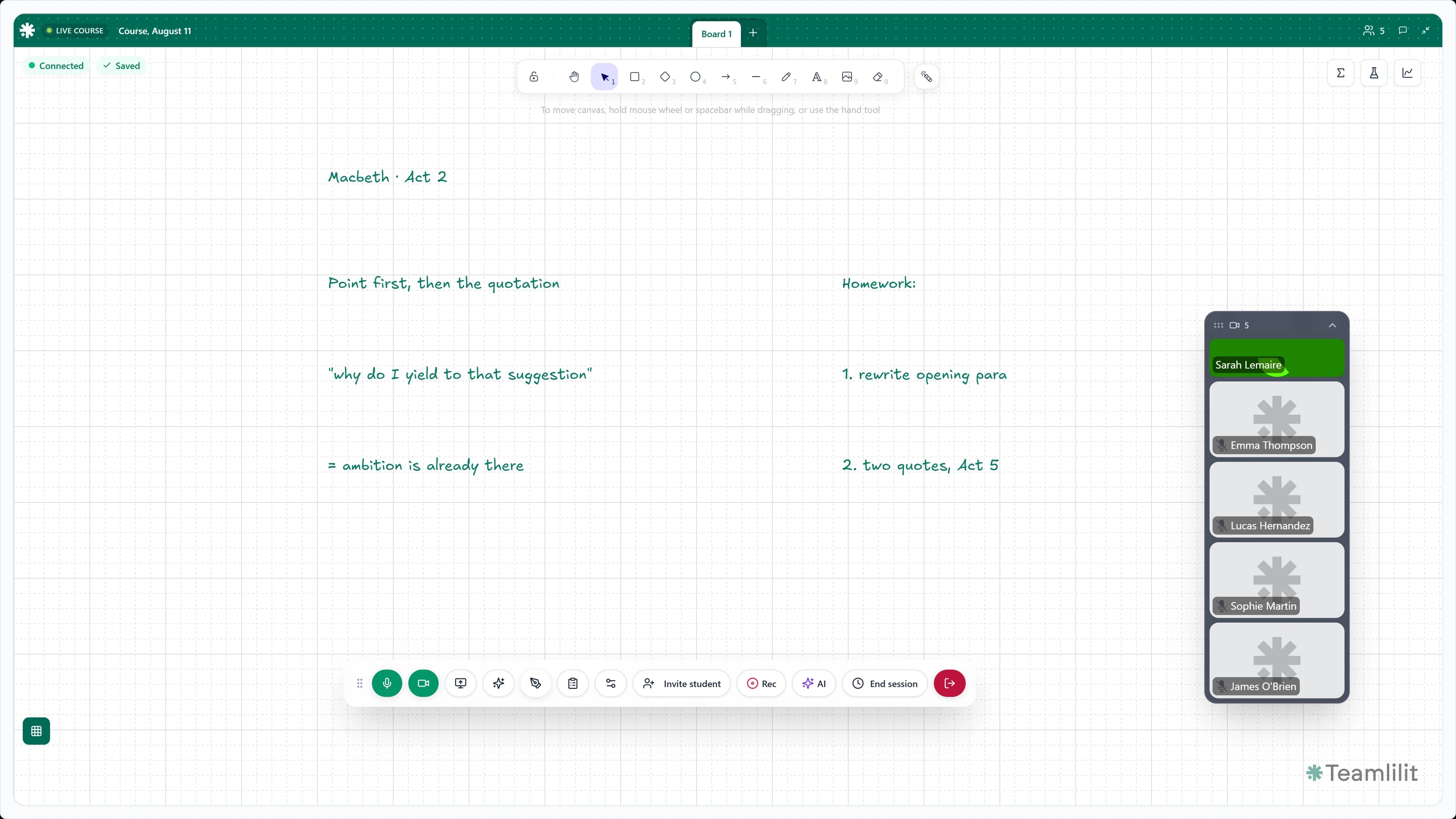
The lesson runs in Teamlilit's own classroom: HD video, screen sharing, chat, and a whiteboard that holds several boards per lesson, typesets equations, plots graphs and opens a past paper as its own tab. Your students join from the link, in the browser, with nothing to install.

This is the hinge of the whole thing. The room is not connected to the session. The room is the session.

A live Teamlilit classroom with the tutor on stage, the class connected, and the whiteboard open mid-lesson

Hands forward: a live room that is the session itself, so nothing has to be matched up afterwards.

Attendance

3. It records who was there

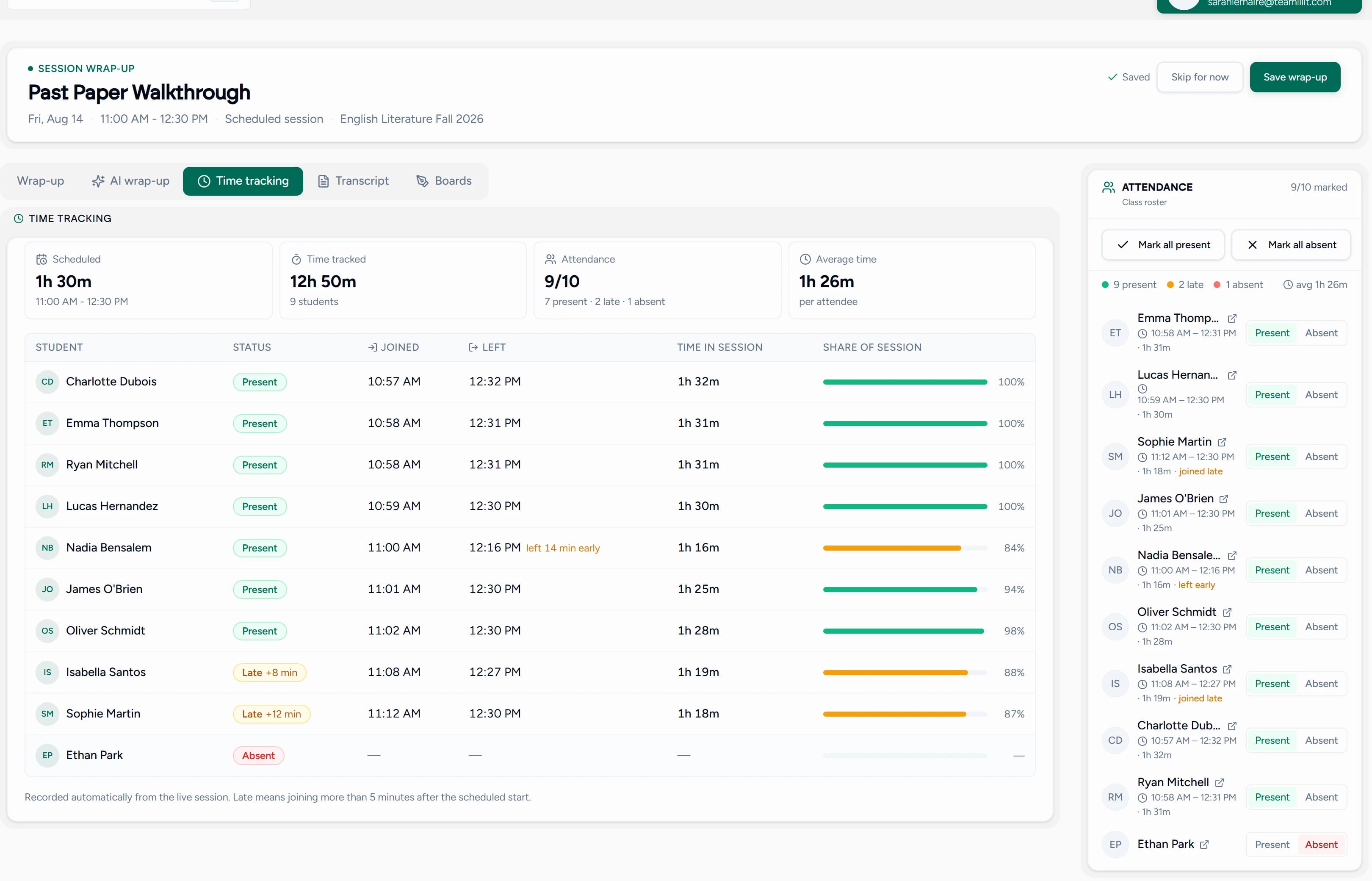
Attendance records itself while you teach. Each student is stamped when they join and when they leave, the duration lands on their record, and late arrivals, early leavers and no-shows are all visible afterwards. You can still correct a line by hand if something odd happened.

No roll call, no stopwatch, no spreadsheet, on any plan. It is a by-product of teaching in the room rather than a task you were given.

The Teamlilit time tracking tab showing each student's join time, leave time and duration for a session

Hands forward: who attended, and the real minutes each of them was there.

AI wrap-up

4. AI writes it up

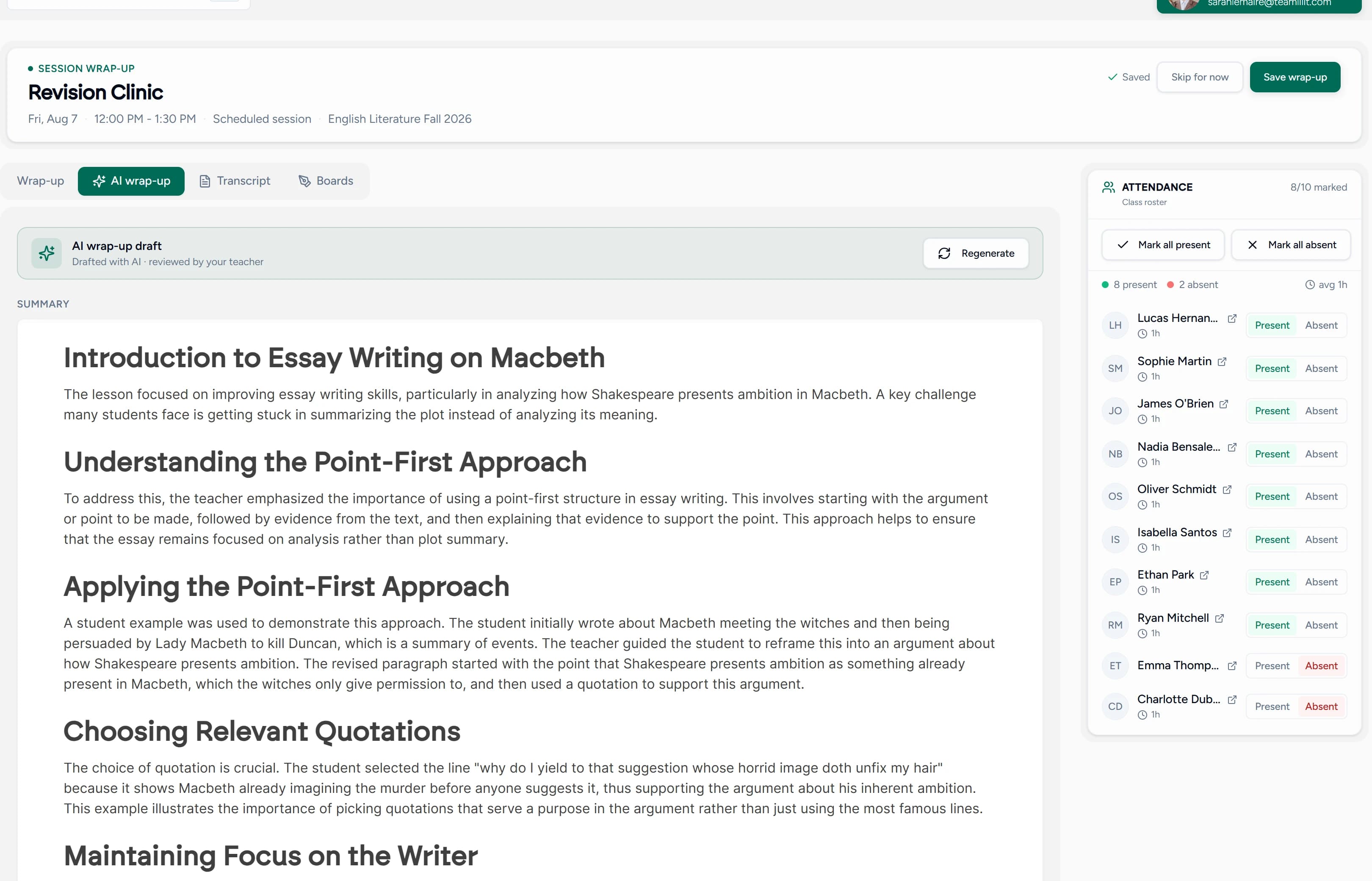
Start the AI wrap-up and Teamlilit transcribes the lesson it already holds, then drafts a summary, session notes and exercises drawn from what was actually said. You edit anything, regenerate what you do not like, and only then send it. Every recap is marked as reviewed by you.

There is no recording to upload and no third-party meeting to connect. The lesson happened here, so the audio is already here.

An AI-drafted lesson wrap-up in Teamlilit, with a summary, key points and suggested exercises ready to edit

Hands forward: a recap you approve and send, and a written record on the student.

Invoice

5. It becomes money

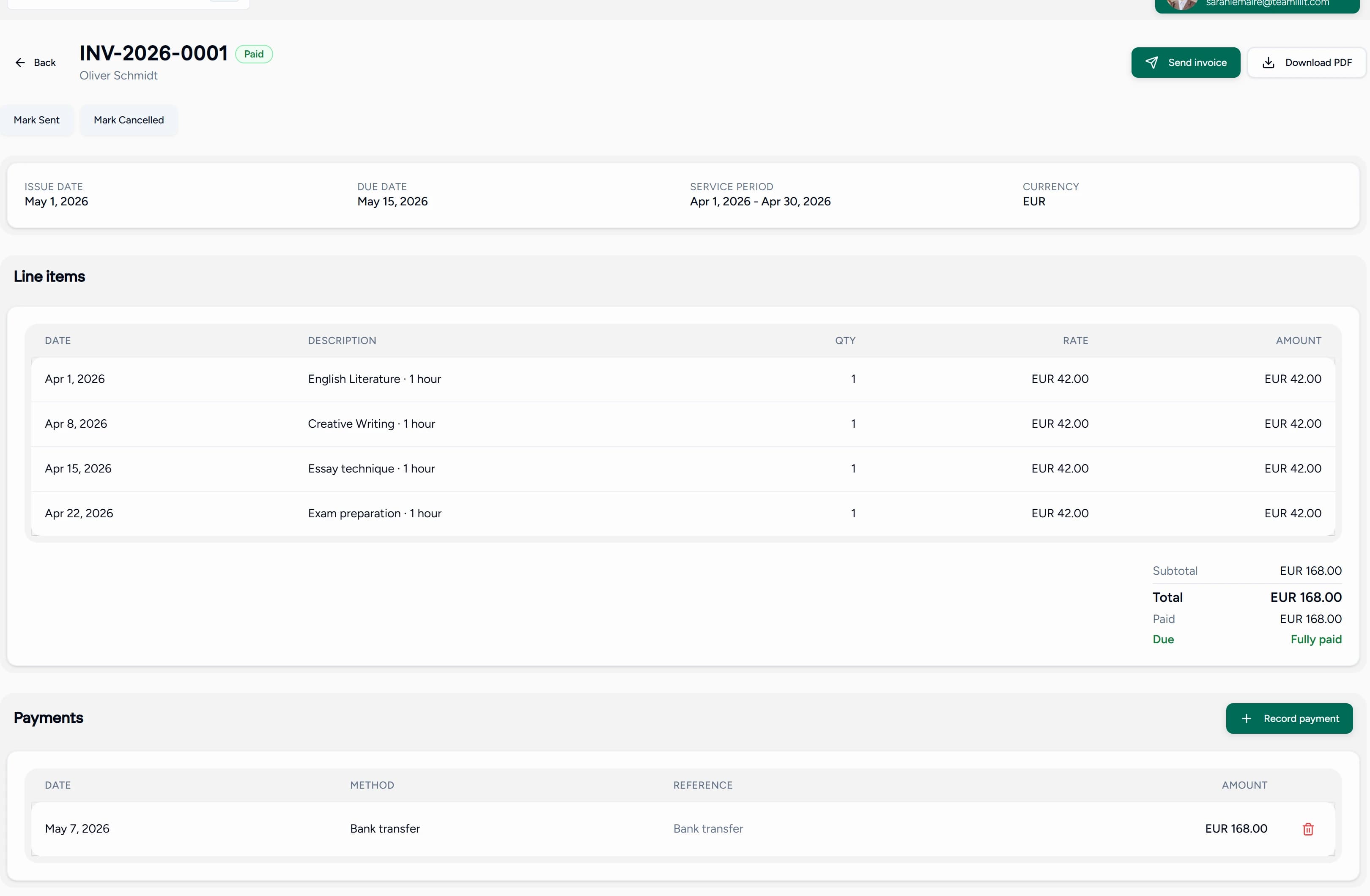
Pick a student and a billing period and Teamlilit fills the invoice lines from the sessions they actually attended, at that student's own rate, by the tracked hour or a flat rate per session. Add tax, bill a whole family or class on one invoice, send the PDF, and record payments as they land.

The invoice can exist because Teamlilit watched the lesson: who attended, and for how long. Nothing was handed over from another app.

A Teamlilit invoice built from attended lessons, showing each session, its hours and the total with tax

Every tool knows one thing. Teamlilit knows the lesson.

This is the whole difference, and it is architectural rather than a feature list.

  • A booking tool knows the lesson was booked.

  • Tutoring admin software knows the lesson exists.

  • A video app knows a meeting happened.

  • An invoicing app knows money is owed.

  • An AI note taker knows what was said.

Teamlilit knows all of it, because in Teamlilit they are the same object. The booking becomes the classroom. The classroom produces the attendance. The attendance sets the billable time. The billable time builds the invoice. And every one of them belongs to the student's history.

Native, not connected

Your classroom is not an integration.

Other tools integrate a classroom with your tutoring software. In Teamlilit the classroom is the tutoring software, so nothing has to be handed between two products. That means no second subscription, no connector to configure, no sync that silently stops working, and no lesson that exists in one system but not the other.

It is also why we can say the attendance and the invoice come from the lesson: there is only one lesson, and it lives here.

What happens on its own, and what you still decide.

Worth being exact about, because a product that claims a fully automatic pipeline gets found out in the first week of a trial.

Happens on its own

  • Attendance is stamped as each student joins and leaves the live room.
  • The real minutes of each student's lesson are recorded and saved to their record.
  • The session, its boards and its files are filed against the class and the student.
  • Session reminders go out to you and your students by email before each lesson.

You decide, we do the work

  • You start the AI wrap-up, then review and edit the draft before anything is sent.
  • You choose when the recap and exercises go to your students.
  • You pick the student and the period and generate the invoice; Teamlilit fills the lines.
  • You record payments as they arrive. Teamlilit never handles your money.

Questions about how it fits together.

No. The live classroom is part of Teamlilit on every plan, with HD video, screen sharing, an interactive whiteboard and chat in the browser. There is nothing to connect and no second bill. It is also the reason the rest of Teamlilit works the way it does: because the lesson happens here, the attendance, the lesson time and the AI wrap-up all come from the lesson itself.

It records itself. Each student is stamped when they join the live room and when they leave, and the duration is saved to their record, on every plan. Late arrivals, early leavers and absentees are all visible in the wrap-up afterwards. You can correct a line by hand if you need to, but you never have to take a register.

No, and deliberately so. You start the AI wrap-up on the lesson you want written up, and Teamlilit transcribes the audio it already has and drafts the summary, notes and exercises. You review and edit before anything reaches a student, and every recap is marked as reviewed by you. Each plan includes a monthly allowance of AI credits and you can top up if you need more.

No. You choose a student or a class and a billing period, and Teamlilit fills the invoice lines from the sessions they actually attended, at their rate. You review the draft, adjust anything, apply tax if you need it, and send it. Recurring invoices can be prepared on a schedule, but they still wait for your approval before going out.

They click a link and join in the browser. There is nothing to install, and you can send a single-use link from inside the lesson so a student joins by typing a name, with no account at all. Guests join as listeners; to speak, share a camera, chat or draw, a student needs a free account and an invitation on stage from you, which they can create without leaving the room.

With a lesson. Sign up, start a session, and teach one, even a practice one on your own. Everything downstream in the chain fills in from that: the attendance appears, the wrap-up has something to write about, and the invoice has hours to bill. The 14-day trial runs on the full Pro feature set and does not ask for a card.

See the chain on your own lesson.

Teach one session in Teamlilit and watch the attendance, the write-up and the invoice appear behind it.

14-day free trial · No credit card required · Cancel anytime

Why Teamlilit exists

Seamless learning

Start free trial

14-day free trial · No credit card required · Cancel anytime

Teamlilit