

Tutor time tracking software that counts every minute for you
How many hours did you actually teach Emma this month? If answering that means scrolling back through a calendar and counting lessons on your fingers, your time tracking is costing you money. Teamlilit records the time each student spends in every session, automatically. It is one piece of the wider online teaching workflow we cover in our guide on the virtual classroom for tutors.
Tutor time tracking software records how long each student spends in every lesson and turns those minutes into accurate, invoice-ready totals. In Teamlilit, the clock runs from the live session itself, alongside attendance, so billing matches what was actually taught, with no timers and no spreadsheets.
Your current stack

Who this is for
- Tutors billing by the hour who need exact numbers, not estimates
- Tutors selling lesson packages who need to know how much has been used
- Tutors whose parents ask "how much time did you spend with my child?"
- Tutoring centres that need clean per-student time records across tutors
How a taught lesson becomes an invoice line
Most tutors have four separate jobs here, done at four different times: teach the lesson, remember who turned up, work out what is billable, and write the invoice. The gap between them is where hours go missing. In Teamlilit they are one chain, and each step hands its output to the next.
Session completed → attendance confirmed → billable time calculated → invoice prepared.

1. Session completed. The lesson ends and its record closes itself. Nothing to start, nothing to stop, nothing to write down while a student is still talking to you.
2. Attendance confirmed. Who joined, when they joined, and when they left is recorded on the session, per student. In a group class that is eight separate records, not one. You confirm rather than compile.
3. Billable time calculated. This is the step that is not just arithmetic. Time in the room and billable time are different numbers, and your cancellation policy is what separates them. A late cancellation may be fully billable; a lesson you cut short may not be. The section below covers exactly how each case resolves.
4. Invoice prepared. The billable lines become a draft invoice, one line per lesson, with each student's rate applied. You review and edit it before anything is issued or sent, tax comes from your VAT settings, and a session that has already been billed is excluded from the next invoice, so nothing is charged twice.
The point of the chain is that no step asks you to remember the previous one. If you skip a month, the record is still there when you come back.
What counts as billable: cancellations, late arrivals, and short lessons
"Hours taught" and "hours you can charge for" are rarely the same number, and this is where hourly billing quietly leaks money. Each case resolves differently:
| What happened | What the record shows | What is usually billable |
|---|---|---|
| Student attended in full | Full session duration | The full lesson |
| Student joined 20 minutes late | Their actual time in the room, separate from the rest of the group | Your policy decides: the booked hour or the time attended |
| Student left early | Join and leave timestamps on their record | Usually the booked slot, since you held it |
| Cancelled inside your notice period | Session marked as a late cancellation | Typically billable in full, per your policy |
| Cancelled with enough notice | Session marked as cancelled in time | Not billable, and the slot is freed |
| No-show | No attendance recorded against a session that ran | Typically billable, since the time was held |
| You cancelled or rescheduled | Original and replacement lessons stay linked | Not billable; the replacement is |
Two things make this workable rather than a monthly argument. First, the distinction is recorded at the moment it happens, not reconstructed weeks later when nobody remembers whether Thursday's cancellation came with a day's notice. Second, the rule is written down once in your cancellation policy and applied the same way to everyone, so a parent asking "why am I being charged for a lesson my daughter missed?" gets the same answer every time.
Completed lesson hours are the simplest case and still worth stating plainly: a lesson that ran to its scheduled length, with the student present throughout, produces one billable line at that student's rate. Most of your month should look like this. The table above exists for the fortnight it does not.
Time tracking built for tutoring, not timesheets
Generic time trackers were built for freelancers: start a timer, stop it, categorise the entry, repeat. Forget once and your records are fiction.
Tutoring time has more structure than that. It's always a lesson, with a student, for a duration. Teamlilit uses that structure: time is captured inside the virtual classroom for tutors, per student, per session. No timers, no timesheets, no end-of-week reconstruction.
Track tutoring hours per student, automatically
When a student joins a session, the clock starts for them. When they leave, it stops. That duration is saved on the session together with attendance, and every lesson in a student's profile shows the time they actually spent in class. Building your records by hand for now? Start with the free student profile template for tutors.
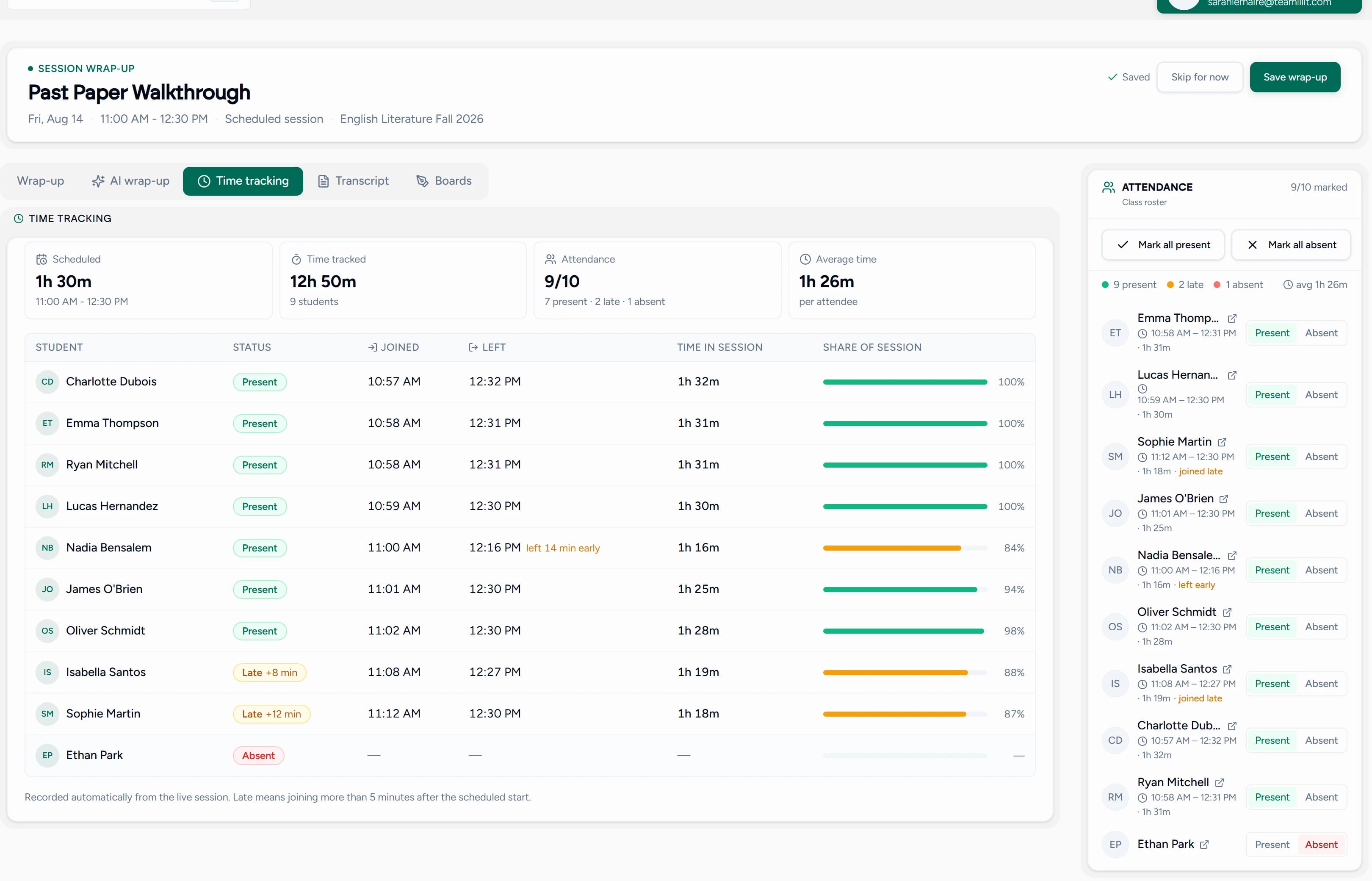
So when you need to answer "how much time has this student had?", you open their profile and read it off, session by session, instead of reconstructing it from memory. For the full workflow behind this, read our guide on how tutors can track billable hours, attendance, and lesson time. If your student records are scattered across apps, see how to organise private tutoring students and what student records private tutors should keep.
Time tracking for group lessons
Group classes are where manual time tracking truly breaks down: eight students, two late arrivals, one early leaver, and one number in your notebook for all of them.
Teamlilit tracks time for each student in a group session individually. The student who joined 20 minutes late has a different recorded time than the one who stayed the full lesson, which is exactly what fair billing and honest parent reports need. If a student joins late, leaves early, misses a session, or attends only part of a group lesson, the billing record should reflect what actually happened, not a round number you guessed afterwards. Tracking by hand for now? Start with the free tutoring attendance sheet template to record who attended each lesson.
From tracked time to invoice
Tracked time is only useful if it turns into revenue. Teamlilit can track actual attendance minutes from your online lessons and turn them into billable lesson records for invoices, so a student who arrived late or left early is billed for the time they were really there, not a round number you guessed afterwards. When you bill by the hour, the student's profile gives you the period's sessions and durations, ready to put on the invoice. Our free tutor invoice maker turns that list into a professional PDF, while the built-in tutor invoicing software goes further by pulling tracked hours into invoices, tracking what is paid, and sending reminders for you. Our guide to invoicing tutoring students covers the rest: numbering, payment terms, and chasing late payers politely. If you charge for the time each student was actually present, our walkthrough on how to invoice tutoring students based on attendance shows how to turn those recorded minutes into billable lines.
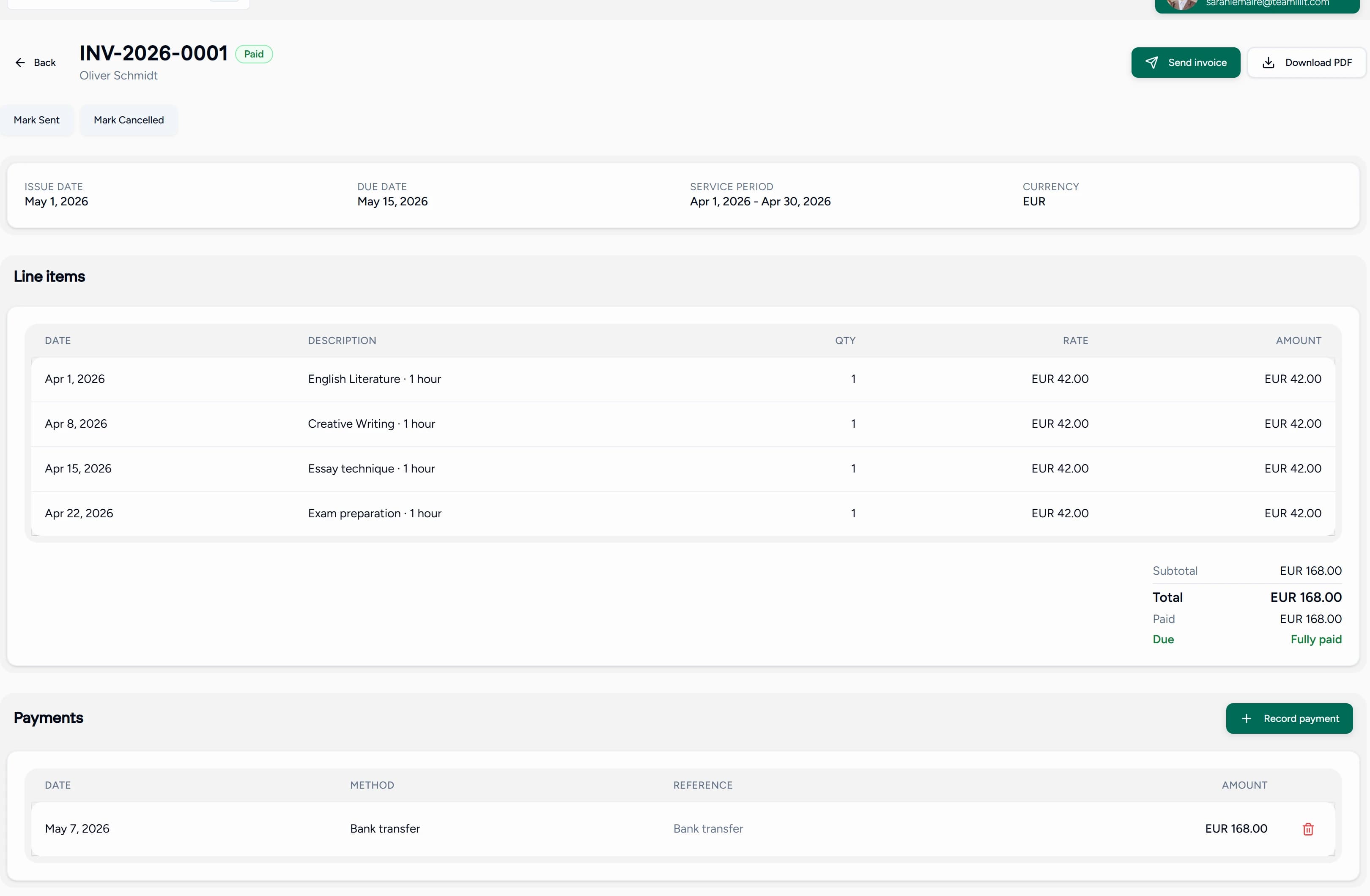
Not ready to automate yet? Our free tutoring hours tracker lets you log lesson time, attendance, and billable hours by hand, then export the record or copy the billable lines straight into an invoice. It is a good way to build the habit before the software does it for you.
Tracked hours only pay if the rate behind them is right. The free tutor pricing calculator works backwards from the income you need to a sustainable hourly rate, counting the prep and admin behind each lesson and the hours lost to no-shows, and shows what a month of teaching at that rate actually pays.
Time you reserved but didn't teach still has a cost. A clear cancellation policy for tutoring lessons sets out your notice period and late-cancellation fees, so the hours you held open are accounted for instead of quietly lost.
For package students, the same record answers "how many lessons are left?" before a parent asks.
Tutor time tracking software vs spreadsheets
A spreadsheet feels free until you count the time it costs. Every lesson is a row you have to remember to fill in, every group class is a guess, and every month ends with you reconciling a sheet against a calendar against your memory. Tutor time tracking software removes that work because the lesson itself produces the record.
| Task | Spreadsheet | Teamlilit |
|---|---|---|
| Track lesson duration | Manual | Automatic from the live classroom |
| Track per-student time | Hard in group classes | Per student, per session |
| Connect time to attendance | Separate sheet | Same lesson record |
| Prepare invoice lines | Manual copy/paste | Ready from lesson history |
| Track no-shows/cancellations | Easy to forget | Linked to attendance and policy notes |
If you are still deciding whether a spreadsheet is enough, our free tutoring hours tracker is a better halfway house: it keeps the manual control of a sheet but does the duration, billable, and earnings maths for you. For the bigger picture of when to move your whole student record off a sheet, read tutor CRM vs spreadsheet, and for the schedule side of the same decision, tutor timetable software vs spreadsheet.
Track billable tutoring hours for invoices
Billable hours are not the same as hours taught. A lesson a student attended in full is billable. A late-cancelled lesson may be billable under your policy. A 60-minute group class where one student left after 20 minutes is two different numbers on two different invoices. Teamlilit keeps each of these straight, because the time is recorded per student against the lesson, with attendance on the same record.
When invoicing day comes, you do not reconstruct anything. Open the student's profile, read off the period's sessions and durations, and drop them onto an invoice with the free tutor invoice maker. For the end-to-end workflow, our guide on how tutors can track billable hours walks through turning attendance and lesson time into a clean monthly invoice.
Time tracking for UK private tutors and tuition centres
UK private tutors and tuition centres run on hourly rates, term-time blocks, and parents who expect a clear account of what they paid for. That makes accurate time tracking a billing requirement, not a nice-to-have.
- Per-student hourly records for tutors charging by the hour, ready to total at the end of the month
- Term-time blocks where recurring lessons each produce their own time and attendance record automatically
- Late cancellations and no-shows tied to your cancellation policy, so held hours are accounted for instead of quietly written off
- Parent-ready summaries showing how long a child actually spent in class across a block, not a rounded estimate
- Multi-tutor centres where every tutor's hours land in one place, ready for tutoring centre billing software to invoice from, with staff oversight in tutoring centre software
Whether you are a solo private tutor in London or a multi-room tuition centre, the time, attendance, and invoice trail lives in one system instead of a spreadsheet, a register, and a separate billing app.
Time, attendance, and your timetable in one place
Time tracking isn't a separate app to maintain. It's the same system that runs your tutoring schedule, records attendance, keeps student records, connects lesson notes software for tutors to the same session history, and hands those hours straight to billing software built for tutors, all part of one connected tutoring management software that runs your whole week. Every scheduled session produces its own time and attendance data the moment it ends, with nothing to sync and nothing to export between tools. It is also why tutors switching from Zoom finally get accurate hours without a stopwatch.
What tutor time tracking software does for you
- Automatic time recording per student, per session
- No timers or manual timesheets: time comes from the live classroom
- Join and leave timestamps with attendance
- Per-student session history with durations on every student profile
- Individual time tracking inside group lessons
- Works with the built-in scheduling system and virtual classroom
Want the manual version of this first? Our month-end routine for turning tracked hours into invoices walks through the same chain without any software doing it for you. If you are weighing up how much of your billing to connect and in what order, the guide to automating tutoring invoices compares the four common setups and is honest about what does not integrate. When you are ready to stop copying hours between apps, a tutor billing management system generates the invoice from the tracked session itself, with the durations, attendance and rates already attached.
Frequently asked questions
How do tutors track their tutoring hours?
Most tutors reconstruct hours from a calendar or a notebook at the end of the month. Time tracking software removes that step: each session records its duration automatically, and the time each student spent in class is saved on their profile. When it's time to bill, the record is already there.
Does Teamlilit track time per student?
Yes. The time each student spends in a session is recorded automatically, alongside attendance. Every student's profile shows their sessions with the time spent in each one, across 1:1 lessons and group classes.
Do I need to start and stop a timer?
No. Time is captured from the live classroom: when a student joins a session, the clock starts for them, and when they leave, it stops. There's nothing to remember and nothing to fill in afterwards.
Can I track time for group lessons?
Yes. In a group session, time is tracked for each student individually. If one student joins 20 minutes late, their record shows it, while the rest of the class keeps their full duration.
Can I use tracked time for invoicing?
Yes. Per-session time per student is exactly what hourly billing needs: open the student's profile, read off the sessions and durations for the period, and put them on the invoice. Our free invoice maker turns that list into a professional PDF in minutes.
How does tutor time tracking software connect to invoicing in Teamlilit?
Tracked time feeds the invoice instead of being retyped into one. Set an hourly or per-session rate on each student, pick the period you want to bill, and Teamlilit drafts the invoice from the sessions it already tracked, one line per lesson from the time recorded against it. You review and edit that draft before anything is issued or sent. Tax is applied from your VAT settings if you are registered, an optional late fee can be added once an invoice goes overdue, and any session that has already been billed is left out of the next invoice, so the same lesson is never charged twice.
If a student joins late, do I charge for the full hour?
That is your policy to set, and the record supports either choice. Teamlilit stores the student's actual time in the room separately from the booked slot, so you can bill the hour you reserved or the time they attended. Most tutors bill the booked slot, because the time was held and could not be resold, and use the recorded minutes for the parent conversation rather than the invoice.
Do I bill for a lesson cancelled at short notice?
Usually yes, and that is exactly what a cancellation policy is for. Sessions carry their own status: cancelled in time, late cancellation, or no-show. A cancellation inside your notice period is typically billable in full because the slot could not be refilled, while one with enough notice frees the slot and is not billed. Because the status is recorded when it happens rather than reconstructed later, the answer is the same every time a parent asks.
What's the difference between attendance tracking and time tracking?
Attendance tracking tells you who was present; time tracking tells you for how long. Teamlilit records both together: each session shows who joined, when they joined and left, and the resulting time in class for every student.
Can I use Teamlilit as online timesheet software for education?
Yes, with one difference: nothing is filled in by hand. Where a traditional timesheet asks educators to log hours after the fact, Teamlilit records lesson time per student from the live session itself, rolls it into attendance-based invoices, and keeps it with the rest of your tutoring records. For tutors and small academies, it replaces the timesheet rather than digitising it.
Stop counting hours by hand
Your time records should build themselves while you teach. Set up your Teamlilit workspace and every session from now on tracks its own time. See pricing for plan details.
