

TutorBird vs Teamlilit: what each costs and includes in 2026
How much does TutorBird cost in 2026? US$16.95 a month for one tutor, plus US$4.95 for each additional tutor or staff member, read on TutorBird's pricing page on 13 October 2026. Teamlilit is €29, €69 or €119 a month with the online classroom included, and a 14-day free trial with no card. What each price actually buys is compared below.
Does the lesson live inside the tool, or beside it? That is the real question separating these two products, and it decides more than any feature list.
TutorBird is a tutoring business management system. It handles scheduling, student records, attendance, invoicing, payments, SMS and even your website, and the lesson itself happens in a tool you connect to it: Zoom, FaceTime, Skype or Lessonspace. Teamlilit is where the lesson itself happens. You teach in it, and the register, the notes and the bill come out of the class you just taught instead of being written up afterwards.
Both are credible. TutorBird is cheaper on subscription and stronger on payments, SMS, websites and in-person tutoring. Teamlilit is built for tutors who want to stop stitching a classroom and an admin tool together.
TutorBird details were read from their pricing page, their features page and their Zoom, FaceTime and Skype integration article on 31 July 2026. Pricing changes, so check before deciding.
What each product actually includes
Start here rather than with price, because the two subscriptions do not buy the same thing.
| Capability | Teamlilit | TutorBird |
|---|---|---|
| Classroom you teach in | Built in, opens in the browser | Connects to Zoom, FaceTime, Skype, Lessonspace |
| Collaborative whiteboard | Included | Via the classroom you connect |
| Screen share | Included | Via the classroom you connect |
| Session recording | Pro and Academy plans | Via the classroom you connect |
| Attendance | Captured from join and leave during the lesson | Recorded against the lesson |
| Invoices from attendance | Yes | Yes |
| Online parent payments | No | Stripe and PayPal |
| Parent or student portal | No | Yes |
| SMS reminders | No, email only | Yes, included |
| Website builder | No | Yes, with hosting |
| In-person tutoring | Limited fit | Strong fit |
| Separate video subscription needed | No | Depends on the classroom you choose |
The last row is the one most comparisons omit. TutorBird's monthly price is the administration layer; whatever you pay for the classroom sits on top of it. Many tutors run free Zoom and pay nothing extra, which is a perfectly good answer. Others pay for Lessonspace or a Zoom plan, and that belongs in the comparison.
How much does each one cost?
TutorBird's subscription is cheaper at every tutor count. That is true and worth stating plainly.
| Tutors | TutorBird | Teamlilit |
|---|---|---|
| 1 | US$16.95 | €29 (Solo) |
| 2 | US$21.90 | €119 (Academy) |
| 5 | US$36.75 | €206 (Academy + 3 seats) |
Two caveats on reading that table. The currencies differ: TutorBird lists US dollars, while Teamlilit prices display in euros and are charged in your local currency at checkout, so these are not converted like-for-like. And the scope differs, per the table above.
The multi-tutor jump deserves explaining rather than hiding. Teamlilit's Solo and Pro plans carry one staff seat each, so a second teaching tutor requires the Academy plan, and further seats are billed per seat on Academy only. If you are staffing a centre and counting cost per tutor, TutorBird is materially cheaper and that should weigh heavily.
Does TutorBird include a built-in video classroom?
No. TutorBird connects to the one you already use. Its setup article describes adding your meeting IDs, then "when scheduling a lesson, choose the appropriate location from the 'Location' drop-down menu", after which you "begin your Zoom meeting by clicking the location from the event details". The video runs in Zoom, FaceTime, Skype or Lessonspace, and TutorBird holds the link, the schedule and the record around it.
That is a deliberate and reasonable choice. Your students already have Zoom installed, and the integration puts the join link in the reminder email and the student portal.
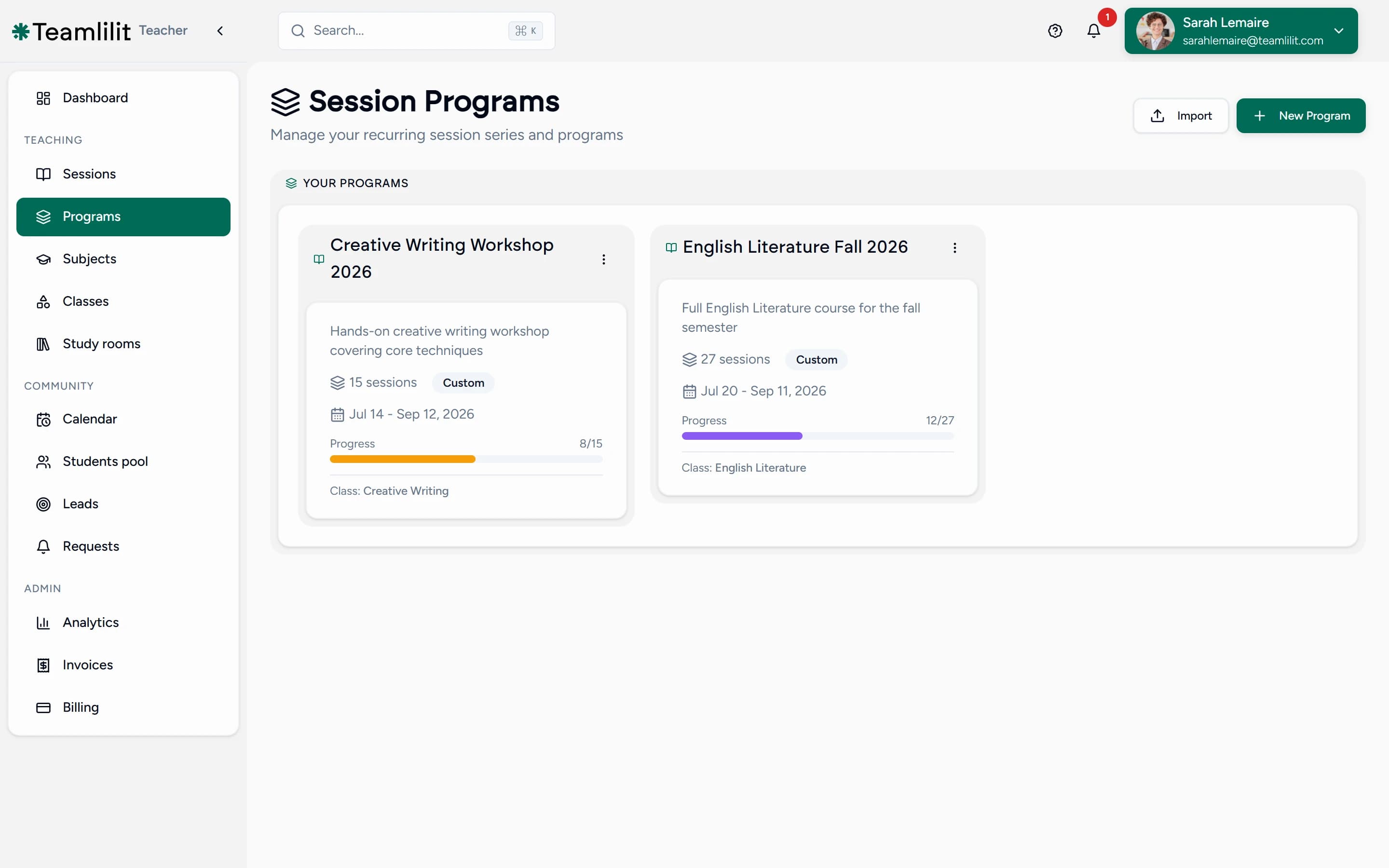
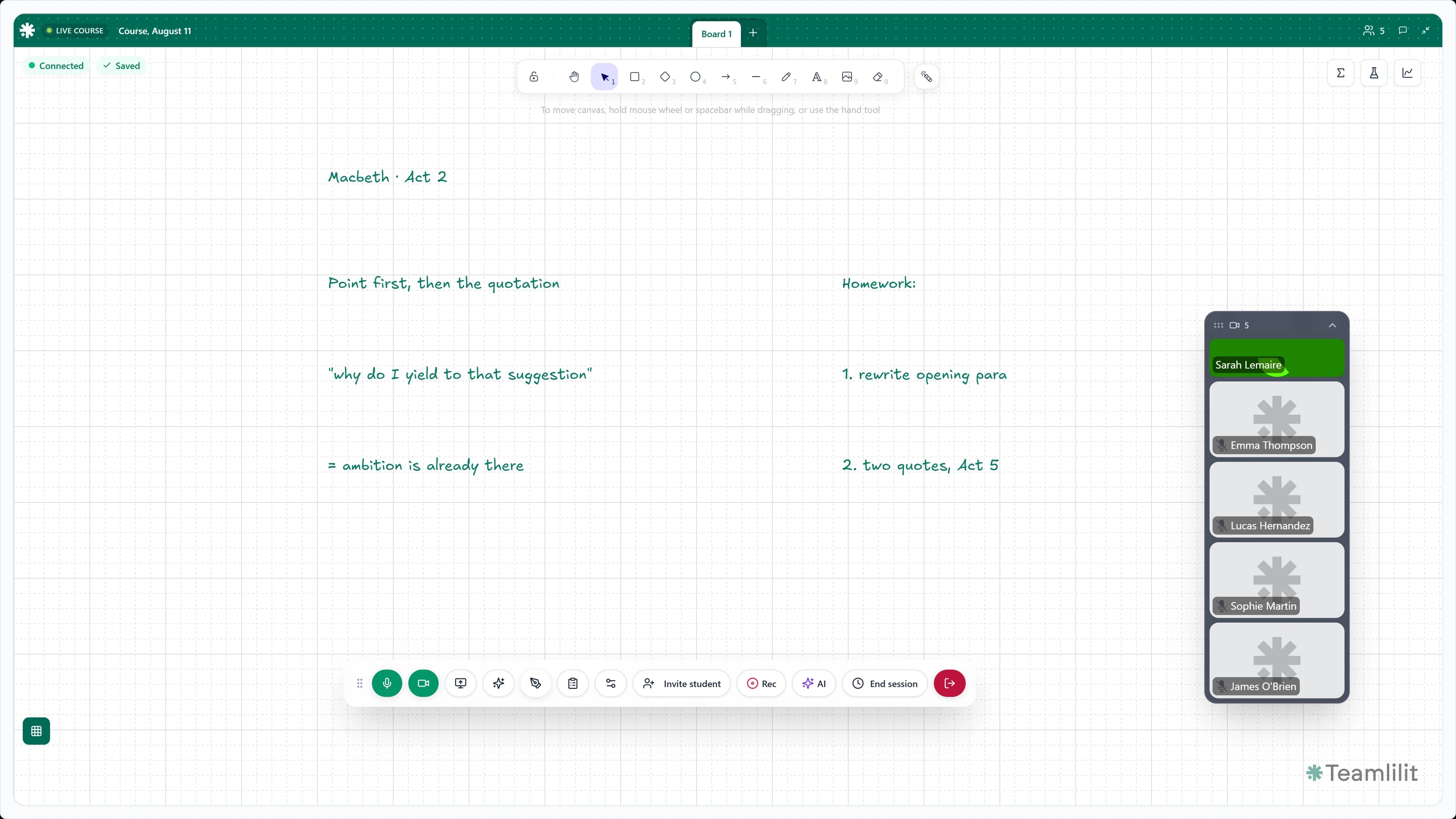
Teamlilit works the other way round: you teach in Teamlilit, with video, a shared whiteboard and screen share, and session recording on Pro and Academy. Our virtual classroom page covers what is inside the room.
Neither way is better in the abstract. They cost you in different places, which is the next section.
That is the structural difference, and it is worth naming plainly: when the classroom is a separate product, the lesson happens in one place and the record of your business lives in another, so something always has to carry data between them. In Teamlilit the classroom is the tutoring software, so nothing is handed over at all. The attendance is not imported after the lesson, it is produced by it, and the billable hours are the minutes each student was actually in the room. It also means one subscription rather than two: your live classroom is included in every Teamlilit plan, so there is no separate Zoom or Lessonspace subscription to pay for alongside it. See one lesson move from booking to invoice.
Both bill from attendance. What is actually different?
The difference is where the attendance number comes from: one is entered, the other is observed.
TutorBird describes calendar-based billing plainly: "you just need to schedule lessons & take attendance, TutorBird does the math for you". That is a real, working attendance-to-invoice pipeline and the same idea Teamlilit is built on. We are not going to pretend otherwise.
The difference happens before the invoice exists. When the class runs somewhere else, the attendance figure is one you supply afterwards. TutorBird's own guides describe recording attendance as a feature, but not taking it from the lesson itself, so we will leave it there.
When you teach in Teamlilit, the lesson fills that in for you.
Teach the lesson, and the paperwork is already done
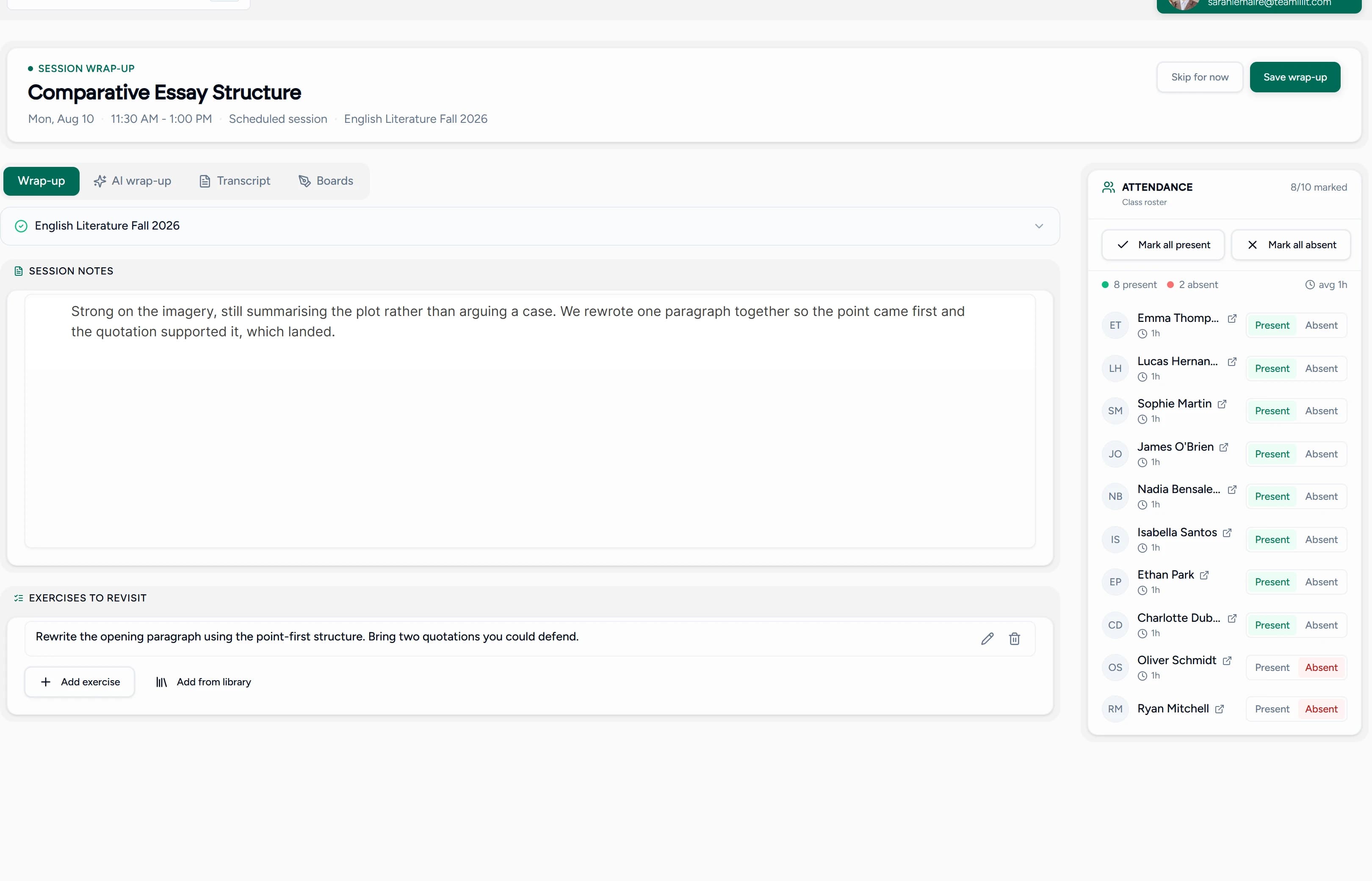
This is the part that actually saves you evenings. Because the class happens in Teamlilit, one lesson leaves behind everything you would otherwise write up later:
- The register takes itself. You can see who turned up, when they arrived and when they left, without reconstructing Tuesday on Friday morning.
- An invoice you can stand behind. The lessons you really taught become the lines on the bill, each at that student's own rate. A short lesson bills short. A missed one is visible instead of quietly charged.
- The lesson is kept, not just remembered. On Pro and Academy the class is saved, so a student who was ill gets the lesson back rather than a summary of it.
- Your notes land on the right lesson. What you covered, what to practise, what to watch next time, all saved against that class instead of a notebook you have to find again.
- The student's story writes itself. By half term, every lesson, note, recording and payment for that family sits in one place, ready for the conversation you know is coming.
Now picture the same week when the class lives elsewhere. The lesson happens in Zoom. Attendance gets typed in later. The invoice gets built from that. The notes go in a document. The recording sits in another account under a filename nobody recognises. Every one of those steps works. Every one of them is also a job for the evening, and one more place where your records and your actual term drift apart.
That is what the extra money buys, and it is a great deal more than one disputed attendance figure.
Which one should you choose?
Choose on which problem is actually costing you time.
- Your main problem is managing the business. TutorBird. Scheduling, records, invoicing, payments, SMS and a website in one mature product, for less money.
- Your main problem is running online lessons across disconnected tools. Teamlilit. The classroom, the attendance, the notes and the billable record come from the same session.
- You teach in person. TutorBird. Teamlilit's central advantage does not exist for you.
- You have several teaching staff. TutorBird, on cost. Teamlilit's seat model gets expensive quickly, though its staff dashboards and centre-wide timetables put every tutor's classes and attendance in one admin view.
- You need card payments, SMS or a website. TutorBird. Teamlilit has none of the three.
- You want the recording, whiteboard and notes on the same student record as the invoice. Teamlilit.
If neither fits, TutorBird alternatives compares eight other tools on how their price scales, where the lesson happens and how families pay.
Where TutorBird is the better choice
TutorBird is the stronger product for business administration, and for anyone teaching in person. Six concrete reasons, all from their own pages:
- Cheaper subscription at every scale, and dramatically so once you add staff.
- SMS reminders included. Teamlilit has no SMS anywhere in the product.
- Online payments through Stripe and PayPal, plus a student portal with payment history. Teamlilit issues no payment links by design.
- A website builder with free hosting. Teamlilit does not build you a website.
- A longer safety net. 30 days free and a 90-day money-back guarantee, against Teamlilit's 14-day trial.
- Keep the video tool you already use. Zoom, FaceTime, Skype and Lessonspace all connect.
One more honest limit on our side: Teamlilit's Solo plan caps a session at two participants and does not allow group sessions. Group teaching starts at Pro, up to 25 people per session.
Frequently asked questions
What is the real difference between Teamlilit and TutorBird?
They are built around different centres of gravity. TutorBird is a tutoring business management system: scheduling, student records, attendance, invoicing and payments, with the lesson itself taking place in a tool you connect, such as Zoom, FaceTime, Skype or Lessonspace. Teamlilit is an online teaching workspace: the lesson runs inside the product, and the attendance record, session history and billable record are produced by that session rather than entered afterwards.
Is TutorBird cheaper than Teamlilit?
On subscription price, yes. TutorBird is US$16.95 a month plus US$4.95 per additional tutor or staff member. Teamlilit is billed in your local currency and shows 29, 69 or 119 per month, with the Solo and Pro plans carrying one staff seat each. Note that the two subscriptions do not buy the same scope: TutorBird's price does not include the classroom you teach in, while Teamlilit's does, so a fair comparison counts whatever you pay for Zoom, Lessonspace or an equivalent alongside TutorBird.
Does TutorBird have a built-in video classroom?
No, it connects to external ones. TutorBird integrates Zoom, FaceTime, Skype and Lessonspace: you store a meeting ID against a location, choose that location when scheduling, and clicking it opens the external platform. Teamlilit runs the lesson in the browser itself, with video, a shared whiteboard and screen share, plus session recording on the Pro and Academy plans.
Both build invoices from attendance, so what is the difference?
The difference is where the attendance number comes from. TutorBird describes calendar-based billing where you schedule lessons and take attendance, and its documentation does not describe capturing attendance from the video call itself. In Teamlilit the lesson runs in the product, so each student's join and leave is recorded as it happens and the invoice is built from that record. One is attendance you enter, the other is attendance that was observed.
Does TutorBird let parents pay online?
Yes, and this is a genuine advantage over Teamlilit. TutorBird integrates with Stripe and PayPal and includes a student portal with payment history. Teamlilit issues no payment links and has no parent payment portal, so families pay you directly and you record the payment against the invoice.
Does Teamlilit send SMS reminders?
No. Teamlilit has no SMS anywhere in the product; its session reminders are email only. TutorBird includes SMS reminders in its base price, so if reaching families by text matters to your practice, that is a real reason to choose TutorBird.
Can Teamlilit run group classes?
On the Pro and Academy plans, yes. Solo is limited to two participants in a session and does not allow group sessions, so a tutor teaching groups needs Pro, which allows up to 25 people per session, or Academy, which allows up to 100. Check that against your class sizes before comparing plan prices, because the cheapest Teamlilit plan is one-to-one only.
Is Teamlilit a good TutorBird alternative for online tutors?
It is the closest alternative for tutors whose lessons happen online and who are tired of running a classroom, an admin tool and a billing process that do not talk to each other. If you teach in person, or your existing Zoom setup works well and you only need administration around it, TutorBird remains the stronger fit and is cheaper.
Next step
Run one week of real online lessons end to end. Start the session, get students into the room, teach with the whiteboard, let attendance record itself, write the follow-up note, produce the billable record, then find that session again from the student's history a week later.
That is the comparison this page is really about, and it is the one you can only judge by doing it. Start a 14-day free trial of Teamlilit, no card required.
