

Tutor invoicing software that bills from attendance and tracked lessons
Get paid for every lesson without rebuilding invoices from spreadsheets. Teamlilit builds your invoices from the sessions you already track: bill by the hour or by session, apply tax, send by email, and see at a glance who still owes you.
INV-2026-0042
1 to 30 June 2026
From
Sophie Bennett
Maths and Physics tutor
Billed to
The Harper family
parent@example.com
- Algebra, GCSE higher3 Jun 20261.5h£45.00
- Calculus revision10 Jun 20261.0h£30.00
- Exam practice paper17 Jun 2026Estimated2.0h£60.00
- Past-paper walkthrough24 Jun 20261.5h£45.00
Invoicing is the part of tutoring nobody signed up for
- You finish teaching, then lose an evening rebuilding invoices in a spreadsheet or a separate tool.
- You scroll your calendar trying to remember who attended, for how long, and what you charge each of them.
- A session slips through the cracks, gets billed twice, or never gets billed at all, and that is money quietly lost.
- If you are VAT registered, every invoice has to show the right tax, your number, and a clean running sequence.
- Once invoices are out, you are left tracking who paid and chasing the ones who did not.
Teamlilit already knows who attended each lesson and for how long. Invoicing simply turns that into a bill you can review and send, so the admin takes minutes instead of an evening.
The invoice can exist because Teamlilit watched the lesson.
The hours on your invoice are not typed in from a calendar or remembered at the end of the month. They come from the live room Teamlilit ran: who joined, when they left, and the real minutes in between. Nothing was handed over from another app, because there was no other app.
You still generate the invoice yourself. Pick the student and the period, and Teamlilit fills the lines from what actually happened.
Attendance-based invoicing for tutors
Teamlilit connects live lesson attendance to invoicing. Instead of rebuilding invoices from a calendar, tutors can generate invoice lines from the students who actually attended, how long they stayed, and whether the lesson should be billed by the hour or by session.
Read our guide: how to invoice tutoring students based on attendance
New to invoicing? Start with how to invoice tutoring students
Setting your rates? Read how to price private tutoring sessions
Not sure what to charge? Work out a sustainable hourly rate with the free tutor pricing calculator
Where those tracked hours come from: automatic lesson time recording
Who actually attended
Only the students who joined the lesson land on the invoice, straight from tracked attendance.
How long they stayed
Each student's real time in the session sets the billable hours, no stopwatch or guesswork.
Billed your way
Charge by the tracked hour or a flat rate per session, and edit any line before you send.
Invoices that build themselves from tracked lessons
Pick a student and a date range. Teamlilit pulls in every attended session, with the time each one actually ran, and turns it into editable invoice lines. Choose to bill by the hour or by the session, and you have a draft in seconds, not an evening.
Generate from tracked sessions
Pick a student and a billing period
3 attended sessions found
- Algebra, GCSE higherTue 3 June, 16:001.5h
- Calculus revisionTue 10 June, 16:00Estimated1.0h
- Exam practice paperTue 17 June, 16:002.0h
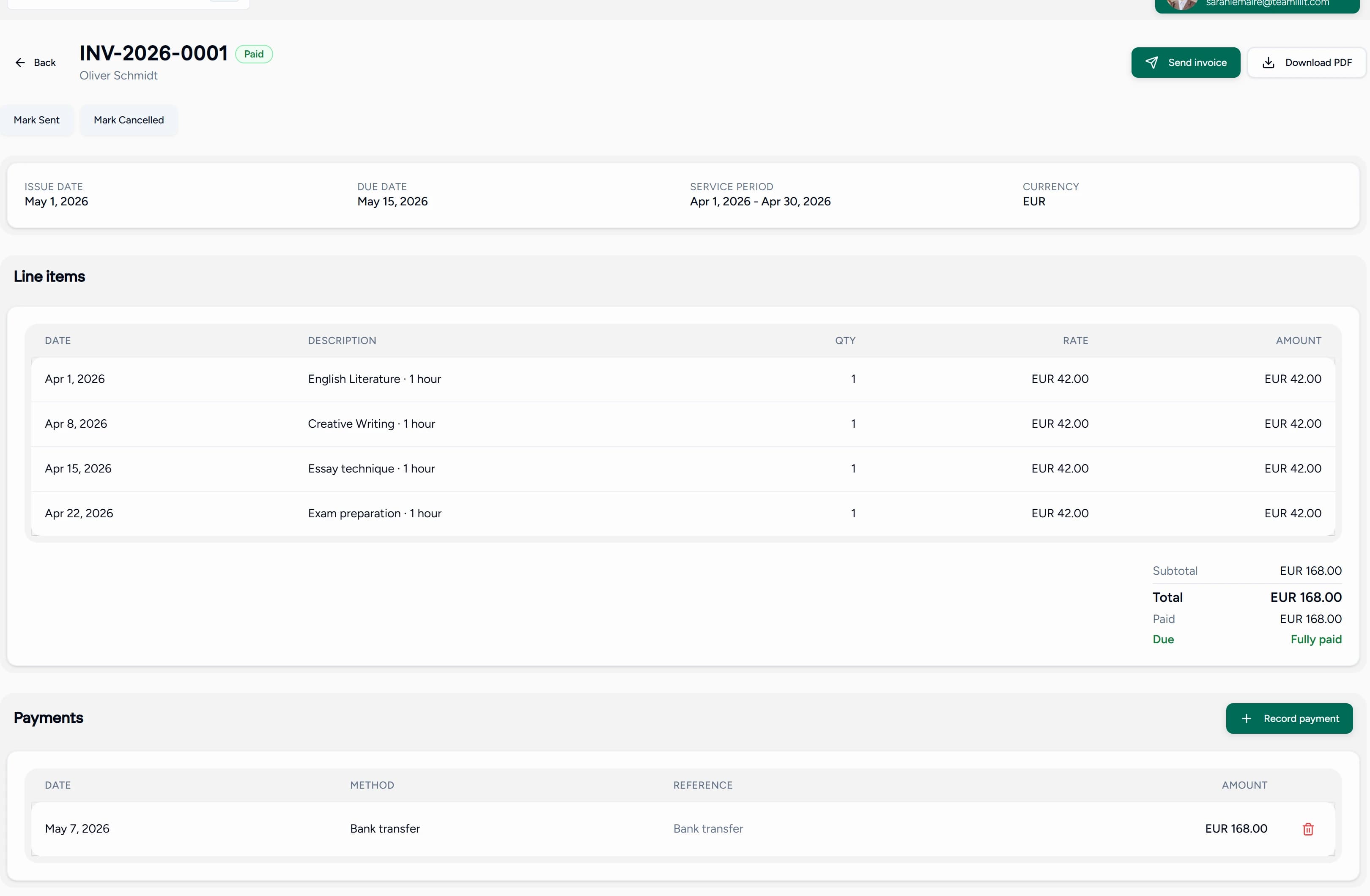
And this is the invoice it produces.
A real invoice from a real account: numbered, dated, itemised by lesson, with the payment recorded against it. Send it by email or download the PDF.
Invoice this class
4 students selected
- LHLiam Harper£135.00
- AKAva Kowalski£90.00
- NMNoah Müller£120.00
- EREmma Rossi£105.00
Choose how to bill
One invoice per family
Four students become four invoices, each sent to the right parent.
One consolidated invoice
Bill a school or company once, grouped by student.
Invoice a whole class or family in one go
Select a class, a tag, or a handful of students, and Teamlilit drafts every invoice at once. Send each family their own bill, or roll several students into a single invoice for a school or company.
- Invoice an entire class or course straight from its roster.
- Tag a group, like a company or a sibling set, and bill everyone with that tag together.
- Charge one parent for two siblings on a single, tidy invoice, with a family discount if you offer one.
Everything you need to bill like a real business
Generated from tracked time
Invoice lines come straight from attended sessions and their real duration. If a session was not tracked, it is flagged as an estimate so nothing is silently missed or billed twice.
Bill by hour or by session
Charge per tracked hour or a flat rate per lesson, with hourly time rounded to neat 15-minute increments. Every line is yours to edit before you save.
Tax done right
Turn on VAT or sales tax once, set your rate and registration number, and choose tax-inclusive or exclusive pricing. Invoices show the correct tax with a gapless, per-year number sequence.
Bulk and consolidated billing
Invoice a whole class, a tag, or a multi-select of students at once, as separate invoices per family or one consolidated bill for a school or company.
Send by email with a PDF
Email a clean PDF invoice to the payer straight from Teamlilit. The invoice is issued and timestamped, so your records stay in order.
Payment tracking
Record payments as they come in, however your clients pay you, and watch outstanding balances and overdue invoices update on their own.
Account statements
Give any family or company a running statement of charges, payments, and credit, with a balance carried forward. A clean answer to where do we stand.
Credit notes and account credit
Correct or refund an issued invoice the proper way with a credit note, or hold a balance as account credit that applies automatically to the next bill.
Recurring invoices
Set a monthly schedule and Teamlilit drafts each invoice from that month's tracked sessions, ready for you to review and send.
Know exactly who has paid, and who has not
Record each payment as it arrives and Teamlilit keeps your outstanding total, overdue invoices, and per-family statements up to date. Reminders go out for invoices that slip past their due date, so you spend less time chasing.
You keep getting paid the way you already do, by bank transfer, card, or your own payment link. Teamlilit tracks the money so you do not have to, and never takes a cut.
Outstanding
£480.00
Paid this month
£1,260.00
- INV-2026-0039The Kowalski family£90.00Paid
- INV-2026-0040The Müller family£120.00Paid
- INV-2026-0041The Rossi family£105.00Sent
- INV-2026-0037The Dubois family£150.00Overdue
Record payments however your clients pay you. Teamlilit never touches the money.
Month-end used to be a lost Sunday rebuilding invoices from my calendar. Now Teamlilit drafts them from the lessons I taught, I check them over, and they are out the door before lunch.
Camille Moreau
Private maths tutor, Lyon
Spreadsheets and side tools versus built-in invoicing
Invoicing on the side
Invoicing in Teamlilit
Hours copied from a calendar, a meeting tool, or memory
Hours come from the live lesson Teamlilit ran
An evening rebuilding invoices from your calendar each month.
Drafts built from tracked lessons in seconds, ready to review.
Sessions missed, double-billed, or charged for the wrong length.
Every line comes from real attendance, and a session can only be billed once.
Tax and invoice numbers managed by hand, and easy to get wrong.
Correct tax and a gapless, per-year sequence applied for you.
Separate invoices typed out one by one for each sibling and class.
Whole classes and families billed in a single action.
A separate note somewhere of who has paid and who has not.
Outstanding balances, overdue flags, and reminders, all in one place.
Tutor invoicing software vs invoice templates
Invoice templates are useful for one-off invoices. Tutor invoicing software becomes more useful when you need to connect invoices to student attendance, lesson history, billable hours, tax, payment status, and recurring monthly billing.
Invoice templates
Best for one-off invoices
A template is quick when you just need a single invoice. You fill in every line by hand each time, with nothing connecting it to your lessons, your students, or who has paid.
Tutor invoicing software
Best for an ongoing teaching business
Teamlilit connects invoices to student attendance, lesson history, billable hours, tax, payment status, and recurring monthly billing, so each invoice builds itself from what you actually taught.
From taught lessons to sent invoice in three steps
Pick who and when
Choose a student, a class, or a group, set a billing period, and decide whether to bill by the hour or by session.
Review the draft
Teamlilit fills in the lines from tracked attendance. Edit anything, add a discount or a one-off charge, and apply tax if you need it.
Send and track
Email the invoice as a PDF or download it, then record payments and let outstanding balances and reminders look after themselves.
Invoicing questions, answered
Can tutors invoice students based on attendance?
Yes. Tutors can invoice students based on attendance by tracking which lessons happened, how long each lesson lasted, and whether there were late arrivals, early exits, missed lessons, or cancellations. This is often more accurate than creating invoices manually at the end of the week or month.
Can Teamlilit turn lesson attendance into invoice records?
Teamlilit helps tutors keep lesson attendance, student records, and billable tutoring hours connected, making it easier to turn completed lessons into invoice records without relying on scattered notes or spreadsheets.
What is a tutor invoicing management system?
A tutor invoicing management system helps tutors turn tracked lessons and attendance into professional invoices, instead of rebuilding each one from a spreadsheet. With Teamlilit, invoices are prepared from the sessions already tracked, sent to the payer by email as a PDF, and payments recorded so you can see at a glance who has paid, all in one place with less manual work.
What is a tutor billing management system?
A tutor billing management system helps tutors organise lesson records, attendance, billable hours, and invoice details in one place. With Teamlilit, billing stays connected to the lessons that actually happened, so tutors can prepare invoices with less manual work and fewer scattered notes.
What is tutor billing software?
Tutor billing software helps private tutors track billable lessons, lesson hours, student payments, invoice records, and parent billing. It is different from a simple invoice template because it connects billing to the tutoring work that actually happened.
Is an invoice template enough for private tutors?
An invoice template can be enough for a tutor with only a few occasional students. But once a tutor manages recurring lessons, cancellations, missed sessions, and different billing rules, a connected invoicing system is usually easier and more reliable.
How do tutors track billable lesson time?
Tutors can track billable lesson time by recording each lesson, its duration, attendance status, cancellation status, and any notes about late arrivals or early exits. This makes it easier to create accurate invoices later.
How are invoices created from my lessons?
Teamlilit tracks who attended each live session and for how long. When you generate an invoice for a student and date range, it turns those attended sessions into editable invoice lines, billed by the hour or per session. You review and edit everything before anything is saved or sent, and a session can never be billed twice.
Does Teamlilit process payments?
No, and that is deliberate. You keep getting paid the way you already do, whether that is bank transfer, cash, card, or your own payment link on the invoice. Teamlilit records each payment so your outstanding balances, overdue flags, and statements stay accurate. The platform never holds or takes a cut of your money.
Can Teamlilit add late fees to overdue invoices automatically?
Yes. Turn a late fee on once and set the amount, either a fixed charge or a percentage of what is still outstanding, plus the grace period in days after the due date. A daily check then adds the fee to the overdue invoice itself, so nobody has to be chased by hand. It applies once per invoice, only to invoices you have already sent that are still unpaid, and it is skipped if a part payment has already cleared the balance. You can exempt individual students, and if tax is switched on you choose whether the fee is taxable.
Can I add VAT or sales tax?
Yes. If you are tax registered, turn it on once and set your default rate, your registration number, and whether your prices include or exclude tax. New invoice lines pick up the right rate, the invoice shows the correct tax breakdown, and numbering stays gapless per year, which helps keep your invoice records cleaner and easier to review. Always check the invoicing rules that apply in your country. If you are not registered, tax stays off and out of your way.
Can I bill a whole family or class at once?
Yes. Select a class, a tag, or several students, and Teamlilit drafts every invoice in one go. You can send each family its own invoice, or combine multiple students, such as two siblings or a company's learners, onto a single consolidated invoice, with a family discount if you offer one.
Can invoices go out automatically each month?
You can set a monthly recurring schedule, and Teamlilit drafts each invoice from that month's tracked sessions so it is ready for you to review. Following our approach to billing, invoices are not sent without you, so you always get the final say before anything reaches a client.
Is invoicing included in my plan?
Creating, sending, and tracking invoices for your own students is part of Teamlilit on every plan. Higher-volume tools, like bulk billing across large groups, follow the same plan limits as the rest of the platform. See the pricing page for the details of each tier.
What is the best invoicing system for a tutoring centre?
A tutoring centre needs invoicing that pulls lesson attendance, per-student rates, and sibling discounts together automatically, rather than rebuilding each bill by hand. Teamlilit's invoicing module does exactly that: it turns tracked attendance across every tutor into draft invoices you review, applies a sibling discount and tax automatically on a consolidated family invoice, and exports a professional PDF you can email to each family. It suits a multi-tutor centre because you can bill a whole class, a tag, or a hand-picked group in one pass.
Who is Teamlilit invoicing for?
Private tutors
Bill weekly or monthly from completed lessons and tracked attendance.
Online tutors
Turn live lesson attendance into billable time without manually checking call history.
Tutoring centres and small teams
Bill classes, groups, siblings, companies, or families from one connected workspace.
Works with the rest of your workspace
Invoicing sits on top of the lessons and students you already manage in Teamlilit.
The invoice is the last stage, not the first.
Everything on it was produced earlier in the same lesson. The booking made the session, the classroom ran it, the attendance measured it, and the wrap-up recorded what happened in it. The invoice is what falls out of the other four.
Stop dreading month-end
Let your invoices build themselves from the lessons you have already taught, and get back the evening you used to spend on admin.
No card required. Invoicing is built in, not an add-on.
