

Student management software that connects your whole tutoring workflow
Teamlilit's student management software for tutors keeps every learner's profile, attendance, lesson notes and progress tracking in one tidy hub, saving hours of admin each week so you can focus on teaching.
You started with a few students and a simple list. Now you have 20, 30, 50 or more across different groups and levels, and the record of each one is scattered across a spreadsheet, your calendar, WhatsApp, email, and your memory. Teamlilit is student management software built for tutoring: one connected record per student, from the first lesson note to the final invoice. It is the student side of the wider tutoring management software that runs your whole week.
Your current stack

Who this is for
- Solo and independent tutors who have outgrown a spreadsheet of students
- Tutors with 10 or more students juggling notes, parents, attendance, and payments
- Tutoring agencies and centres tracking students across several tutors
- Exam prep and language tutors who need progress and attendance per student
Tutors do not lose control because they are lazy
They lose control because their information is scattered. The notes are in a notebook, the parent messages are in WhatsApp, attendance is in your head, the invoice is in a separate folder, and the timetable is in a calendar that knows nothing about any of it.
That works at three students. At fifteen, it cracks. A parent asks how their child is progressing and you search three apps. A lesson gets invoiced twice, or not at all. You forget that a missed lesson was rescheduled, not cancelled. The problem was never effort. The problem is that tutoring information is connected, and your tools keep it apart.
Keep every student, lesson note, parent update, attendance record, and invoice connected
Teamlilit gives each student one home, and connects it to the work you actually do.
Student profiles
Every student has a profile: contact details, year group and subject, goals, strengths, weak areas, group memberships, and notes. One click to see everything about any student, instead of reconstructing it from memory.
Parent and guardian contacts
Parent name, email, phone, preferred contact method, and a separate billing contact all live on the student. Important communication about cancellations, payments, and progress stays linked to the student instead of buried in a chat thread.
Lesson notes
Write a short note after each lesson: what was covered, what went well, what needs practice, the homework set, and the focus for next time. The note sits on the student profile and the lesson, ready to review before the next session. See how lesson notes software for tutors connects that follow-up to attendance, exercises, and student history. Not signed up yet? The free tutoring lesson notes template generates the note and a parent update from one form.
Automatic attendance
When a student joins a live session, attendance is recorded automatically with join and leave times. When they do not show up, you know. No manual roll calls, no end-of-day guessing, and a clear record to act on when you want to cut no-shows. The same records serve recurring clubs and programs as after school attendance software.
Billable hours
Per-student time is captured on each session alongside attendance, so completed lessons turn into billable hours without counting them by hand. Our guide on how tutors can track billable hours covers the full picture.
Invoices
Billable lessons flow straight into invoices. Read off the period from the student profile and turn it into a professional PDF with the free invoice maker, instead of copying numbers between a spreadsheet and a separate billing app. When the invoicing outgrows a template, tutor billing software carries the same student records through rates, payments, late fees and consolidated family invoices.
Reminders and follow-ups
The follow-ups that run a tutoring business, sending a parent update, chasing a payment, booking the next lesson, stop depending on memory and become part of the student record. Once the roster grows past a handful of students, the same discipline applies to your calendar: our guide on how tutors manage lesson availability for multiple students covers designing weekly availability blocks that hold up under a full roster.
Files and homework
Materials and homework connect to the lesson and the student, so the resources for a session are where the session is, not in a separate Drive folder.
Progress history and reports
Every session lands on the student record automatically through your scheduling, building a complete history of attendance, time, and notes. When a parent asks "how is it going?", the answer is already there. And when a parent wants that in writing, the free student progress report template lays out goals, topics covered, strengths, areas to improve, and homework as a parent-friendly report you can copy, print, or export as a PDF.
The connected tutoring workflow
The whole point of student management software is that the pieces connect. In Teamlilit they run as one loop:
schedule → student profile → lesson notes → attendance → billable hours → invoice → parent update
A scheduled lesson becomes a session. The session records attendance and time. Attendance and time become billable hours. Billable hours become an invoice. The lesson note shapes the next lesson and the parent update. Nothing is re-entered, because it was never separate.
That loop is also what makes growing sustainable: the families you win through the best marketing for tutors arrive into a system that keeps them organised from the first session, instead of adding to a pile of notes.
What a tutor student profile should include
A student profile is only useful if it is consistent. The aim is not to record everything, but to capture what you actually need to teach the student well and run the relationship professionally. A good tutor student profile includes:
- Basics: name, year group or level, subject, exam board, target exam date, regular lesson time, lesson format, and agreed rate
- Parent or guardian: name, email, phone, preferred contact method, a separate billing contact, and an emergency contact where appropriate
- Learning profile: the main goal, current level, strengths, weak areas, confidence, learning preferences, and any support needs relevant to tuition
- Lesson notes: a short record per lesson of what was covered, what went well, what needs practice, the homework set, and the next focus
- Admin: payment status, invoice status, package balance, and cancellation notes
Package balance deserves more than one line, because it is where records usually go wrong. A prepaid block tracked as bought minus taught looks tidy and still misleads you, since it says nothing about the lessons already in next month's calendar. Read as four figures instead (purchased, used, booked, and available to book) it answers the question you actually have, which is whether this family can book anything more before paying again. In Teamlilit the record shows all four, flags the case where the calendar has run past the credits, and keeps a dated line for every credit taken or handed back after a correction. Parents see the same counts, and their upcoming lessons, through their own read-only portal link, without any amounts. Our guide to invoicing from attendance records walks through how a package balance and an invoice line stay in step.
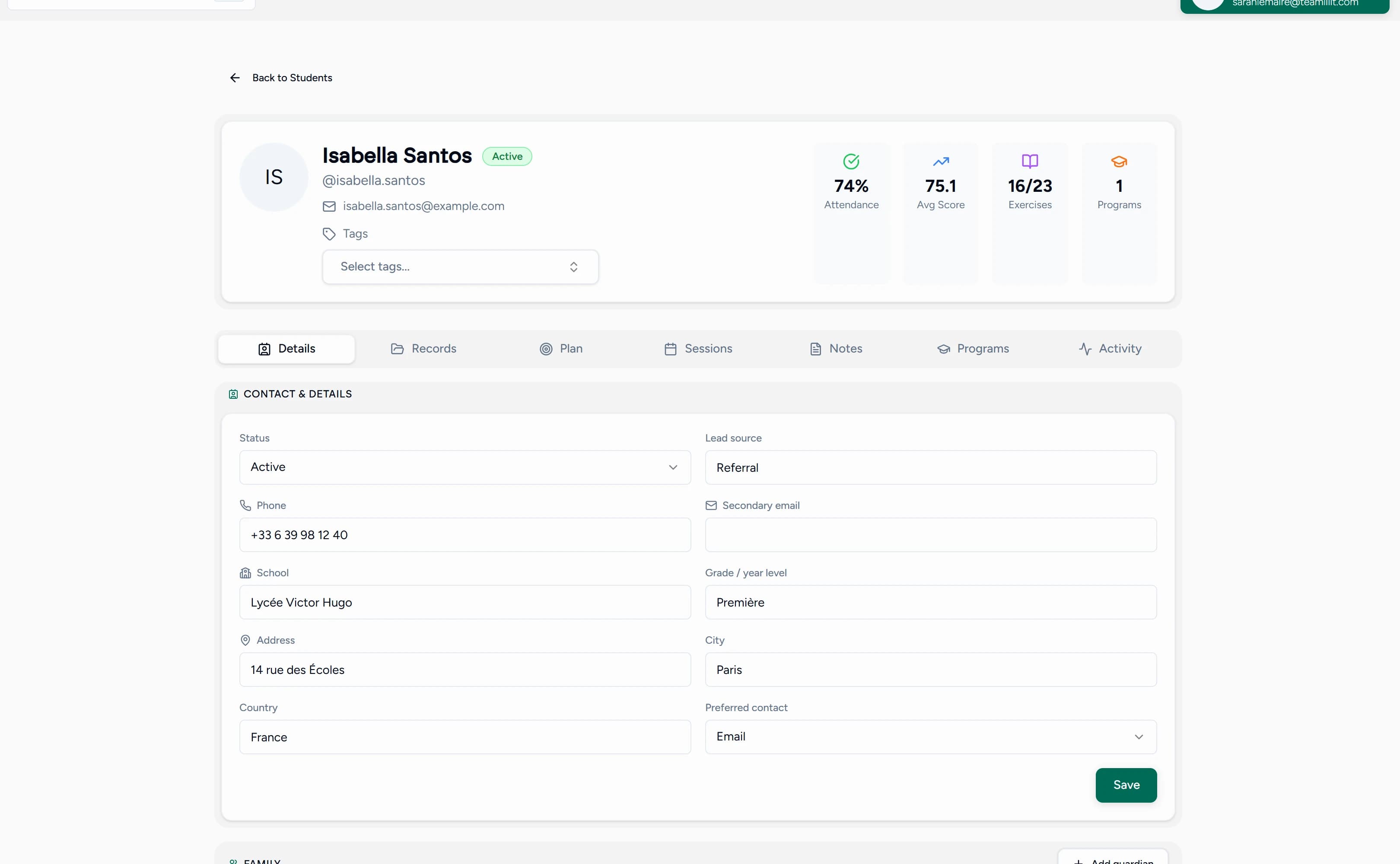
If you want a ready structure to fill in, the free student profile template for tutors lays out every one of these fields, with a worked example. Our guide on what student records private tutors should keep covers what to include and, just as importantly, what not to over-collect.
How student records connect to attendance and invoices
This is where a real student management system separates from a list of names. In a spreadsheet, the student, the attendance, and the invoice live in different tabs that you reconcile by hand. In Teamlilit, they are the same record.
When a lesson runs, attendance and per-student time land on the student profile automatically. Each session carries a status, attended, cancelled in time, late cancellation, no-show, or rescheduled, and your cancellation policy decides whether it is billable. Those billable lessons roll up into billable hours on the profile, and at the end of the period you turn them into a professional PDF with the invoice maker, without counting lessons or chasing dates. The full method is in our guide on how tutors can track billable hours.
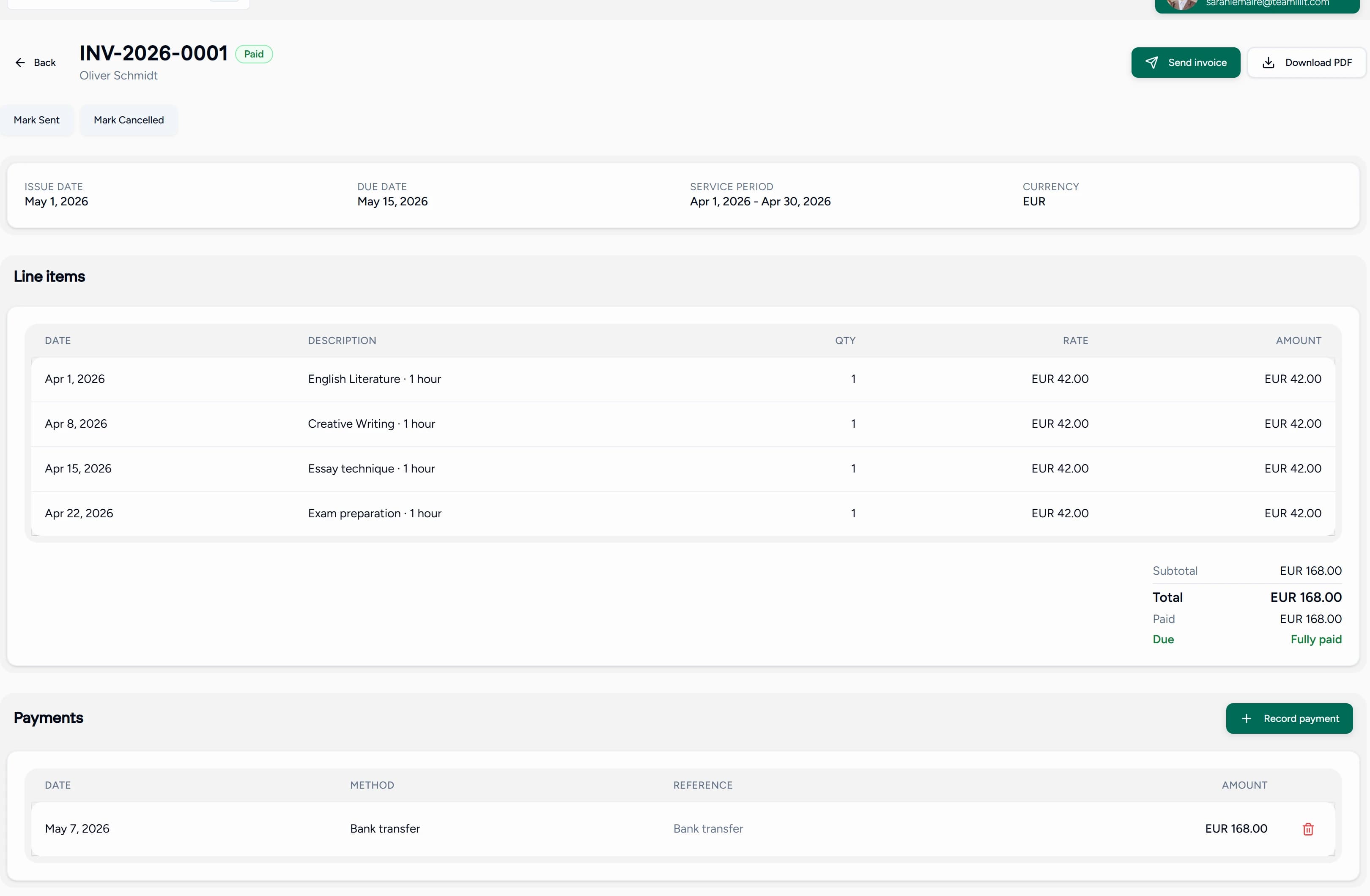
So when a parent asks "which lessons are on this invoice?", the answer is the attendance record, not your memory.
How Teamlilit keeps student profiles connected to live lessons
Most student management tools stop at the admin layer and leave the teaching to a separate video app, so the record never knows what happened in the lesson. Teamlilit closes that gap because the live classroom and the student record are the same product.
When a student joins a session, the clock starts and attendance is logged against their profile. When the lesson ends, its duration, attendance, and your lesson note are already on the record, with nothing to sync between tools. That is why the profile is always current: it is built by the lessons themselves, through the scheduling system that puts each session on the right student, as part of one tutoring management platform.
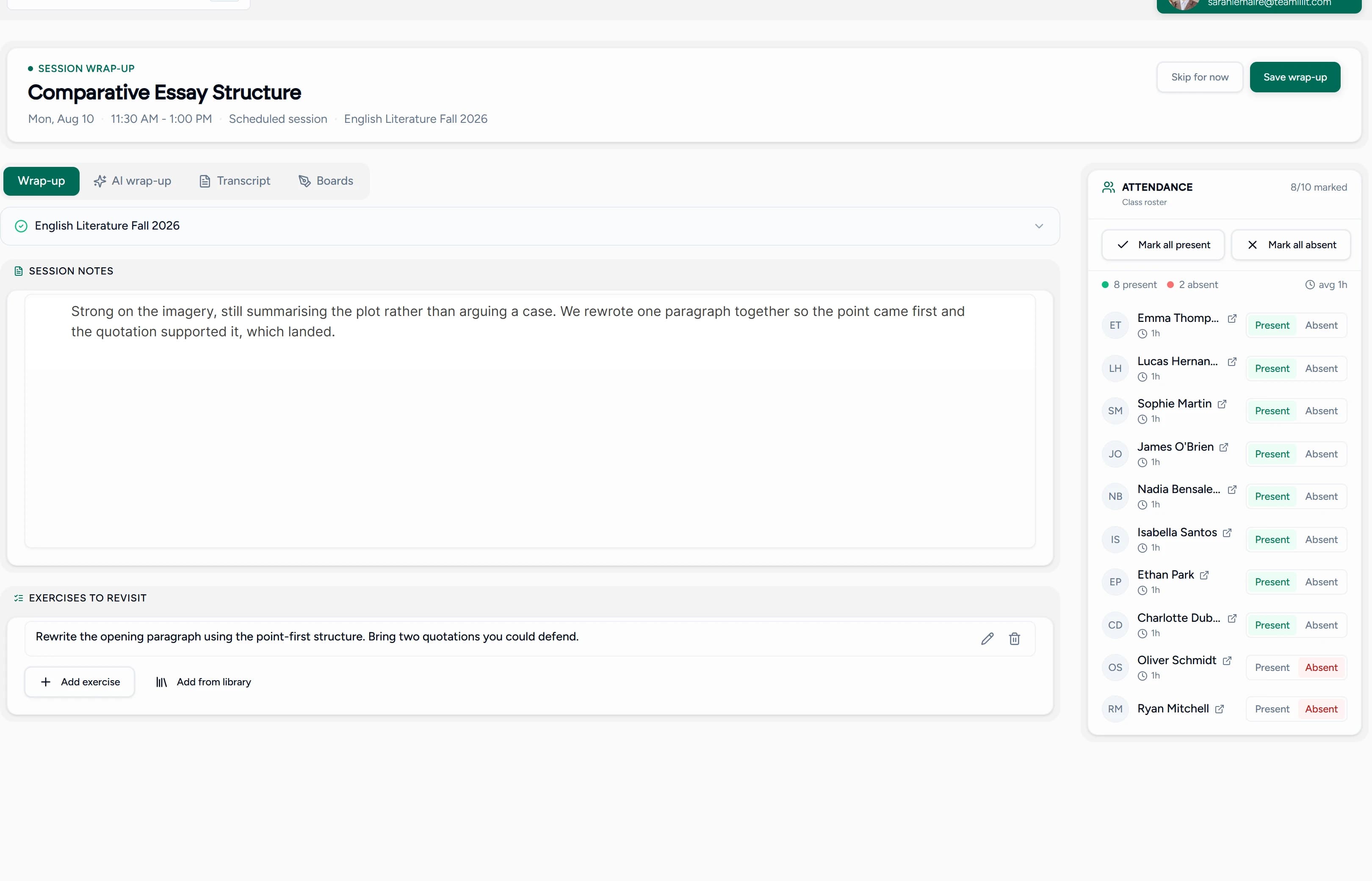
A connected record is also how you keep students long term: the visible progress and consistent follow-up it makes possible are exactly what our guide on retaining tutoring students is built around.
Why this is better than a generic CRM
Tools like HubSpot or Notion can technically track students, but they do not understand tutoring. They think in deals and pipelines; you think in students, lessons, attendance, and invoices.
| Generic CRM (HubSpot, Notion) | Teamlilit | |
|---|---|---|
| Student profiles | Manual setup | Built-in with session history |
| Lesson notes | Free-text field, disconnected | Attached to each lesson and student |
| Attendance | Not available | Automatic, per session |
| Connected to classroom | No | Yes, live sessions update profiles |
| Billable hours and invoices | Not built for it | Time and invoices from completed lessons |
| Group management | Spreadsheet workaround | Native class and group organisation |
| Setup time | Hours of configuration | Minutes, just add students |
Teamlilit's student management is built into the teaching workflow. No configuration, no integrations, no duct tape. If you want a CRM-like experience that understands tutoring, this is it.
Tutor CRM vs student management software
People often ask which one they need. In tutoring, the honest answer is that they are two sides of the same record.
A tutor CRM is about the relationship: who the student is, who the parent is, what was said, and what to follow up. Student management software is about the operation: scheduling, attendance, lesson history, billable hours, and invoices. Use one without the other and you are back to two systems that drift apart.
| Tutor CRM (relationship) | Student management (operation) | |
|---|---|---|
| Focus | Students, parents, notes, follow-ups | Lessons, attendance, hours, invoices |
| Answers | "Who is this student and what did we agree?" | "What happened, and what should be billed?" |
| Risk if used alone | Notes with no link to real lessons | Numbers with no human context |
Teamlilit is both in one place: the relationship and the operation on the same profile, so the note you wrote and the lesson you taught and the invoice you send are all the same thread.
Student management software vs spreadsheets
A spreadsheet is a good place to start, and there is no shame in it. It is free, flexible, and familiar. It works well when you have a handful of students, a stable timetable, and simple payments.
It becomes the wrong tool as you grow, not because it cannot hold the data, but because it cannot run the workflow. The spreadsheet does not know a completed lesson should become billable, that a no-show should follow your cancellation policy, or that a parent needs an update. You become the connection between everything, and that mental load gets expensive.
If you are weighing the move, our guide on tutor CRM vs spreadsheet walks through exactly when a spreadsheet stops paying off, spreadsheet vs tutor timetable software does the same for scheduling, and how to organise private tutoring students covers the system behind a clean record.
Built for UK private tutors and tuition centres
If you tutor in the UK, your student records, parent contact details, lesson notes, attendance, and invoices are personal data under UK GDPR and the Data Protection Act 2018. You do not need to become a data protection expert, but keeping records in one organised, secure system makes the sensible things easy:
- Keep only what you need. One structured profile per student is easier to keep proportionate than notes scattered across apps.
- Find it quickly. If a parent asks what information you hold, an organised record is simple to answer.
- Separate teaching from money. Lesson notes and financial records stay distinct, and financial records can be kept for tax.
- Delete what you no longer need. A single system makes a yearly review and clean-up realistic.
For the full picture, see our guide on what student records private tutors should keep.
One system instead of a patchwork
The real competitor is not another app. It is the patchwork most tutors run by default. Teamlilit replaces the whole stack with one connected student record, and the student side sits inside a broader tutoring management system that runs your scheduling, live lessons, attendance, and billing from the same place.
| What you replace | The problem it created |
|---|---|
| Google Calendar | Blocks time but knows nothing about the student or the lesson |
| Where parent updates, cancellations, and payments get lost | |
| Google Sheets | Stores rows, but you maintain every connection by hand |
| Notion or a generic CRM | Built for sales teams, not lessons and attendance |
| PDF invoice folders | Disconnected from the lessons that were actually taught |
| Manual reminders | Follow-ups depend on memory, so some never happen |
Still weighing separate apps against one system? Our guide to the best tools for tutors compares the video, scheduling, and payment options tutors actually use, and shows where a connected platform starts to win.
Student management for private tutors vs tutoring centres
The same record has to solve two different jobs. A private tutor is keeping their own students organised; a centre is keeping many tutors consistent without students slipping through the gaps. Teamlilit handles both from one system.
| Private tutor | Tutoring centre | |
|---|---|---|
| Whose records | Just yours, one roster to keep clean | Shared records across every tutor |
| Access | You see everything | Each tutor sees their own; admins see all |
| Main goal | Get students off a spreadsheet and your memory | Keep notes, attendance, and billing consistent across staff |
| Onboarding | Add or invite a student in minutes | Assign students to the right tutor and group once |
| The risk it removes | Forgetting a note, an update, or an invoice | One tutor's gaps becoming the centre's problem |
For a solo tutor, the win is one clean home per student. For a centre, the win is running every tutor's student records from one place on the Academy plan for tutoring centres, so quality does not depend on which tutor is more organised.
Run a tutoring centre? Manage students across every tutor
One tutor with 5 students is simple. Three tutors with 50 students across 10 groups needs structure. On the Academy plan for multi-tutor centres, Teamlilit manages student records across every tutor from one dashboard: each tutor sees their own students, admins keep oversight of the whole centre, and students are organised into the right groups once instead of week by week. It is part of the same online tutoring platform that runs the lessons themselves.
Key features
- One student profile per learner with contact, goals, and notes
- Parent and guardian contacts with a separate billing contact
- Lesson notes attached to each lesson and student
- Automatic attendance tracking per session
- Per-student time and billable hours from completed lessons
- Invoices generated from lesson history
- Free student progress report template for parent updates
- Class and group organisation
- Student accounts with self-service access to classes and materials
- Connected to scheduling and the live classroom
- Multi-tutor student management for tutoring centres (Academy plan)
How it works
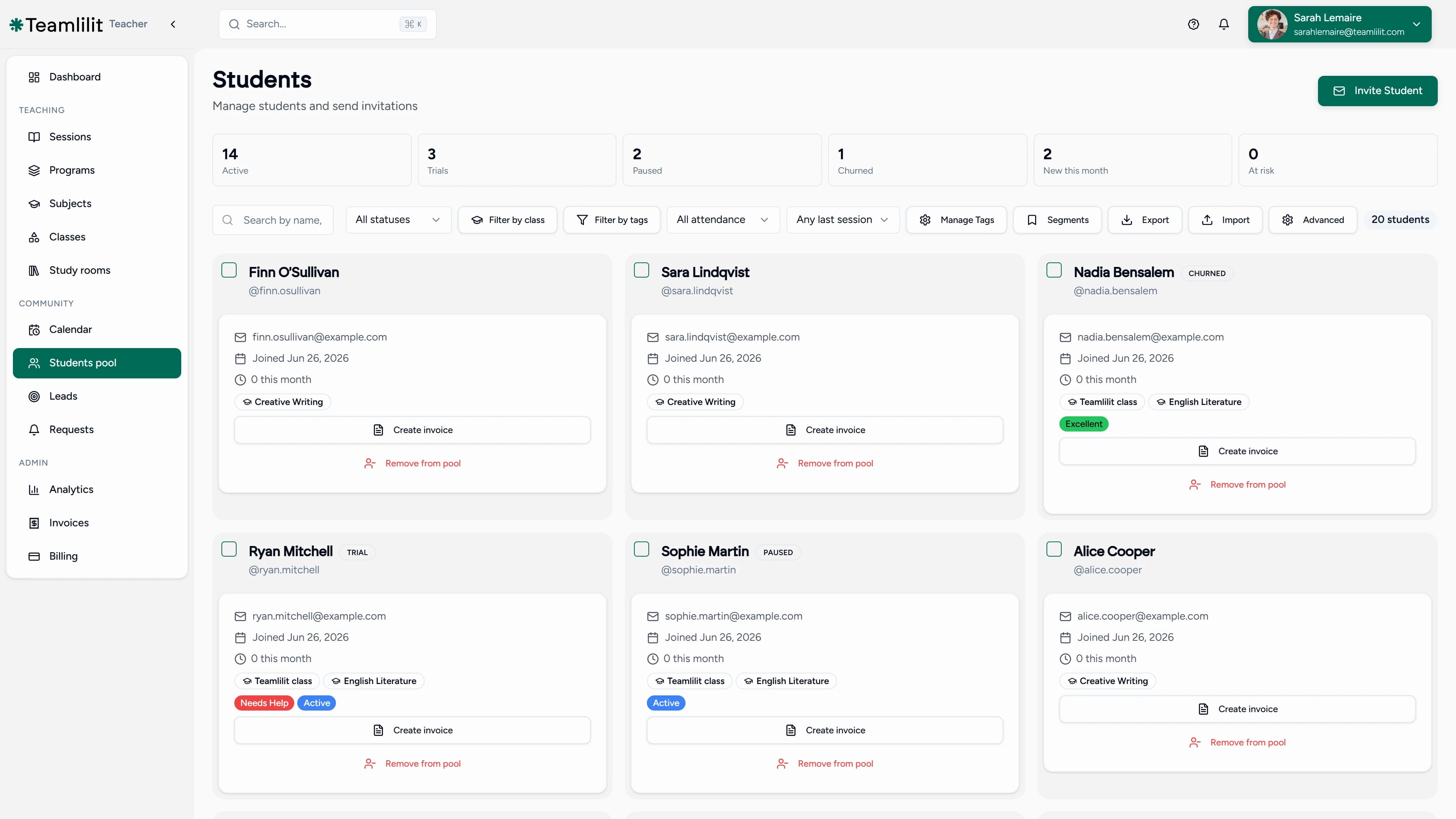
- Create your tutoring workspace
- Add your students, or invite them to create their own accounts
- Organise them into classes and groups
- Schedule sessions, teach, and let attendance and time record themselves
- Read off billable hours and send invoices from the student record
Frequently asked questions
What is student management software for tutors?
Student management software for tutors is a system that keeps everything about each student in one connected place: their profile, lesson notes, parent contacts, attendance, billable hours, invoices, and progress. Unlike a generic CRM, it understands the tutoring workflow, so the lesson, the record, and the billing all link together instead of living in separate apps.
How is this different from a tutor CRM?
In tutoring the two overlap heavily. A tutor CRM focuses on the relationship: student profiles, parent contacts, notes, and follow-ups. Student management software adds the operational side: scheduling, attendance, lesson history, billable hours, and invoices. Teamlilit is both, in one connected system where the record and the teaching are the same product.
Is this better than a spreadsheet?
A spreadsheet works well when your tutoring business is small. It becomes harder as you grow, because it stores rows but does not run the workflow: it cannot connect a completed lesson to attendance, to billable hours, to an invoice. Student management software keeps those connected, so you stop being the link between five different tools. Our guide on tutor CRM vs spreadsheet covers the decision in detail.
Can I keep lesson notes for each student?
Yes. Each student profile holds short lesson notes alongside their attendance and session history, so you can write a quick note after each lesson and review it before the next one without searching docs and messages.
Does it track attendance and billable hours automatically?
Yes. When a student joins a live session, attendance and per-student time are recorded automatically, with join and leave times. That record feeds straight into billable hours and invoices, so you do not reconstruct the month from memory.
Can students and parents have their own access?
Students create their own free accounts to see their classes, join sessions, and access materials. Parent and guardian details, including a separate billing contact, live on the student profile so important communication stays linked to the student instead of scattered across WhatsApp.
Is it suitable for UK private tutors and tuition centres?
Yes. UK tutors keep student names, parent contacts, lesson notes, attendance, and invoices, which is personal data under UK GDPR and the Data Protection Act 2018. Keeping records in one organised, secure system makes it easier to keep only what you need, find it quickly, and respond if a parent asks what you hold. See what student records private tutors should keep.
Can a tutoring centre manage students across multiple tutors?
Yes. On the Academy plan for tutoring centre administrators, a tutoring centre manages student records across every tutor from one dashboard, with each tutor seeing their own students and admins keeping oversight of the whole centre.
Can I use it as drama school management software?
Yes. A drama school runs on the same records as tutoring: who attended, what was covered, how each student is progressing, and what to bill. Teamlilit works as drama school management software for that job: one profile per student, lesson notes after each class, billable hours, and invoices for parents, plus multi-teacher academies on the Academy plan for schools and centres so a school with several teachers keeps one shared record instead of one per teacher. Attendance and per-student time record themselves for online classes; for studio-based sessions, keep attendance on the same student profiles alongside your face-to-face teaching.
Can I create progress reports for parents?
Yes. Each student profile keeps the raw material for a progress report: attendance, per-session time, lesson notes, and what was covered. When a parent wants a written update, the free student progress report template turns goals, topics covered, strengths, areas to improve, and homework into a clean, parent-friendly report you can copy, print, or export as a PDF.
Start organising your students in Teamlilit
Give every student a proper profile, automatic attendance, and an invoice that builds itself from real lessons. It takes minutes to set up. Not ready to commit? Start with the free student profile template for tutors. When you are ready for the connected version, see pricing for plan details.
