

The whiteboard for online tutoring: one board for every part of the lesson.
Most online whiteboards hand you a pen and wish you luck with everything else. Teamlilit gives you a board that holds tabs: a canvas to draw on, a page to write on, the past paper open beside them, and a real equation editor when the notation matters. All inside the live lesson, in the browser.

Click the tabs: this is the real board chrome
The teaching happens on the board. So why is the board the weakest tool you own?
- The whiteboard is one app, the past paper is a PDF in another window, the video clip is a third tab. Half the lesson is spent making sure everyone is looking at the same thing.
- You are explaining a quadratic and drawing the fraction bar with a mouse. Your student is watching a wobbly line, not the method.
- The worksheet you want to work through is on your desktop, so you share your screen and your students lose the board they were following.
- Your students can see everything and touch nothing. They watch you work instead of working, which is the opposite of what a lesson is for.
- When the call ends, the board goes with it. The student has nothing to look back at, so next week you redraw it from scratch.
Teamlilit's board is part of the lesson, not a tool bolted onto it. Several boards per session, any of them a canvas, a written page or an opened file, students who can work on it when you invite them, and everything saved against the session when you finish.
A lesson is a stack of boards, not one blank canvas.
Add as many boards as the lesson needs and switch between them with tabs, the way you would turn a page. You manage the tabs: add one, rename it by double-clicking, remove it when you are done. When you switch, everyone follows, because your active tab is broadcast to the room.
Three kinds of tab, all saved with the session and all reachable from the same lesson link.
A whiteboard
The drawable canvas: pen, shapes and text, plus typeset formulas, plotted graphs and photos you drop straight on to mark up.
A text page
A written page for essay plans, vocabulary lists and worked notes. You write, your students read along, and their view follows your scroll.
A file
Open a PDF, Word, Excel, PowerPoint or image file as its own tab and work through it together. It stays attached to the session for next time.
What the board actually does.
Many boards per session
Add, rename and remove boards as the lesson moves. Your active tab is broadcast, so the room lands on the same page as you without anyone being told which tab to click.
Built-in equation editor
A maths field that typesets as you type: fractions, roots, powers, limits, integrals, matrices. Click the symbols you need, or type LaTeX if that is faster for you.
Function graphing
Plot several functions on one set of axes, each in its own colour, over the x range you choose. The graph lands on the board as an object you can move and resize.
Photos on the canvas
Drop a picture of a student's handwritten working, a diagram or a textbook page straight onto the canvas, then annotate over it with the pen.
Video and Desmos on the board
Paste a YouTube or Vimeo link and the clip plays on the board itself. Desmos calculators embed the same way, so you can bring one into the canvas everyone is watching.
Students can work on the board
Put a student on stage and they can draw, insert their own formulas and plot their own graphs while the rest of the group watches in real time.
Prepare boards in advance
Open the whiteboard from a session in your programme and build it before the lesson: worked examples, the exercises for the day, the file you will need, ready when your student joins.
Saved with the session
Boards are stored against the session and autosave as you teach, so the working is still there next time you open it, and it is captured if you record the lesson.
Nothing to install
You and your students open the board from the lesson link in the browser. No app, no plugin, no separate whiteboard account. Students follow along, and draw once you bring them on stage.
One board, every subject.
The same stack of tabs carries a maths worked example, a chemistry diagram, an essay plan and a past paper without you leaving the lesson to fetch any of them.
Maths, physics, chemistry and economics
The formula editor takes standard LaTeX, so vectors, subscripts, integrals and reaction notation typeset exactly like equations do. Shapes, arrows and freehand cover force diagrams, circuits and apparatus sketches.
Languages and humanities
Add a text page tab and write the essay plan or the vocabulary list live, with your students following your scroll as you go. Paste a YouTube or Vimeo link and the clip plays on the board itself.
Past papers and worksheets
Upload a PDF, Word, Excel, PowerPoint or image file as its own tab and work through it with the class. It stays attached to the session, ready for the next lesson.
Marking written work
Drop a photo of a student's handwritten working straight onto the canvas and mark it up with the pen, right next to the correct method.
From blank canvas to worked solution.
Open the board
Every live lesson has a whiteboard tab. One click and the canvas is up for everyone in the room. No second app, no separate link to send.
Put the lesson on it
Draw it, write a page, open the past paper, or press the formula button to typeset an equation. Add a tab for each and move between them as the lesson goes.
Work it through together
Annotate around it, bring the student on stage to try the next step themselves, and finish with every board saved to the session.
And it handles the case most boards still get wrong.
Notation is where general-purpose whiteboards run out. Press the formula button and a maths field opens: type the way you would write on paper, with an on-screen keyboard for fractions, roots, powers, integrals and Greek letters. It typesets as you type and lands on the canvas as a crisp vector object that stays editable for the rest of the lesson.
Then select that formula, press Plot, and the graphing tool opens with the function already loaded. Algebra to curve in two clicks, without leaving the lesson.
A photo or screenshot of your working
Pixels. Blurry the moment the student zooms in, impossible to edit, and awkward on a phone screen.
Drawn by hand with a mouse
Wobbly fraction bars and ambiguous indices. The student decodes your handwriting instead of following the method.
Typeset on the Teamlilit board
Vector formulas and vector graphs. Sharp at any zoom, editable at any point, saved with the session.
A whiteboard inside a real classroom, not a meeting.
The board is one tab in a live room built for teaching. Groups of up to 100 people including you on Academy, everyone joining muted and camera-off, and you deciding who comes on stage to speak or take the pen. Attendance is recorded against your student records while you teach.
Your classroom is included. Teach with video, whiteboard and screen sharing inside Teamlilit, with no separate video subscription.

The signal:
Green stroke = on stage.
Mic, camera and pen live. The tutor put them there.
Silent, camera off. The default for every student.
Two clicks to add. Two clicks to remove. You decide who works on the board.
A lesson, actually running.
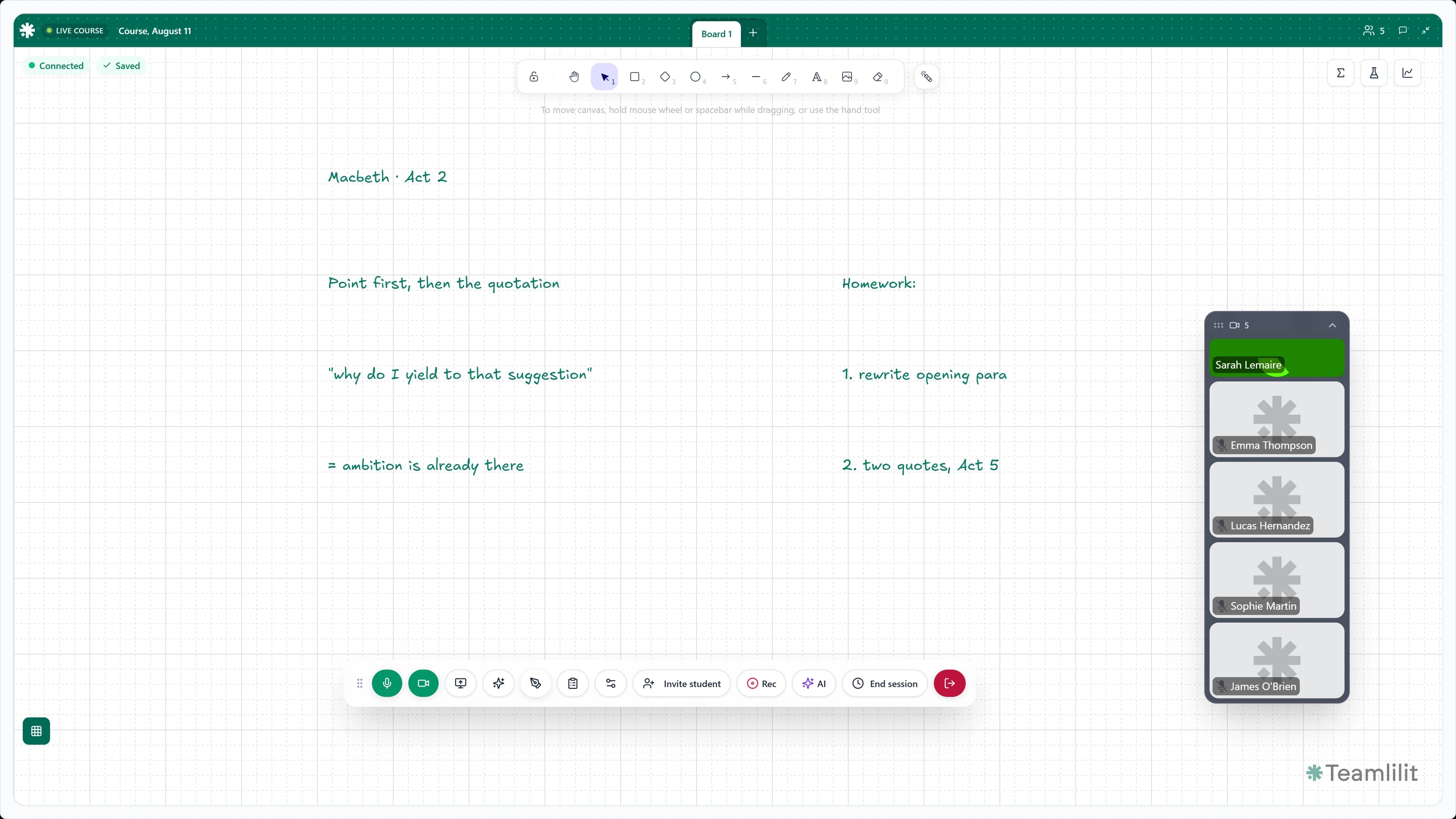
The board is the room. Your class joins from a browser, the work stays on the canvas, and the controls sit out of the way until you need them.
I teach IELTS groups of 18 students. On Zoom it was always someone's mic causing feedback, or someone who couldn't get in. Since switching to Teamlilit's classroom, I've had zero tech issues in three months.
Beta user
IELTS group tutor, 3 groups of 15-20 students
A general whiteboard vs a board built for teaching.
A general-purpose whiteboard
Teamlilit's teaching board
One canvas per room, so the lesson scrolls away as you fill it
As many boards as the lesson needs, switched with tabs the room follows
Draw the fraction bar yourself, or paste in a picture of it
Type it in a maths field that typesets as you write, then plot it
Share your screen to show the past paper and lose the board
Open the paper as its own tab, next to the board you were using
Everyone can edit at once, or nobody can edit at all
You choose who comes on stage and can work on the board
A canvas with no lesson around it: no roster, no attendance, no recording
Inside the live room, with attendance attached and recording on Pro and Academy
A separate subscription on top of your tutoring software
Included in your Teamlilit plan, on every tier
Students need their own account on the whiteboard tool
Students open it from the lesson link in their browser
Questions about the classroom whiteboard.
What is an online whiteboard for tutoring?
It is a shared canvas that lives inside the live lesson rather than in a separate app, so the tutor and students work on the same surface without a second link or account. Teamlilit's version holds several boards per session as tabs, each one a drawable canvas, a written text page or an opened file, and every board is saved against the session when the lesson ends. Students follow the board by default and can draw on it once you bring them on stage.
Can I have more than one board in a lesson?
Yes. A session holds as many boards as you need and you move between them with tabs. You manage them: add a board, rename it by double-clicking the tab, or delete one you have finished with. When you switch tabs, the room follows you, so nobody has to be told which board to open.
Can I open a PDF or worksheet on the board?
Yes. Upload a file as its own tab and it opens for the whole room: PDF, Word, Excel and PowerPoint documents, and images in JPEG, PNG, GIF, WebP or SVG. The file stays attached to the session for the next lesson. If you want to write on top of something, place it on the canvas as an image instead and annotate it with the pen.
Does the whiteboard support maths equations?
Yes. The board has a built-in equation editor: you type into a maths field that typesets as you go, with an on-screen symbol keyboard for fractions, roots, powers, integrals and Greek letters. The finished formula lands on the canvas as a crisp vector object, and you can select it and edit it again at any point in the lesson.
Can I plot graphs on the whiteboard?
Yes. The graphing tool plots one or more functions on the same axes, each in its own colour, over the x range you set. The graph drops onto the board as an object you can move, resize and reopen later to change the functions.
Can I turn an equation I have already written into a graph?
Yes. Select a formula on the board and press Plot: the graphing tool opens with that function already loaded. It is the quickest way to get from the algebra to the picture in the middle of an explanation.
Can students write on the whiteboard too?
Yes, when you invite them. Any student you bring on stage can draw on the board, insert their own formulas and plot their own graphs while the rest of the group watches in real time. Send them back to listening when they are done, so the board never turns into a free-for-all.
Do we need to install anything?
No. The whiteboard runs in the browser for you and your students, on the same link as the lesson. There is no app to download, no plugin and no separate whiteboard account for students.
Is the board saved after the lesson?
Yes. Boards are stored against the session and autosave while you teach, so the working you did together is there when you reopen it. If you recorded the lesson, the board is captured in the recording as well.
Can I prepare the board before the lesson?
Yes. Open the whiteboard from a session in your programme and build it in advance: worked examples, the exercises for the day, the file you will need. When the lesson starts, everything is already there.
The board is one stage of a longer lesson.
Teaching in Teamlilit is the step that makes the rest possible. The room is the session, so when the lesson ends the attendance is already recorded, the audio is already here for the wrap-up, and the hours are already there to invoice.
Everything the lesson needs, on one board.
Canvas, text pages, files and maths notation, inside a live classroom built for teaching.
14-day free trial · No credit card required · Cancel anytime
