

Lesson Notes Software for Tutors and Tuition Centres
Write the note once, keep it with the right lesson, and give every student a clear next step. Teamlilit connects session notes, exercises, attendance, and student history so post-lesson follow-up stops living across notebooks, documents, and email drafts.
The difficult part of lesson notes is not knowing what to write. It is writing them every week, attaching them to the right student, finding them before the next lesson, and sending the useful part without repeating the same admin. Teamlilit is lesson notes software for tutors who want the record to stay connected to the teaching.
First Conditional · Group A
Tue 14 Apr · 60 min · 6 studentsCovered the first conditional (if + present, will + base). Built it from real examples, then practised in pairs.
- Strong: forming the if-clause correctly
- Revisit: 'will' vs 'going to' in the result clause
- Homework set, due before the next session
First conditional, 12 sentences
HomeworkReading: short dialogue + 4 questions
HomeworkSpeaking: three 'what if...' prompts
In classLesson notes should close the loop after every session
A useful tutoring note answers five practical questions:
- What did we cover?
- What did the student understand well?
- What needs more practice?
- What homework or exercises did I set?
- What should we do next time?
That is a small record, but it has several jobs. It helps you prepare the next lesson, gives a student a clear recap, supports a specific parent update, and builds the evidence behind a later progress report. When the note lives in a notebook and the homework lives in a document, those jobs split into separate tasks.
Lesson notes software keeps the follow-up attached to the event that produced it: the lesson. The note, exercises, attendees, duration, and student history remain connected instead of depending on you to file and forward them by hand.
From finished lesson to useful follow-up in three steps
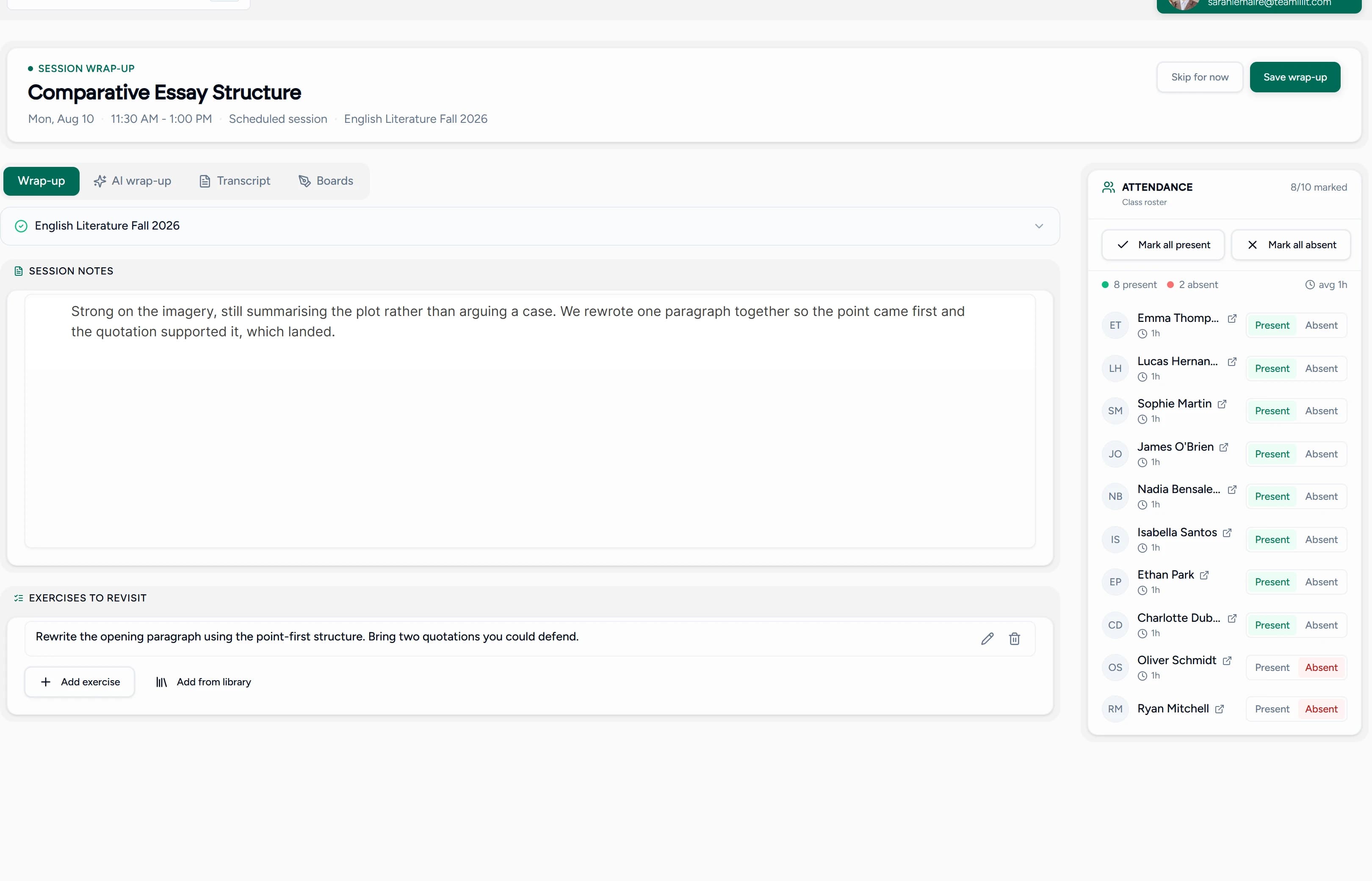
1. Write the session note
Open the completed lesson and record what you covered, the student's response, points to revisit, and the next focus. Teamlilit provides a rich notes editor, so headings, lists, and emphasis are available when a cramped text field is not enough.
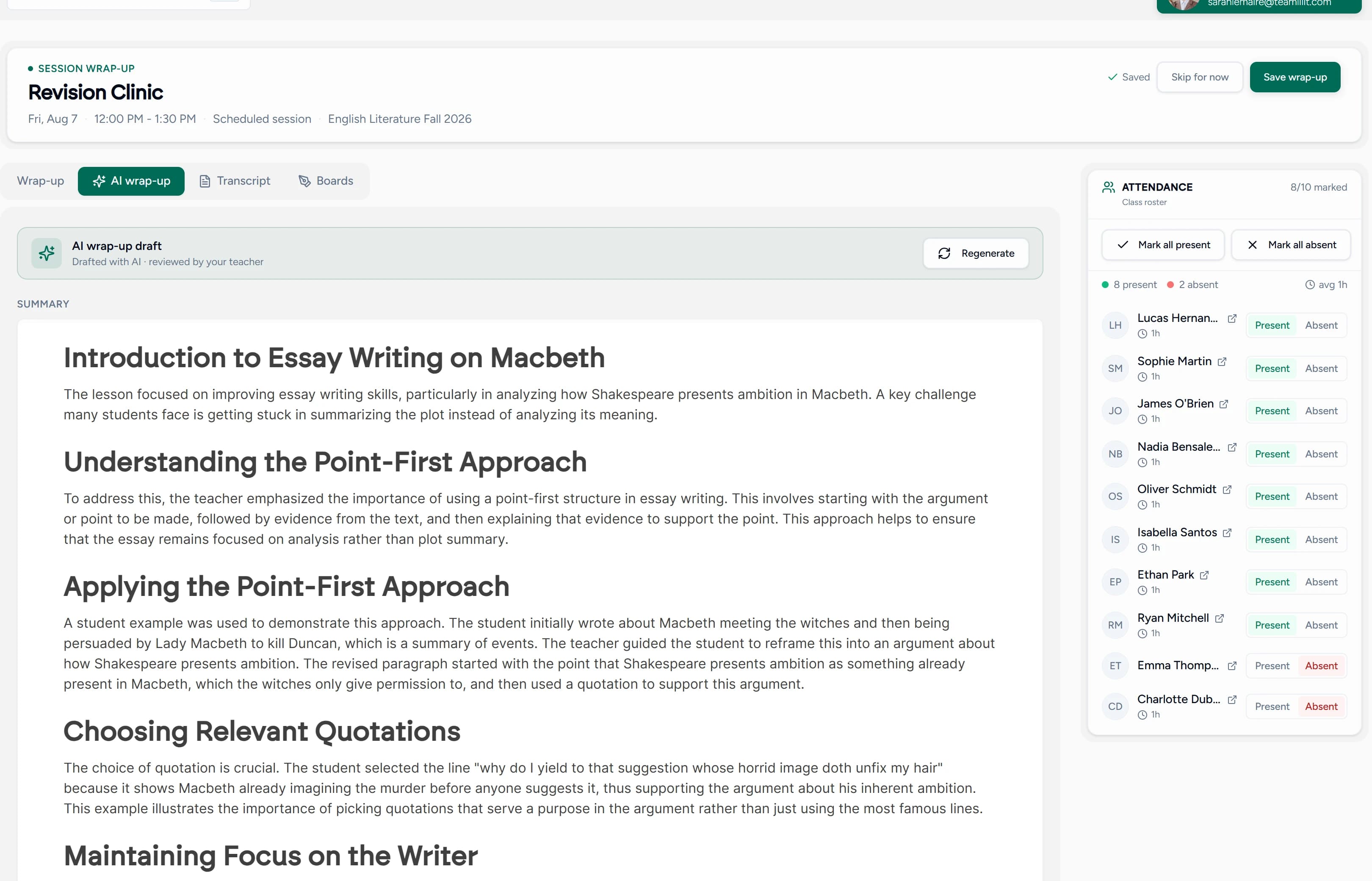
If you use AI session summaries, you can start from a draft summary, lesson note, and suggested exercises. You still review and edit everything before it reaches a student. The draft saves the blank-page work; the tutor keeps the judgement.
2. Add homework or exercises
Create practice tasks for the lesson or reuse an exercise from your library. Each task stays with the session, so you do not need to search old documents for the version you used or rebuild the same instructions next week.
3. Review and publish
Publish the completed wrap-up once. Students who attended receive the notes and exercises by email, and the same follow-up remains available in their history. You no longer copy a recap into several messages or wonder which student missed it.
If you use AI summaries, the draft arrives written and you edit rather than start from a blank box:
For a closer look at the interface, see Teamlilit's notes and exercises feature tour.
What tutors get from connected lesson notes software
Notes attached to the exact lesson
A note without context quickly becomes an orphaned document. Teamlilit stores each note on the session it describes, beside its date, class, students, attendance, and exercises. You can see what happened without reconstructing the surrounding lesson.
A teaching history on every student profile
Each completed session contributes to the student's history. Before the next lesson, you can review earlier notes alongside attendance and session records instead of searching a notebook, Drive folder, calendar, and inbox. This is where lesson notes become part of real student management software for tutors, not another isolated writing tool.
Rich notes, not a one-line activity log
General CRMs often offer a generic activity field designed for sales calls. Tutoring needs enough structure to capture concepts covered, misconceptions, examples, homework, and next steps. Teamlilit gives session notes a focused editor rather than treating teaching detail like a comment on a contact record.
Exercises that stay with the note
The recap explains what happened; the exercise turns it into action. Keep the two together, create tasks with clear instructions, and reuse strong exercises rather than rebuilding them. Students see what to do and why it follows from the lesson they just completed.
Attachments and resource links in context
Add the marked worksheet, recap video, or resource link to the note it belongs to. The material stays in the lesson context rather than becoming another unnamed file in a general folder.
Follow-up sent without copy-paste
When the note is ready, publish it to the students who attended. The email delivery and saved session history come from the same action, reducing the chance that one student gets forgotten or an old version gets sent.
AI assistance with tutor review
AI can provide a first draft of the session summary, notes, and exercises. It does not replace your professional judgement. Review, correct, remove, or rewrite anything before publishing; students receive the tutor-approved version.
Lesson notes software vs templates and general notes apps
The right choice depends on how many students and sessions you manage.
| Approach | Best for | Where it starts to break |
|---|---|---|
| Paper notebook | A few early students and quick private reminders | Hard to search, share, back up, or connect to sessions |
| Document or notes app | Flexible writing and manual folders | You still file each note, send follow-up, and maintain student history yourself |
| Lesson notes template | Consistent notes without buying software | Every note still needs manual storage and delivery |
| Teamlilit | Tutors and centres that want notes connected to sessions, students, exercises, and attendance | More system than you need if you only teach an occasional lesson |
If you are still building the habit, start with the free tutoring lesson notes template. It helps you structure one useful note and parent update. Move to software when keeping the templates organised becomes a second job.
Built for private tutors and tuition centres
For independent tutors
A private tutor needs a fast routine that survives a full teaching day. Open the completed lesson, write or review the note, add the homework, and publish. At the next session, the previous focus is already on the student's history. You spend less time remembering where information lives and more time acting on it.
For group tutors
Write one shared recap for the group, attach the common exercises, and publish it to the attendees. The session retains the shared teaching record while each student keeps their own attendance and lesson history. This is especially useful when a student arrives late, leaves early, or misses the class and needs a clear record of what was covered.
For tuition centres and academies
When several tutors teach under one organisation, consistency matters as much as speed. A shared lesson-notes workflow gives every tutor the same place to record the session, helps administrators see that follow-up is happening, and keeps teaching history with the student when classes or tutors change.
The result is continuity without asking each tutor to invent a private filing system.
Connect notes to attendance, time, and progress
Lesson notes are most useful when they are not a standalone feature. In Teamlilit, the tutoring workflow runs as a connected loop:
schedule → teach → attendance and time → lesson notes and exercises → student history → next lesson
The scheduled session provides the class and student context. The live lesson produces attendance and per-student time. The wrap-up records what was taught and what comes next. Together, those records support accurate tutor time tracking software, clearer parent updates, and progress reports based on a real history rather than memory.
This connection also prevents double entry. You do not need one app to prove the lesson happened, another to record what happened, and a third to remember what should happen next.
What to look for when choosing lesson notes software
Use these questions when comparing options:
- Are notes attached to both the lesson and student? A general notebook is not enough if you still have to rebuild the context.
- Can I add homework and exercises in the same workflow? The note should lead naturally to the student's next action.
- Can students receive the approved follow-up automatically? Look for one publish action, not manual copy-paste into separate emails.
- Does it work for 1:1 and group tutoring? Shared session notes and individual student histories should coexist.
- Can I find the previous note before the next lesson? A useful history needs to be attached, chronological, and easy to review.
- Is AI optional and reviewable? Drafting assistance should save time without publishing unreviewed content.
- Does it connect to attendance and time tracking? The strongest record shows both what was taught and who was present for it.
- Can I keep ordinary teaching notes separate from sensitive concerns? Safeguarding concerns should follow your safeguarding process, not sit in routine student-facing notes.
Frequently asked questions
What is lesson notes software for tutors?
Lesson notes software for tutors is a system for writing, storing, and finding notes from each tutoring session. Unlike a general notes app, it connects each note to the lesson and student, so the topic covered, homework, attendance, and next focus remain part of one teaching history.
What should tutoring lesson notes include?
Useful tutoring lesson notes usually include the topic covered, what the student understood, what needs more practice, homework or exercises set, and the focus for the next lesson. Keep the note short enough to complete consistently and specific enough to help you prepare.
Can Teamlilit send lesson notes to students?
Yes. After reviewing the session notes and exercises, publish them to the students who attended. Students receive the follow-up by email, and the notes remain available in their session history.
Does Teamlilit use AI to write lesson notes?
Teamlilit can draft a session summary, lesson notes, and suggested exercises from an AI wrap-up. You review and edit the draft before publishing, so the final note stays under your control.
Can lesson notes be used for group tutoring?
Yes. Write one shared session note and set of exercises for a group, publish it to the students who attended, and keep the wrap-up attached to that group lesson. Individual student records retain their own session history.
How is lesson notes software different from a template?
A template helps you write one consistent note. Lesson notes software keeps every note attached to the correct student and session, connects it to attendance and homework, and builds a history over time. The template is a good starting point; software removes the repeated filing and sending.
Is lesson notes software suitable for tuition centres?
Yes. Tuition centres can keep lesson follow-up consistent across tutors, preserve a session history for each student, and avoid notes being scattered across individual notebooks, documents, and inboxes.
Give every lesson a useful ending
Keep the note, homework, attendance, and next step in the same tutoring workflow. Explore Teamlilit pricing and start a 14-day free trial, or try the free lesson notes template first if you are not ready to automate the process.
