

Set homework in minutes, or let AI draft it from the lesson.
Build assignments from six kinds of question, or have AI draft them from what you covered and where the student struggles. Send them with a due date to one student or a whole class. Answers with a key mark themselves, and you mark the rest.
Practice: solving linear equations
Year 8 · 10 questions · 18 pointsMia solves x + 7 = 15 and gets x = 22. What is the correct solution?
- x = 22
- x = 8
- x = 15/7
Solve 4x − 9 = 2x + 5. Give the value of x.
Answer: 7Three times a number plus 1 equals four times the number minus 7. Write the equation, using n.
3n + 1 = 4n − 7A rectangle has a perimeter of 40 cm and is 4 cm longer than it is wide. Photograph your working.
Up to 3 filesHomework is where a good lesson leaks away.
- Writing fresh questions for each student takes an evening, so the same worksheet goes out again.
- Homework travels by email, chat and photos of exercise books, and some of it never comes back.
- You mark the same ten sums by hand, then type the feedback into yet another message.
- Nothing tells you who did it, who is late, or what the answers say about the next lesson.
Teaching the lesson is the part you are good at. Setting the right practice, getting it back and knowing what it showed is the part that eats your evenings.
Quick questions that mark themselves, and the ones that need your eye.
Mix them in one assignment. Maths and chemical equations display properly, and formula answers are typed on a maths keyboard.
One right answer or several. Make each wrong option a mistake students really make.
Mia solves x + 7 = 15 and gets x = 22. What is the correct solution?
A numerical answer with a tolerance and a unit, so 7 and 7.0 both count.
Solve 4x − 9 = 2x + 5.
An expression or an equation. Written another way, it comes to you with a hint on whether it is equivalent.
Factorise x² + 5x + 6.
A word or a phrase. List the answers you accept; case and accents are ignored.
Name the process plants use to make glucose.
An explanation or a justification, with a length hint. You mark it and leave feedback.
Explain why no value of x solves 2x + 1 = 2x + 4.
Students photograph their working or attach a PDF, up to three files. You mark it.
Photograph your full working for question 5.
Tonight's homework, drafted from today's lesson.
Choose the kinds of question, how many and how hard, and add a line to steer it if you like. Teamlilit drafts the questions from what the lesson covered, where the student is weakest and your last note on them, not from a generic topic list.
A set, not a stack of drills
The set is planned to build from a warm-up to the hardest question the difficulty allows, and it mixes in questions that make students think: find the mistake in a worked solution, pick the equation that fits a situation, reason before calculating.
Every answer worked out, then checked
Each question is written with its worked solution before its answer. A second pass then solves every question again and replaces the ones that are wrong, unclear or muddled before you see them.
Drafts you edit, never sent on their own
The questions land in the builder marked AI, with their answer keys, ready to edit, reorder or delete. Nothing reaches a student until you press Send.
Priced by the question
One AI credit for every three questions, from your plan's monthly credits. Only the questions you receive are charged, and a fill that fails costs nothing.
Fill with AI
Block kinds
How many
10Difficulty
Include one word problem
What it drafts from
- Covered today: two-step equations, the unknown on both sides
- Where Elena is weakest: collecting like terms
- Your last note: rushes the sign when moving terms
- Planning the set
- Writing each question with its worked answer
- Solving every question again
10 questions added for 4 credits
AI drafts the questions and you decide what goes out. Marking is done by the answer key and by you, never by AI.
Send it once. See who did it.
Send an assignment to one student, to the students you tick in a lesson, or to everyone enrolled in a class. Leave the due date empty and it is due at the next lesson.
Students answer in their own dashboard. Their answers save as they go, and a due soon list keeps the week's work in view.
They are told by email and in the app, in their own language.
You see how many have turned it in and whose work is waiting for your mark, from the lesson and from each student's record.
Late work can still be turned in, and it shows as late.
Answers with a key mark themselves. You mark the rest.
When a student turns in, choice, number and short answers with a key are marked straight away, and formula answers too when they match the key. Written answers and photos come to you, with the student's work next to your key.
Leave feedback on any question and a note on the whole assignment, then return it.
Students see the worked answer once it is marked, so a wrong answer still teaches something.
Parents see what was set, whether it came back and the mark on the family portal, never the answers or your feedback.
Homework that never came back shows up when you plan the next lesson with AI.
Elena Moreau
Turned in Tue 18:42
- 1ChoiceCorrect solution of x + 7 = 15
x = 8
Self-marked1 / 1 - 2NumberSolve 4x − 9 = 2x + 5
7
Self-marked2 / 2 - 3FormulaWrite the equation
4n − 7 = 3n + 1
Equivalent to your key
To mark / 2 - 4Photo or fileRectangle: your working2 photosTo mark / 3
Feedback
Good check at the end. Watch the sign when you move 2x across.
Ask the room
Quick check
Solve 3x + 4 = 19.
How the room answered
- x = 58
- x = 7.72
- x = 151
Ask the room a quick check.
In the Teamlilit classroom, send two or three quick questions to everyone in the lesson. Each student answers on their own device, you see how the room answered, and you reveal the answers when you are ready. The check is kept as a record.
Guests can follow along. Students signed in to their account answer and have their work recorded.
And the notes stay with the lesson.
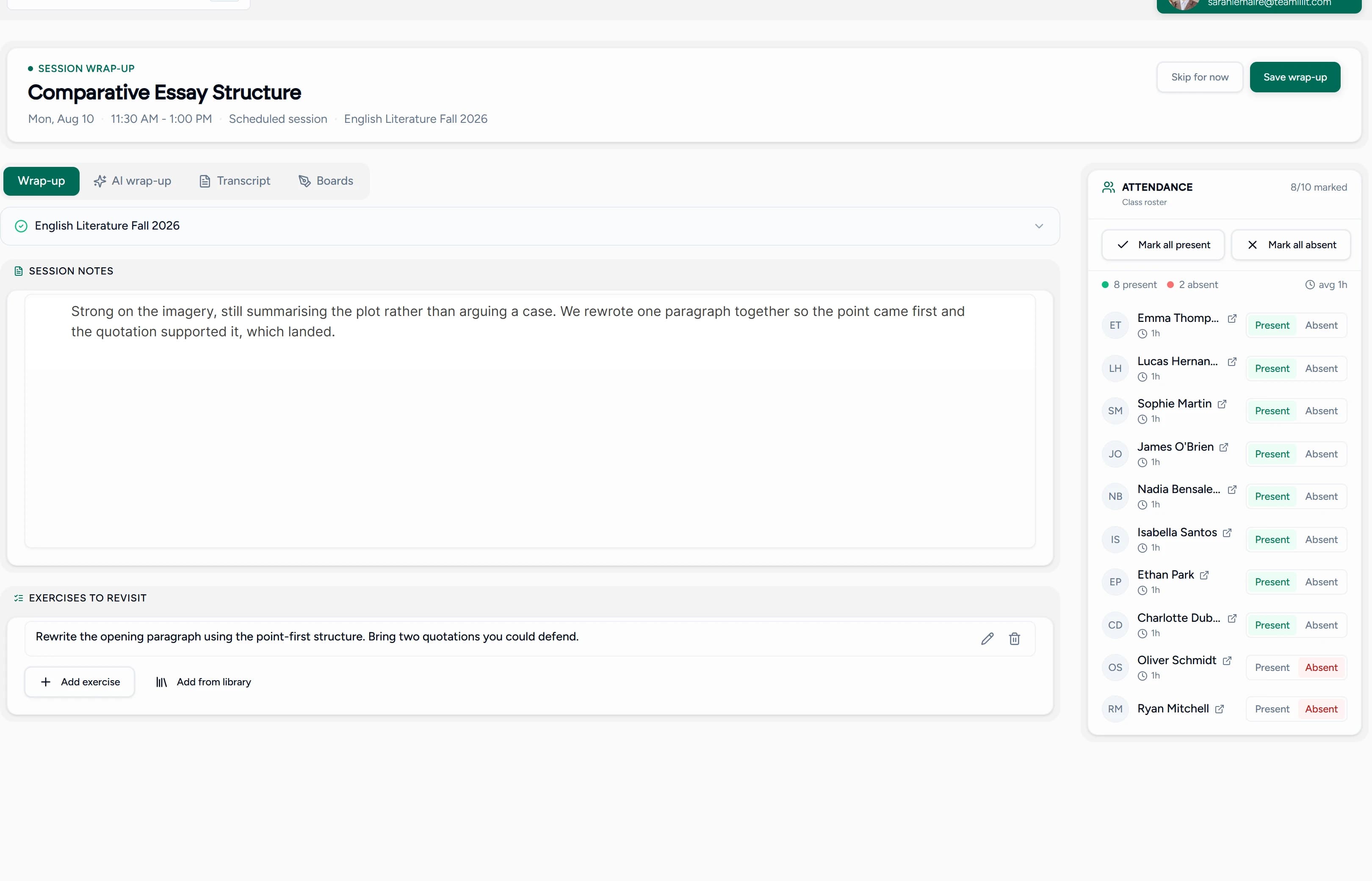
After class, one page holds what you covered, the work you set from it and who turned up, attached to the lesson and to each student. Start from a blank page or from an AI-drafted wrap-up.
The details that save you time every week.
Templates
Save a good assignment as a template and send it again to the next student or group.
Built from the lesson
Open the builder from a lesson and its topics and students come with it.
Points per question
Give each question its points, and the total adds up as you build.
Maths and chemistry
Maths and chemical equations display properly in questions and answers, with a maths keyboard for formulas.
Answers when you choose
Show the answers as soon as the student turns in, or keep them back until you have marked.
In the student's language
Emails and notifications reach students in English, French, Spanish, German, Portuguese or Dutch.
On every student's record
Every assignment and mark stays on the student's record, and marked work counts towards their progress.
A clear week for students
Students see what is due soon, what they have turned in and what has come back marked.
Notes alongside
Lesson notes and the homework set from them sit on the same lesson.
From lesson to marked homework in three steps.
Build it, or let AI fill it
Add questions yourself, start from a template, or have AI draft them from the lesson. Edit anything before it goes out.
Send it with a due date
To one student, the students of a lesson or a whole class. They are told by email and in the app.
Mark what is left and return it
Answers with a key are already marked. Mark the written work and photos, add feedback, and send it back.
My notes used to live in a notebook and my homework in random docs. Now everything is on the session and on each student, and they actually receive it. I haven't lost a single piece of homework since.
Beta user
Private language tutor, 18 students
Homework with and without Teamlilit.
Without Teamlilit
With Teamlilit
Writing new questions by hand every week
AI drafts them from the lesson; you edit and send
Homework scattered across email, chat and photos
One assignment, sent to a student or a class with a due date
Chasing who did it and who is late
Turned in, late and waiting for your mark, at a glance
Marking every answer yourself
Answers with a key marked on turn-in; you mark the rest
Parents asking whether the homework was done
Parents see it and its mark on the family portal
Questions tutors ask about homework and AI
What kind of homework can I set in Teamlilit?
An assignment made of questions of six kinds: multiple choice, a number, a formula, a short answer, a written answer, or a photo or file of the student's working. Give each question its points, add instructions, set a due date and send it. Maths and chemical equations display properly.
Can AI write homework for my students?
Yes. Choose the kinds of question, how many (up to ten at a time) and the difficulty, and Teamlilit drafts them from the lesson: the topics it covered, where the student is weakest and your last note on them. The questions arrive in the builder as drafts marked AI, with answer keys and worked solutions, and you edit them before you send anything.
How do I know the AI's answers are right?
Each question is written with its worked solution first, and a second pass solves every question again before you see it. Questions with a wrong key, two possible answers or muddled working are replaced or dropped. That catches most mistakes but not every one, so read the questions before you send them.
Why not just ask ChatGPT for a worksheet?
A chat window cannot see your lessons, so it does not know what you covered today, where this student is weakest or what you noted last time. Its worksheet is also text you still have to copy, send, collect and mark. In Teamlilit the questions become an assignment with a due date, answers with a key mark themselves, and the results stay on the student's record.
What does AI homework cost?
One AI credit for every three questions, rounded up, so ten questions cost four credits. AI credits are included with every paid plan each month and can be topped up. Only the questions you receive are charged, and a fill that fails costs nothing.
Does the homework mark itself?
Partly. Choice, number and short answers with a key are marked the moment the student turns in, and a formula answer is too when it matches your key. Written answers and photos are always marked by you, and so is a formula written in a different form, with a hint on whether it is equivalent.
Can students show their working?
Yes. A photo or file question lets them photograph their working or attach a PDF, up to three files of 10 MB each, and a written question takes an explanation of the length you suggest. You mark both.
Can I send one assignment to a whole class?
Yes. Send it to one student, to the students you tick in a lesson, or to everyone enrolled in one of your classes. Students who join the class later do not receive it.
What happens when homework is late?
It stays open: the student can still turn it in after the due date, and it shows as late. Homework that never came back also shows up when you plan the next lesson with AI, so you can pick it up in class.
Can parents see their child's homework?
Yes, on the family portal: what was set, when it is due, whether it was turned in, late or not at all, and the mark once you return it. Parents never see the answers or your written feedback.
Can I use it during a live lesson?
Yes. In the Teamlilit classroom, Ask the room sends two or three quick questions to everyone in the lesson. Each student answers on their own device, you see how the room answered and reveal the answers when you are ready, and the check is kept as a record.
Which languages does it work in?
The builder and the student pages are in English, French, Spanish and German, and AI writes the questions in your own language rather than translating them. Emails and notifications reach each student in their language, and Portuguese and Dutch are covered there too.
Where is my students' data processed?
AI homework runs on open models hosted in the EU rather than being sent to a consumer chat service, and your lesson records are used to draft your questions, not to train anyone's model. Assignments and answers stay in your account.
Where to next?
Homework is where the lesson lands. These are the pages around it.
Set better homework in less time.
Build it or let AI draft it, send it with a due date, and let the answer keys do the first round of marking.
14-day free trial · No credit card required · Cancel anytime
