

Tutor Billing Software: Rates, Balances and Payments
Most tutors do not have a billing system. They have a rate in their head, hours in a calendar, an invoice in a Word template, and a banking app open to check who paid. Teamlilit is tutor billing software that connects those into one cycle: rate, lesson, invoice, payment, all on the same record.
Tutor billing software runs the money side of a tutoring business end to end: the rate agreed with each student, the balance that builds as lessons are taught, the credits and adjustments that correct it, and the payments recorded against it. Because billing is wired into the same system as your timetable and attendance, the balance follows what really happened, not what you can reconstruct at the end of the month.
Producing the invoice document itself is a step inside that cycle, and it has its own page: invoicing software for tutors covers generating, itemising and sending invoices from tracked lessons. Invoicing turns taught lessons into a document. Billing is the running account that document belongs to.
Generate from tracked sessions
Pick a student and a billing period
3 attended sessions found
- Algebra, GCSE higherTue 3 June, 16:001.5h
- Calculus revisionTue 10 June, 16:00Estimated1.0h
- Exam practice paperTue 17 June, 16:002.0h
Billing starts at the lesson, not the invoice
The reason tutor billing goes wrong is that the evidence lives somewhere else. The invoice is written on a Sunday evening from memory, three weeks after the lesson it bills.
In Teamlilit, every scheduled lesson records its own evidence as it happens: attendance is tracked automatically with join and leave times, and per-student time tracking accumulates the hours that are actually billable. If a student arrived late or a group ran long, the record shows the real times.
Attendance
Live session snapshot
- EVElena Vasquez16:29 – 17:30· 61mPresentAbsent
- LBLeo Bergman16:30 – 17:30· 60mPresentAbsent
- MRMaya Rivera16:42 – 17:30· 48m· joined latePresentAbsent
- FOFinn O'Sullivan16:31 – 17:05· 34m· left earlyPresentAbsent
- SLSara LindqvistPresentAbsent
- TNTyler Nguyen16:30 – 17:31· 61mPresentAbsent
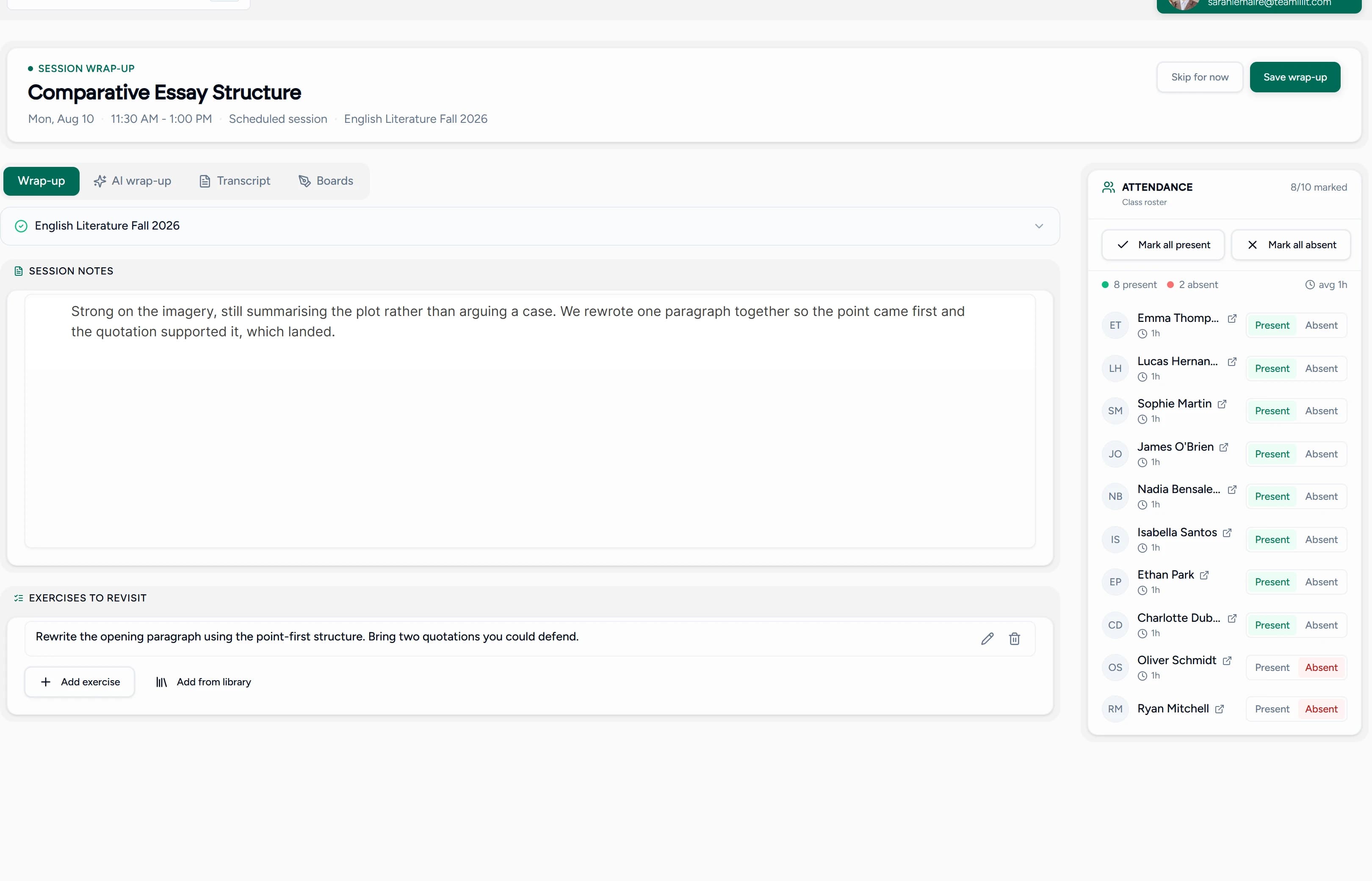
By the time you invoice, there is nothing to reconstruct: the billable lessons, their durations, and their students are already on the record. If you currently add this up by hand, our guide on how tutors can track billable hours shows the full method, and the free tutoring hours tracker is a no-signup way to start.
Per-student rates, packages and discounts
Real tutoring pricing is per-student, not per-tutor. A GCSE student at £35, an adult learner at £28, and a group seat at £15 all pay differently, and billing software has to hold that without a lookup table in your head.
- Per-student rates live on each student's record and flow onto invoices automatically
- Sibling discounts apply from the records, so families are billed correctly without manual maths
- Packages sit on the student's record and read as purchased, used, booked and available, so you can see the lessons already promised to the calendar before the credits run out
- Purchase limits follow naturally: an introductory package created on one student's profile can be issued only once
The four numbers matter because a single balance answers the wrong question. "Six left" tells you what has been paid for and taught; it does not tell you whether this family can book anything else. A package reading 10 purchased, 6 used, 3 booked, 1 available says both at once, and if that last figure goes negative you are looking at lessons you have agreed to teach for nothing. Corrections are visible too: reverse an attendance mark and the credit comes back with a dated line saying so, which is what settles a disagreement about how many lessons are left. Parents can see the same counts, without any amounts, through their guardian portal link.
Not sure the underlying rate is right yet? Work it out with the free tutor pricing calculator, which turns your target income, teaching hours, prep time and expenses into a sustainable rate and prices your packages and group seats off it. Benchmark the result against our guide to pricing online tutoring sessions, check what it pays with the tutor earnings calculator, then set the discounts. Our walkthrough on setting up billing and CRM for a tutoring business covers packages and rates step by step.
From tracked lessons to a sent invoice
When lessons carry their own records, invoicing collapses into a review-and-send step:
- Generate the invoice from tracked lessons: sessions, times, and rates pre-filled for the period
- Review the itemised draft, adjust anything unusual
- Send it by email with a PDF attached, individually or in bulk for the whole month
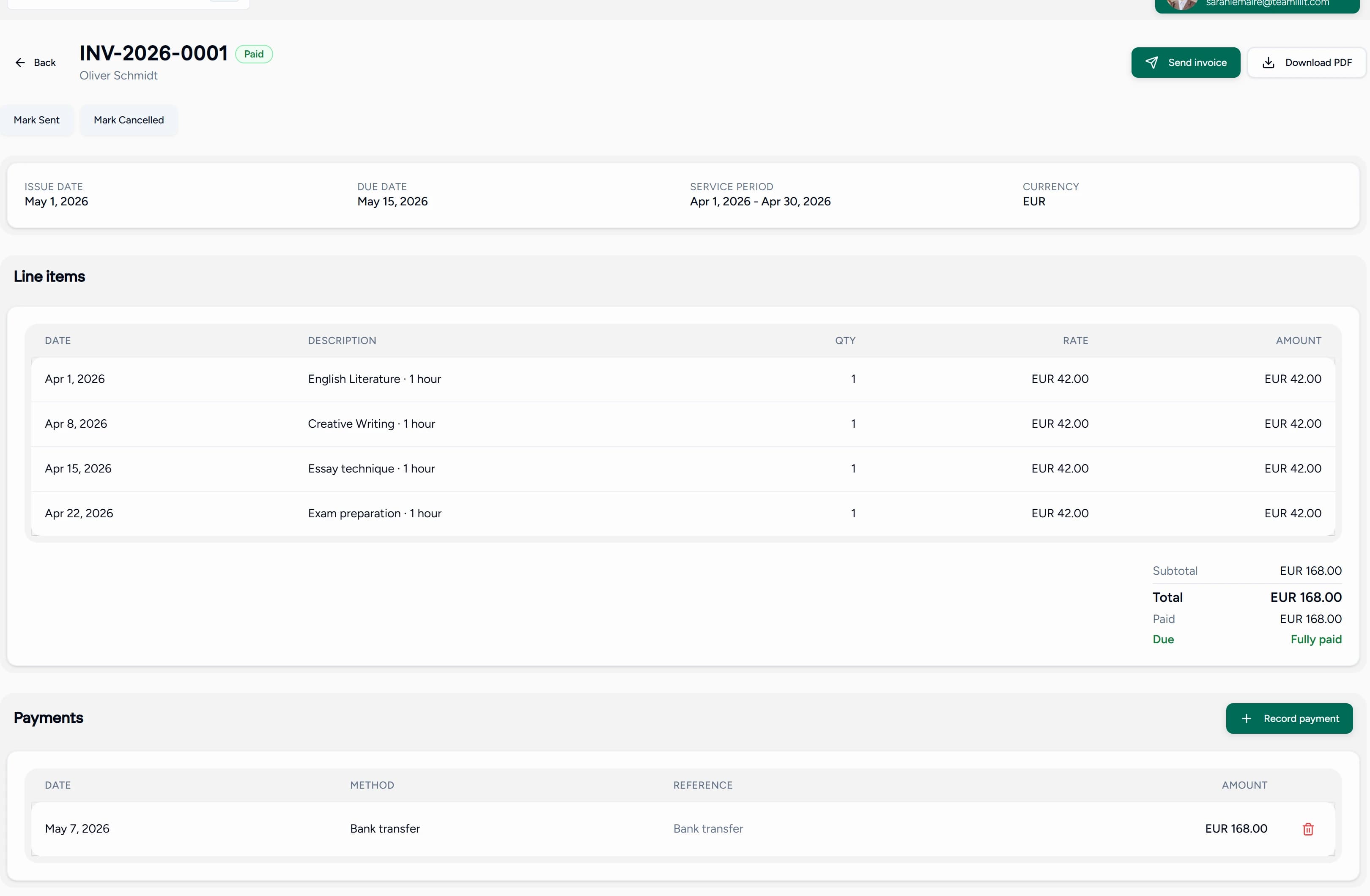
Every line on the invoice traces back to a lesson that actually ran, which is also what makes invoices easy to defend when a parent queries one. The same path works for a single session rather than a month: a make-up lesson, a trial hour, or the kind of paid back-to-school prep session that wins a new family is invoiced straight from that student's record. The invoice engine behind this step has its own deep dive on our invoicing software for tutors page. If you just need a one-off document today, the free tutor invoice maker and weekly class invoice generator create clean PDFs with no signup, and our tutoring invoice template guide covers what belongs on the invoice itself.
Getting paid: payment tracking and late fees
An invoice sent is not money received, and the gap between the two is where tutors lose evenings. Teamlilit closes it from both ends:
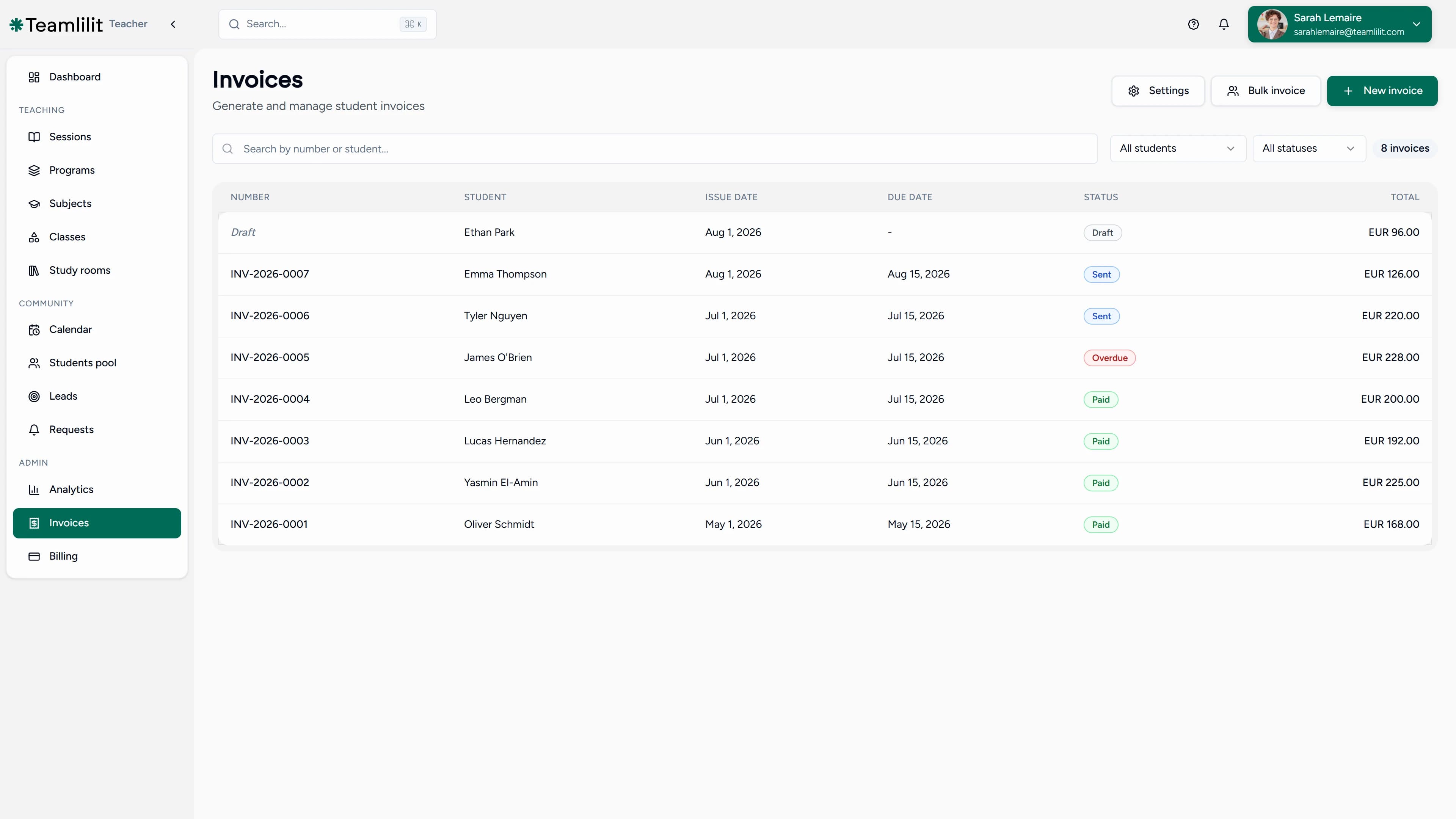
- Your own payment details go on every invoice, your bank details or your own Stripe or PayPal link, rendered on the PDF and in the email, so families pay you directly
- Recorded payments cover bank transfer and cash: log the payment against the invoice and the status updates
- Automated late fees add a charge after your chosen grace period, so overdue invoices chase themselves
- Account statements show each family what was billed, what was paid, and what is outstanding, ending the "what do we owe you?" thread
Billing for families and tutoring centres
Family billing is where spreadsheets give up: two children, different rates, a sibling discount, one parent paying. Consolidated invoices bill multiple students from one family on a single invoice, itemised per child. An account credit wallet holds prepaid balances or credit from a changed package and applies it automatically to the next bill, and credit notes handle refunds and adjustments cleanly when plans change.
For a tutoring centre, the same records scale up across every tutor on the Academy plan for tutoring centres: each tutor's taught lessons feed the same billing system, so the centre invoices from one place instead of collecting numbers from staff. That is the billing half of running a centre; the operational half is covered in our guide to tutoring management software.
VAT and recurring billing
If you charge VAT, the invoice has to do more than add 20%. VAT fields and rates are built in, tax is calculated on each invoice, and you can export VAT-ready invoices to upload to your accounting software.
For students you bill the same way every period, recurring invoices put billing on schedule: a monthly retainer or fixed weekly package invoices itself instead of being rebuilt each time.
Is this a student invoicing system?
Yes, and the distinction worth drawing is who it was built for. Search for a student invoicing system and almost everything on the first page is school software: district billing, financial aid modules, fee collection across thousands of enrolments, and an implementation project to match. That software solves a real problem. It is not your problem.
A tutor or a small centre needs the same core idea at a completely different scale: a record of which student had which lesson at which rate, and an invoice that comes out of it correctly. No enrolment hierarchy, no district reporting, no procurement cycle.
What a tutoring business actually needs from one:
- Invoices that start from lessons, not data entry. Attendance is the source: you mark who attended, and the invoice is built from that. Our guide on how to invoice tutoring students walks through the routine end to end.
- Rates that live on the student. Per-student rates and sibling discounts sit on each student's record, the same records student management software for tutors is built around, so the right price reaches every invoice without being retyped.
- The family as the billing unit. Consolidated invoices bill several children on one document, itemised per child.
- Chasing that runs itself. Automated late fees after your chosen grace period, plus account statements showing each family what was billed, paid and outstanding.
- Room to correct things. Credit notes for refunds and adjustments, and a credit wallet that applies a leftover balance to the next bill.
Setup is a list of students, their rates, and your payment details. That is the whole configuration. For the full feature picture see our comprehensive invoicing features, and if you are running several tutors, tutoring management software covers the wider operation.
Tutor billing software vs templates and spreadsheets
| Word / PDF template | Spreadsheet | Generic invoicing app | Teamlilit | |
|---|---|---|---|---|
| Produces a clean invoice | Yes | Manual | Yes | Yes |
| Knows which lessons actually ran | No | Manual | No | Yes, from attendance |
| Per-student rates and sibling discounts | Retyped | Formulas | Per-invoice | On the student record |
| Package balances that count down | No | Manual | No | Automatic |
| Late fees and statements | No | No | Some | Automated |
| Connected to timetable and student records | No | No | No | Yes |
A template solves the document. A billing system solves the cycle: what to bill, who owes what, and what happens when nobody pays. The template is still the right first step for a brand-new tutor, and our tutoring invoice template guide plus the free invoice maker will carry you until the admin outgrows them.
Key features
- Per-student rates and sibling discounts on the student record
- Packages with automatic balance draw-down from attendance
- Invoices generated from tracked lessons, reviewed before sending
- Email delivery with PDF, individually or in bulk
- Consolidated invoices for families with several children
- Recorded payments for bank transfer, standing order and cash, with status always current
- Automated late fees after your grace period
- Account statements, credit notes, and a credit wallet
- VAT fields, rates, and VAT-ready export
- Recurring invoices for retainers and fixed packages
- Centre-wide billing across tutors in tutoring centre management software (Academy plan)
Running this by hand until you switch? Our month-end routine for turning tracked hours into invoices sets out the order to apply cancellation status, package drawdown and per-student rates.
Frequently asked questions
What is tutor billing software?
Tutor billing software runs the whole money side of a tutoring business in one place: the rate agreed with each student, the lessons actually taught, the invoice built from those lessons, and the payment recorded against it. Because it is connected to your timetable and attendance, billing starts from what really happened instead of what you remember.
What is the difference between billing software and invoicing software for tutors?
Invoicing is one step: creating and sending the bill. Billing is the whole cycle around it: per-student rates and packages, tracked lessons, the invoice, payment collection, late fees, and credit when something changes. Teamlilit covers the full cycle, with invoicing built in as one step of it.
How do per-student rates work?
Each student's rate lives on their record, so a beginner, an exam-prep student, and a group seat can all carry different prices. When an invoice is generated, the right rate flows on automatically, along with any sibling discount, so you never recalculate prices by hand.
Can I bill a family with several children on one invoice?
Yes. Consolidated invoices bill multiple students from one family on a single invoice, with each child's lessons itemised. Sibling discounts are applied from the student records automatically, so a family with two children is billed correctly without any manual maths.
How do invoices reach parents?
By email, with a PDF attached. Invoices are generated from tracked lessons, so each one arrives itemised with the sessions, times, and rates behind the total. You review before sending, and bulk sending covers a whole month of invoices in one go. The full invoice workflow is on our invoicing feature page.
Can parents pay online?
Families pay you by whatever method you already use, usually bank transfer, standing order or cash. You record each payment against its invoice and the status updates to paid, part-paid or overdue, so you always know what is outstanding without the platform sitting between you and your money.
What happens when an invoice is overdue?
Automated late fees add a charge after your chosen grace period, so overdue invoices chase themselves instead of you writing reminder messages. Account statements show each family exactly what was billed, paid, and outstanding.
Does it handle VAT?
Yes. VAT fields and rates are built in, so tax is calculated on each invoice, and you can export VAT-ready invoices to upload to your accounting software.
Can I set up recurring invoices?
Yes. Recurring invoices cover students you bill the same way every period, such as a monthly retainer or a fixed weekly package, so regular billing runs on schedule without being rebuilt each time.
Can I sell lesson packages and track their balance?
Yes, and the balance is split into four numbers rather than one: purchased, used, booked and available. Booked is the lessons already in your calendar, so a package reading four left will tell you only one is genuinely free to book when three are already scheduled. If the calendar runs past the credits, Teamlilit says how many lessons are promised with nothing behind them, which is the point most tutors discover by teaching an unpaid lesson. Every credit taken, handed back after a correction, or adjusted by hand is kept as a dated history, and because packages sit on individual records an introductory offer can be limited to one per student. Our billing and CRM guide walks through package setup.
What about refunds, adjustments, and credit?
Credit notes handle refunds and adjustments cleanly when a package changes or a lesson is written off. An account credit wallet holds prepaid balances or credit from a changed package and applies it automatically to the next bill.
Do I have to move all my billing over at once?
No. Start with the students you invoice most often: set their rates, let the timetable track their lessons, and generate your first invoices from those records. Everything else can move over one family at a time.
What is a student invoicing system?
A student invoicing system creates, sends and tracks the bills for teaching a student, linking what was taught to what is owed. Most products carrying that name are built for schools, so they handle enrolment fees, financial aid and district reporting. A tutoring business needs the same link between lesson and invoice without any of that overhead: rates on the student record, invoices generated from attendance, and a clear view of what is paid and what is outstanding.
Do I need school billing software to invoice students?
Almost certainly not. School billing platforms are priced and configured for institutions managing hundreds or thousands of enrolments, with modules for financial aid, fee schedules and district-level reporting that a tutoring business never touches. If you teach one to one or run a centre of up to ten tutors, a tutor-focused system covers the same cycle, rates, invoices, payments, late fees and credit, with a setup measured in students rather than departments.
Tutoring billing guides and resources
Work through the part of billing you are setting up:
- How to invoice tutoring students: invoice fields, templates and when to bill.
- Handle late cancellations on invoices: record the decision and explain the charge.
- Invoice students based on attendance: connect the register to the bill.
- Track billable tutoring hours: keep lesson time and billable status clear.
- Automate tutoring invoices: connect the records and retain your review before sending.
- Reduce student no-shows: set reminders, attendance habits and cancellation expectations.
Next step
Stop reconstructing your month from memory. Start your 14-day free trial of Teamlilit and send your first invoice built from real lessons. See pricing for plan details.
