

Tutor Timetable Management Software
Building the timetable takes an afternoon. Running it takes the rest of the year: the reschedules, the registers, the hours nobody wrote down, the invoice that has to match what actually happened. Teamlilit is tutor timetable management software for that second job.
Tutor timetable management software keeps the plan and the record on the same object. A recurring lesson holds its enrolled students, marks its own attendance, accumulates per-student taught hours, keeps its reschedule history linked, and hands those hours to an invoice without re-entry. A calendar can hold the plan. What it cannot do is tell you, in November, how many hours Emma has used from her package and which of them are billable.
If you are choosing between products rather than operating one, our UK comparison of the best tutor timetable software ranks the main options, ours included.
Sofia M.
sofia.m@email.com
Pick a time
60 min · Private lesson
What a tutoring timetable needs that a calendar can't do
A calendar shows blocks of time. A tutoring timetable has to answer questions a calendar has never heard of: which students are in Thursday's group, what repeats every week during term time, who attended last Tuesday, and how many hours Emma has used from her package.
Teamlilit treats the timetable as timetable management, not time-blocking:
- Every lesson slot carries its students and group, not just a title
- Recurring lessons keep the weekly structure in place without re-entry
- Attendance and per-student hours are recorded on the slot itself
- The same record feeds each student's profile and their invoices
If bookings and availability are the part you care about most, that side lives on our tutor scheduling software page: same timetable, viewed from the booking end.
Build your week once with recurring lessons
Most tutoring weeks are the same shape: Emma on Mondays at 5pm, the GCSE maths group on Saturdays at 10am. Build that shape once and Teamlilit repeats it automatically, weekly or on a custom interval, with the right students already assigned to each lesson.
- Recurring 1:1 lessons that hold their student, rate, and history
- Recurring group classes with the whole group enrolled once, not week by week
- Term-time blocks that carry a fixed timetable through the term
- One-off and instant sessions dropped into the gaps when needed
Setting up a week from a blank page? Our guide on how to create a tutoring timetable walks through the structure step by step, and aligning your tutoring with the school calendar covers term dates, half terms, and exam season. Opening slots in the weeks before term starts? Turning back-to-school nerves into booked sessions shows what to put in them.
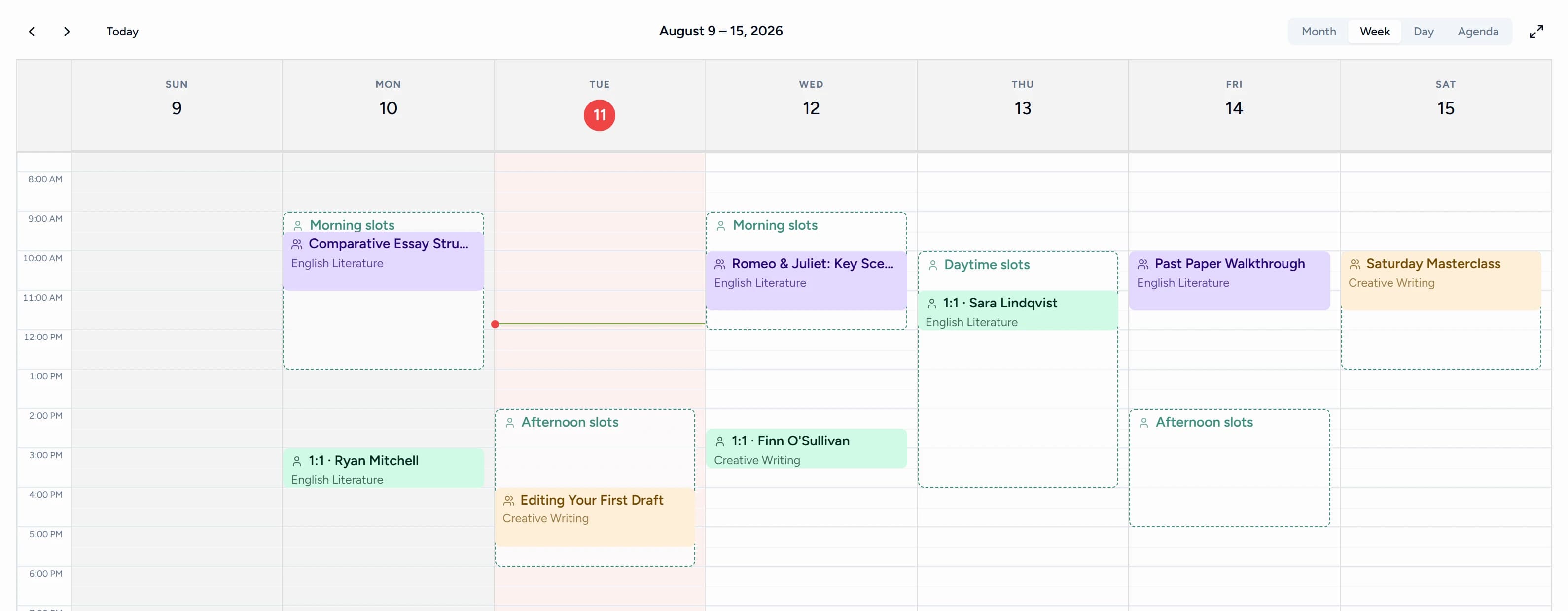
Day, week and month views of your tutoring schedule
As tutor calendar software, Teamlilit shows your whole tutoring schedule the way you need it in the moment: today's lessons in order, the week as a grid, or the month for planning ahead. Group classes, 1:1s, and every tutor's sessions sit in one view instead of one calendar per tutor.
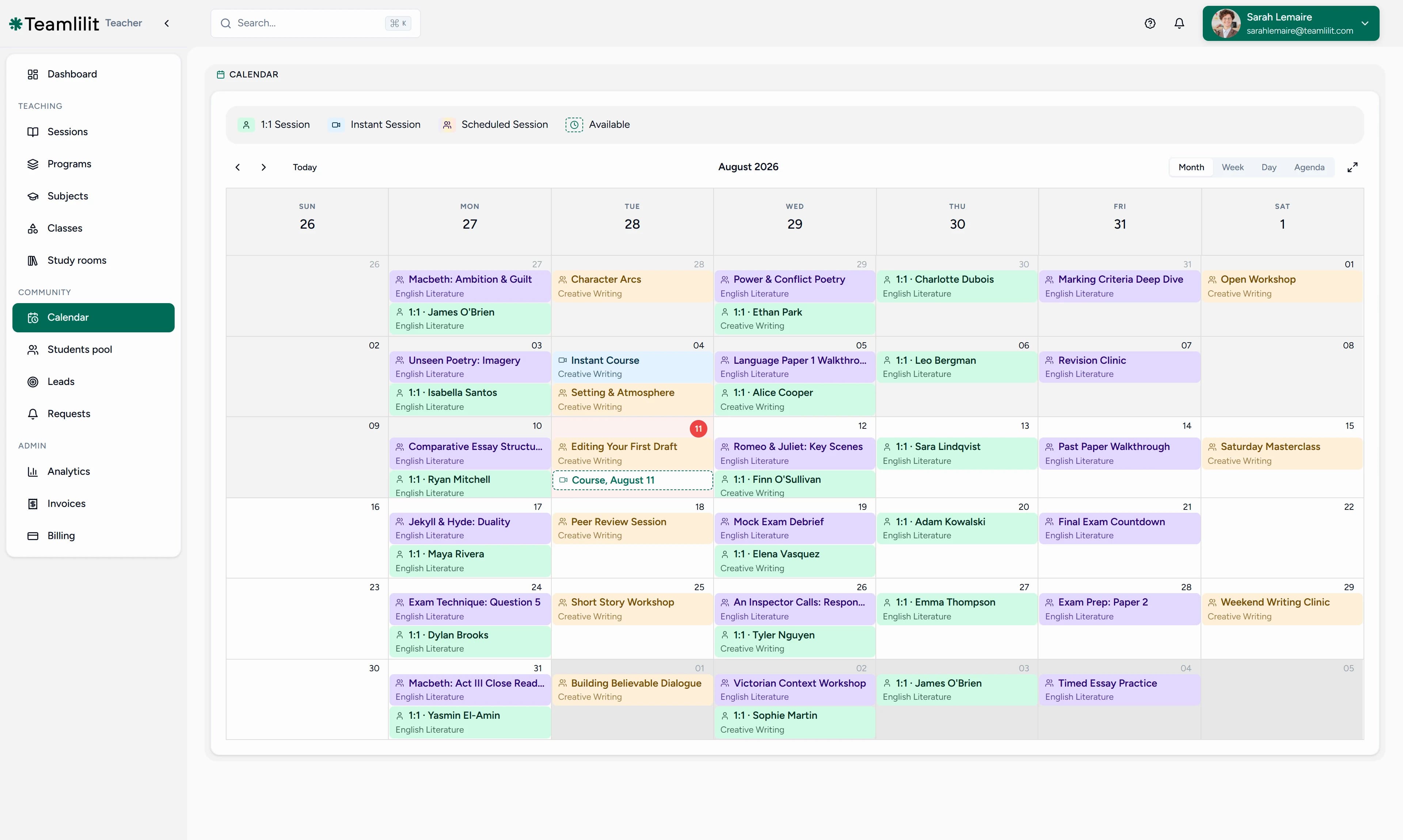
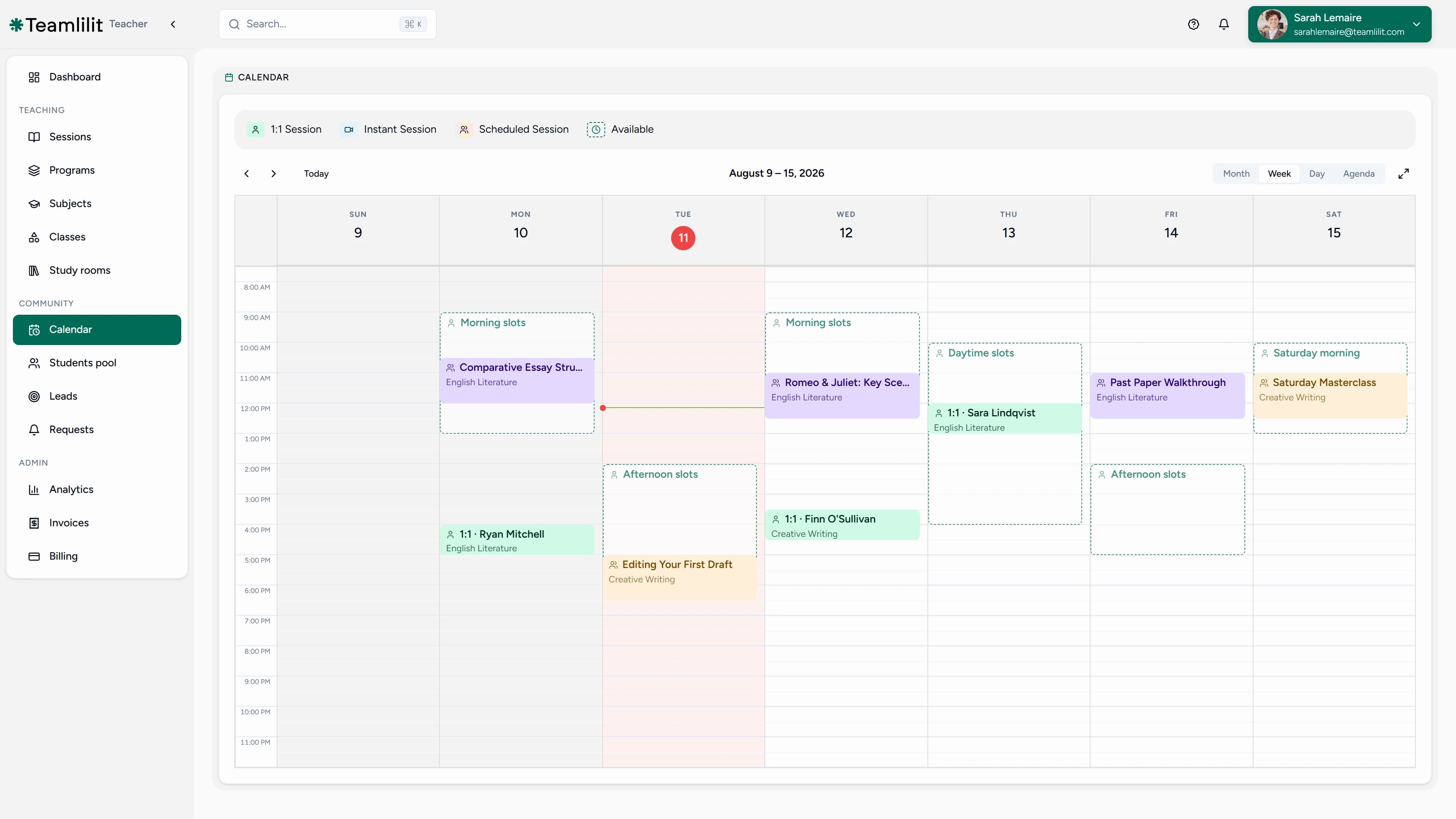
Sessions also sync to your Google Calendar automatically, so your teaching blocks appear alongside everything else in your life and you never double-book across the two.
Tutor timetable management for tuition centres
One tutor's week is a planning problem. A tuition centre's week is a coordination problem: multiple tutors, rooms, subjects, and groups that must never collide. On the Academy plan for tuition centres, Teamlilit works as tutor timetable management software for the whole centre.

- One shared timetable across every tutor, so nothing double-books
- Per-tutor views: each tutor sees only their own week
- Admin oversight: who teaches which group, when, and how full each class is
- Group enrolment: assign students to recurring classes once, not week by week
- Guardian records: a parent on each child's record, so reception knows who belongs to whom
UK tuition centres run on term-time rhythm: fixed after-school and weekend blocks, rebuilt each term. Build the term's timetable once and every tutor's week is already laid out, without a coordinator merging spreadsheets every Sunday. Centres running two or more sites have a second problem on top of this one, the physical room clash, and our comparison of academic scheduling platforms that prevent double-booking across multiple campuses sets out which category of software actually solves it.
When lessons move, the timetable follows
A timetable that only shows the plan falls apart the first time a parent asks to shift Thursday to Friday. In Teamlilit, moves live on the same record as the plan. Each session carries its own status: attended, cancelled in time, late cancellation, no-show, or rescheduled. The original booking stays linked to the new one, and your cancellation policy decides what is still billable instead of you relitigating it per parent.
Automatic reminders go out before each session, so the most common timetable failure, someone simply forgetting, stops happening.
A timetable that feeds attendance, hours and invoices
The real payoff of a connected timetable is what it produces while you teach:
- Attendance is recorded on every session automatically, with join and leave times per student
- Hours accumulate as per-student time tracking, so package balances and billable time stay current
- Invoices draw from those records: attendance pre-fills the invoice with the actual lesson time and the right student, and per-student rates (£25 for KS3, £40 for A-Level prep, whatever you charge) flow on automatically
That last step is its own workflow, and our tutor billing software page covers it end to end: rates, invoices, payment tracking, and late fees, all fed by this timetable. If you are still adding up hours by hand first, try the free tutoring hours tracker.
What to check before you commit to timetable software
Most tutor timetable tools demo well and diverge on the same handful of things. These are the questions worth asking of any of them, ours included:
- Does a recurring lesson carry its students, or just its title? Recurrence that only repeats a calendar block leaves you re-assigning students every week. In Teamlilit, the group is enrolled once and stays enrolled.
- What happens to the record when a lesson moves? Ask whether the original and the rescheduled session stay linked. If a move overwrites the original, you lose the history that cancellation policies and disputes depend on.
- Is attendance a manual tick or a by-product of teaching? Registers you have to remember to fill in stop being filled in around week three. Teamlilit records attendance and per-student time as the session runs.
- Does the timetable reach billing without re-entry? The gap between "hours taught" and "invoice sent" is where tutoring admin actually lives. If the two systems don't share a record, you'll be retyping.
- Can it hold a centre, not just a tutor? Multi-tutor timetables, per-tutor views, and room-level clash prevention are Academy-plan concerns that solo tools never grow into.
- What does it cost when your roster doubles? Per-student pricing looks cheap at ten students and stops being cheap at forty.
Is it the right fit for you?
| Your situation | What you probably need |
|---|---|
| Under 8 students, times rarely change | A template is genuinely enough for now |
| Growing roster, weekly reschedules, invoicing by memory | Timetable software, the case this page is about |
| Multiple tutors, shared rooms, term-time blocks | Tutoring centre software with multi-tutor timetables |
| You mostly need students to book themselves | Start at tutor booking software instead |
Weighing the paid options against each other? Compare tutor timetable tools covers the main choices honestly, ours included, and when to move beyond a tutoring spreadsheet makes the case for staying on the sheet a while longer.
Want the timetable to fill itself?
Everything above assumes you place the lessons. The other half is letting students do it: publish your availability and let them book open slots themselves, inside rules you control. That booking side, availability rules, approval flows, and no-show reduction, is covered on our tutor scheduling software page. The two halves share one timetable, so a booked slot and a placed slot look exactly the same in your week.
Key features
- Recurring weekly and custom-interval lessons with students assigned
- 1:1, group, and instant sessions in one timetable
- Day, week, and month views of the whole tutoring schedule
- Google Calendar sync for every session
- Automatic reminders before each lesson
- Session statuses and linked reschedule history
- Attendance and per-student hours on every slot
- Multi-tutor timetable management for tutoring centres and academies (Academy plan)
- Student self-booking when you want it (scheduling side)
Frequently asked questions
What is tutor timetable management software?
Tutor timetable management software runs the week rather than just drawing it. It keeps students, groups, attendance, taught hours, and reschedule history attached to every recurring lesson, so the same object that holds the plan also holds the record, and that record is what your student profiles and invoices are built from.
How is tutor timetable software different from tutor scheduling software?
The timetable is the structure of your week: recurring lessons, groups, and views by day, week, or month. Scheduling covers how that timetable fills and changes: availability rules, student self-booking, and booking approvals. Teamlilit does both in one system, so the week you build here is the same week students book into. The scheduling side is covered on our tutor scheduling software page.
Can I build a recurring weekly timetable?
Yes. Build your week once and it repeats automatically, weekly or on a custom interval, with the right students already assigned to each lesson. Term-time blocks, fixed after-school slots, and weekend groups all stay in place without rebuilding anything.
Can I see my tutoring schedule by day, week, and month?
Yes. Day, week, and month views show your whole tutoring schedule at a glance, including 1:1 lessons, group classes, and every tutor's sessions if you run a centre. Sessions also sync to Google Calendar automatically, so your teaching week shows up alongside the rest of your life.
Is there a free tutor timetable template I can start with?
Yes. Our free tutor timetable template is an interactive builder: add your students, subjects, and hourly rates, then download the schedule as a PDF or Excel file, free and with no signup. When you want that timetable to track attendance and hours on its own, move it into Teamlilit as recurring sessions.
Can a tutoring centre manage timetables for multiple tutors?
Yes. On the Academy plan for centre timetable management, a centre manages every tutor's timetable from one dashboard: one shared timetable across every tutor so nothing double-books, per-tutor views so each tutor sees only their own week, and admin oversight of who teaches which group and when.
What happens when a lesson moves or is cancelled?
The timetable updates instead of a chat thread. Each session carries its own status: attended, cancelled in time, late cancellation, no-show, or rescheduled. Your cancellation policy decides what is still billable, and the student's record keeps the full history of the original and the moved lesson.
Does the timetable track attendance and taught hours?
Yes. Attendance is recorded on each session automatically, along with per-student time. Every student's profile shows the lessons they attended and the hours they logged, ready for parent updates, package tracking, and invoicing.
Why not just keep my timetable in a spreadsheet?
A spreadsheet can show your week, but every change is manual and nothing is connected: it does not know who attended, which hours are billable, or that Thursday's lesson moved. Timetable software keeps the plan and the record in one place, so the same slot that holds the lesson also holds its attendance and hours. Our guide on tutor timetable software vs spreadsheet walks through when the sheet stops paying off.
How long does it take to set up my timetable?
Most tutors have their week rebuilt within their first hour: add your students, create your recurring lessons, and the timetable takes over from there. You do not have to migrate everything at once; start with next week and let recurring sessions fill in the rest of the term.
Tutoring timetable guides and resources
Plan the week, then choose how to keep it running:
- Create a tutoring timetable: place recurring lessons, bookable hours and buffers.
- Free tutor timetable template: build a weekly plan and export it as PDF or Excel.
- Best tutor timetable software in the UK: compare options against your teaching week.
- Tutor timetable software vs spreadsheet: decide when manual updates need a connected system.
- Five tutor scheduling tools: compare calendars, spreadsheets, booking apps and tutoring software.
Next step
Build your week once and let it run. Start your 14-day free trial of Teamlilit and have next week's timetable maintaining itself today. See pricing for plan details.
