Teamlilit already knows which topics you did not reach, where your student is weakest, and what homework never came back. Planning uses all of it, and shows you every piece before it writes a single line.
Free for 14 days. No card, and no AI credits spent until you ask for a plan.
Based on: your last lesson on 28 August, 3 topics left unfinished, a mastery score of 1 out of 5 on quadratic equations, and the 4 exercises in your library.
Ask a chat window for an hour on quadratic equations and you will get a reasonable one in seconds. What it cannot know is which topics you ran out of time for last week, which ones this student keeps getting wrong, or that the homework you set a fortnight ago was never opened.
Those details are what make a lesson land, and Teamlilit already has them.
All of it recorded while you taught, not typed in again for the AI's benefit.
The topics still unticked on your last lesson plan come first in the next one, with the time they need rather than a token five minutes.
Every topic you tick with a student present builds their mastery record. The weak ones get real time on the plan.
Write “ran slower than planned, she is guessing at the formula rather than reading it” in your wrap-up, and the next plan is built around it.
An exercise past its due date and still unopened is a reason to revisit the topic, not a statistic.
Planning opens with the records it is about to use, each one showing where it came from. Untick any of them and it stops shaping the lesson. Nothing is generated, and nothing is charged, until you have looked.
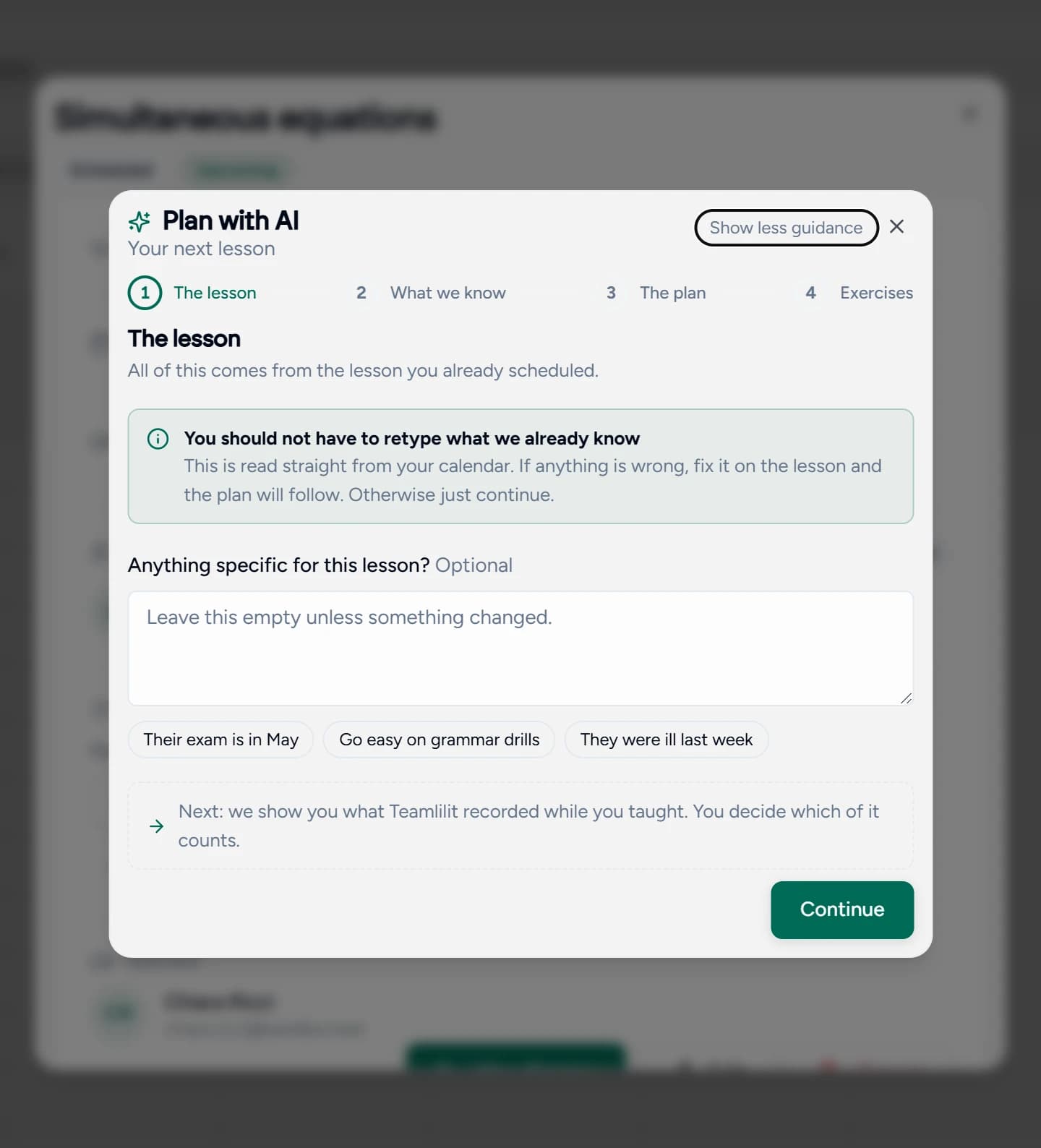
Only one step asks you to type, and that field is optional. The rest is confirming what Teamlilit already recorded.
The time, the student and the subject are read from the lesson you scheduled. There is nothing to fill in, and one optional box for anything that changed since last week.
If the exam moved, say so here. Otherwise leave it empty and carry on.
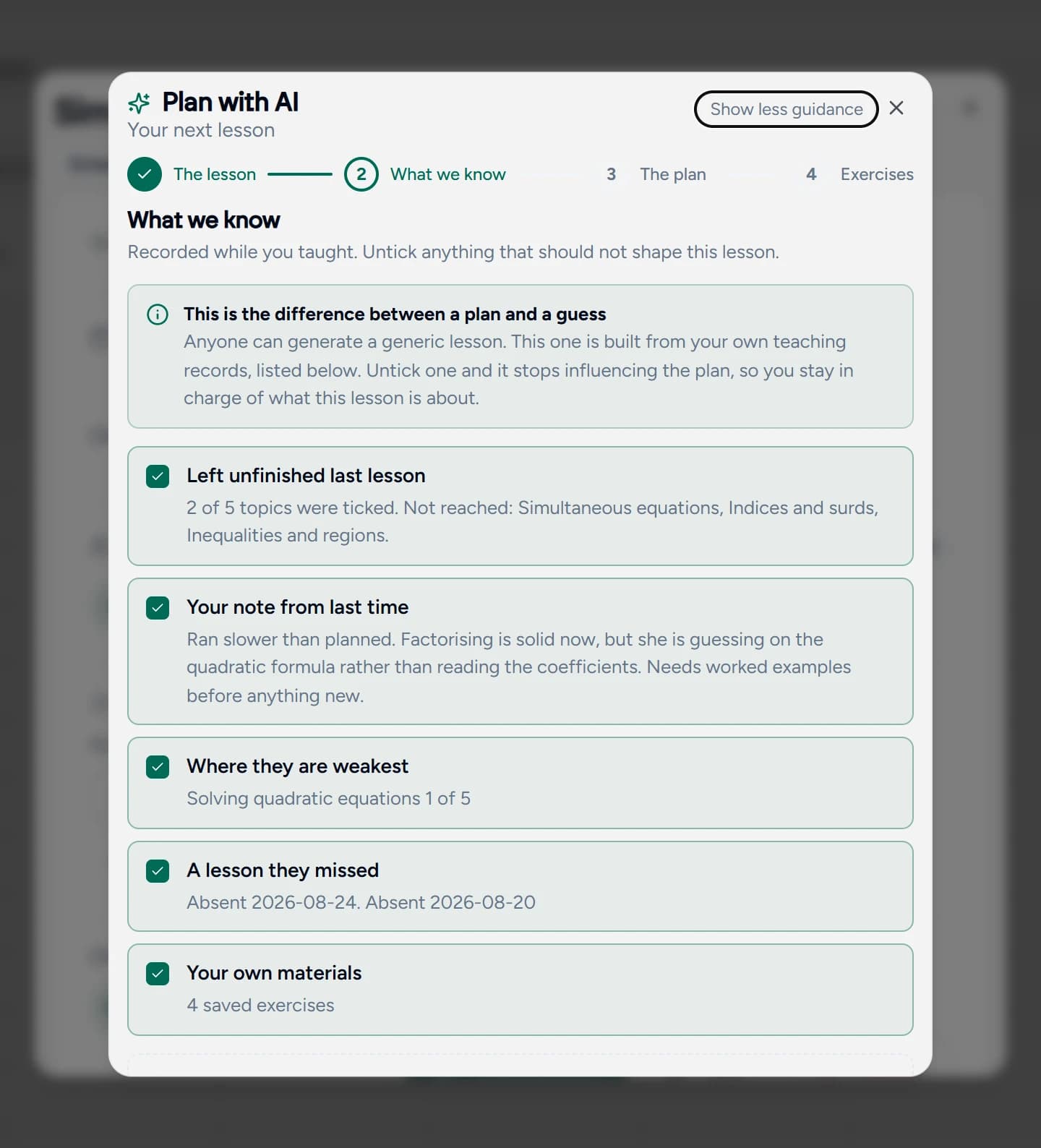
Everything Teamlilit found about this student, each card naming what it is and where it came from. Untick one and it stops shaping the lesson. The credit cost is stated here, before you commit to it.
This is the screen that separates a plan from a guess.
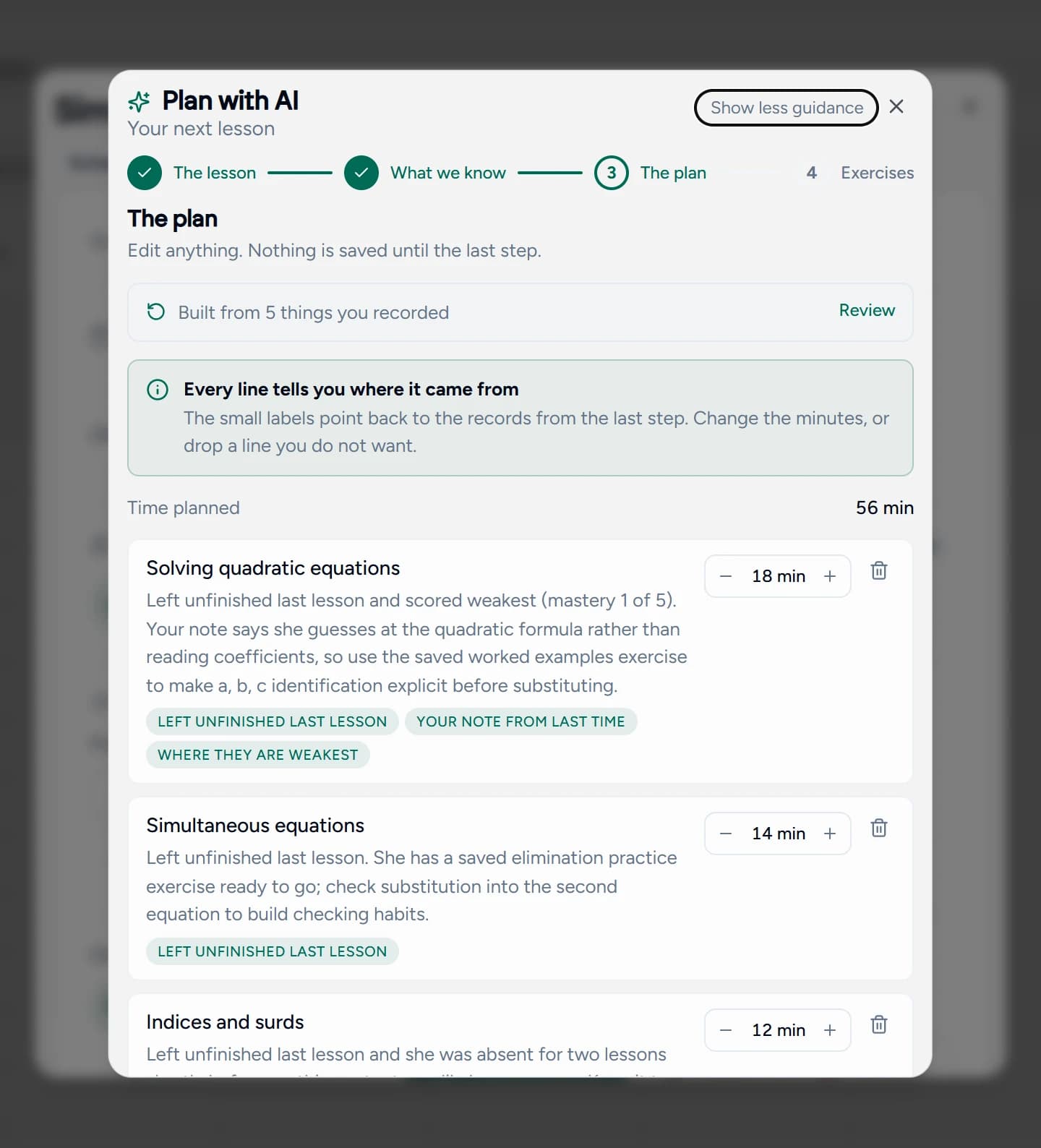
Each line carries a label pointing back at the record behind it, and a note in plain language. Change the minutes, drop a line, or reorder. The time bar keeps you honest about the hour you actually have.
Unfinished work goes first. Weak areas get real time, not a token five minutes.
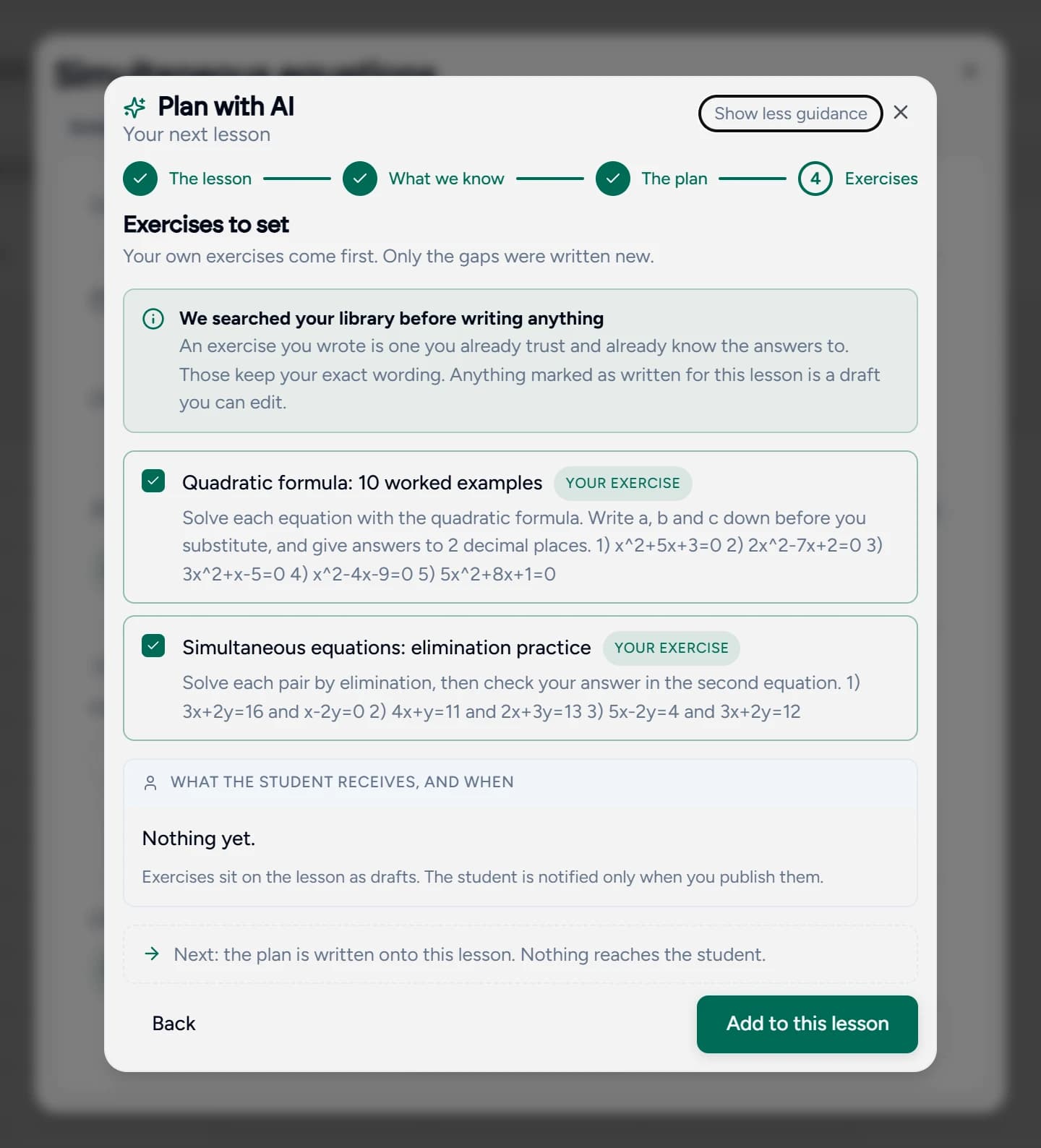
It searches the exercises you have saved before writing anything, and what it reuses keeps your exact wording. Anything marked as written for this lesson is a draft you can edit.
Nothing is sent to a student. Exercises sit on the lesson until you publish them.
This is step three in full. Not a tidy summary of what the AI decided, but the reason attached to each line, so you can agree or disagree with it in seconds.
Under each topic sit the records behind it: left unfinished last lesson, your note from last time, where they are weakest. A line with no label was grounded in nothing, and you can see that at a glance.
Every topic carries its own estimate rather than one flat number split evenly. Nudge one down, push another up, or drop the line with the bin. It is a draft, not a verdict.
Time planned sits above the list and updates as you change the minutes, so an overloaded hour shows itself before the lesson rather than during it.
The bar at the top counts what the plan was built from, and Review takes you back to the records themselves. The count is what the system actually found, so a thin plan tells you your records are thin.
Edit every line, delete half of them, or close the dialog and walk away. The plan reaches your lesson only when you press the button on the final step.
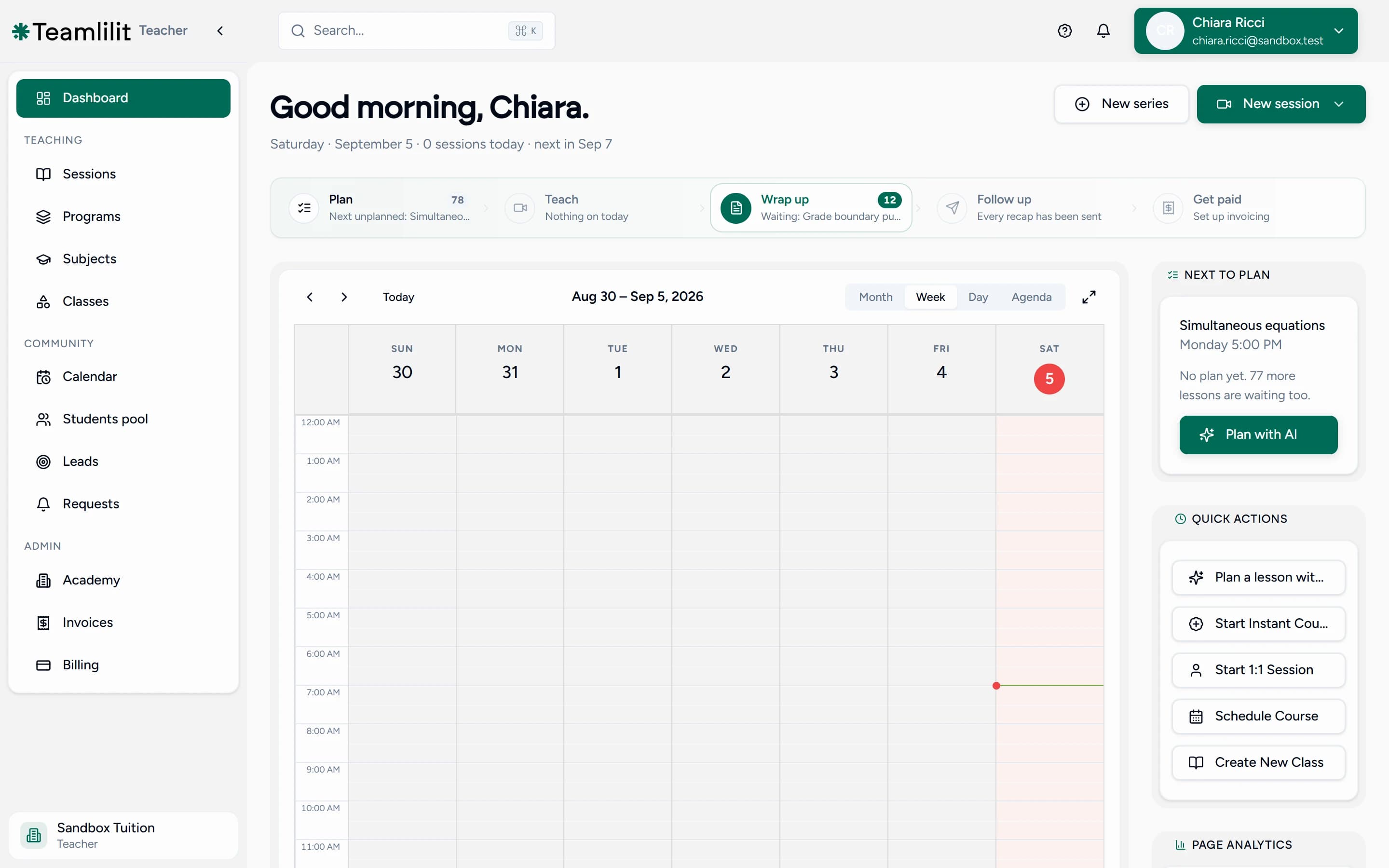
The next lesson without a plan is offered on your dashboard, in quick actions, on the teaching loop, and at the end of every wrap-up. You never have to remember it exists.
An exercise you wrote is one you already trust, already know the answers to, and already know how long it takes. Planning searches your saved exercises before writing anything new, and anything it reuses keeps your exact wording.
The longer you use Teamlilit, the more of each plan is your own work rather than generated text.
Reused from your library, in your own words, unchanged.
A draft, because nothing in your library covered it. Edit it before anyone sees it.
Anyone who teaches the same people repeatedly, which is where a record of past lessons is worth something.
You teach a handful of students week after week and plan at 11pm the night before. The record of what you covered is already in Teamlilit; this turns it into tomorrow's plan.
Progress is cumulative and uneven: a student can be fluent in the past simple and lost in reported speech. Mastery per topic makes that visible, and planning acts on it.
Several tutors, shared students, and handovers. A plan built from the recorded lessons rather than from one tutor's memory survives someone covering a colleague's session.
You can, and for a generic lesson it will do fine. Here is what it cannot reach.
| What you need | A chat window | Teamlilit |
|---|---|---|
| Knows this student | Only what you retype each time | Every lesson you have taught them |
| Shows its working | Explains after the fact, if asked | Shows the records first, and lets you veto them |
| Uses your materials | Writes everything from scratch | Reuses your saved exercises, word for word |
| Leaves a record | Lives in a chat log | Lands on the lesson, ticks off as you teach |
It is a four step wizard that proposes the next lesson for a specific student or class: topics in teaching order, minutes for each, a short note explaining why each is there, and the exercises to set. It is built from the records of the lessons you have already taught them, not from a description you type in.
From what you recorded while teaching. The topics you left unticked on the last lesson plan, the note you wrote in your wrap-up, the mastery levels built up each time you tick a topic with a student present, exercises that are past their due date and still unopened, and lessons a student was marked absent for. Nothing is retyped for the AI's benefit.
Yes, at three separate points. Step two lists every record before anything is generated and lets you untick any of them. Step three lets you change the minutes, reword a line or delete it. And nothing reaches your lesson plan until you press the final button, which adds to a plan you already started rather than replacing it.
For a generic lesson you can, and the result will be fine. A chat window cannot see your records, so it has no idea which topics you ran out of time for, where this student is weakest, or which homework never came back. It also cannot put the result on your actual lesson, be ticked off as you teach, or feed your wrap-up afterwards.
You see and edit everything before it is saved, which is the real safeguard. Behind that, a second model reviews each draft against the records and sends it back if the plan ignores the evidence, overruns the lesson, or splits the hour evenly instead of giving weak areas real time. If a generation comes back empty it fails and costs you nothing rather than showing you a blank plan.
It looks through your saved exercises before it writes anything new, and where one fits it reuses it with your exact wording rather than paraphrasing. Exercises marked as written for this lesson are drafts, and they are the ones worth reading before you publish. The longer you use Teamlilit, the more of each plan is your own work.
There is nothing to plan from yet, so the wizard hands over to the topic library builder instead: describe what you teach in a sentence and you get an editable list of topics for that subject. From your second lesson onward the planning screen fills itself with your own records.
Both. For a one to one the records are about that student and the notes can be specific. For a group, unfinished topics are shared and the student signals are summarised across the class rather than naming individuals, because a lesson plan is one document for everyone in the room.
No. The lesson plan is visible to you only, in the app and in the classroom, because a plan can carry candid notes about the people in it. Exercises sit on the lesson as drafts and a student is notified only when you publish them, so finishing a plan never messages anyone.
Yes. Plans are generated in your own language, not translated from English afterwards, so topic names and notes read the way you would have written them. The whole interface is available in English, French, Spanish and German.
Planning uses AI credits, which are included with every paid plan, and the cost of a plan is shown on screen before you spend anything. Reviewing the records is free, editing the plan is free, and accepting it is free. Only the generation itself costs a credit, and a failed generation costs nothing.
Planning runs on open models hosted in the EU rather than being sent to a consumer chat service, and your lesson records are used to build your plans rather than to train anyone's model. The records themselves stay in your account, where you can see and delete them.
A plan is only as good as the record behind it. You teach from the plan, tick topics as you cover them, the wrap-up writes itself from what you ticked, and the next plan starts there. Each stage makes the next one better informed.
Teach a lesson, tick what you covered, and the next plan is waiting with the rest of it. Free for 14 days, no card.
14-day free trial · No credit card required · Cancel anytime
© 2026, All rights reserved.


