

A lesson calendar that syncs to Google Calendar: your schedule, rebuilt automatically.
Set your availability once. Teamlilit handles the rest: student self-booking, reschedules, reminders, and Google Calendar sync. All without a single WhatsApp message.
Sofia M.
sofia.m@email.com
Pick a time
60 min · Private lesson
Every reschedule is a mini crisis.
- "Can we move Thursday to Friday?" and now you're manually updating Calendly, messaging the student, and checking if Friday is even free.
- If you teach groups, it's worse. One student cancels and the whole slot needs to be rethought.
- You spend more time managing your calendar than teaching from it.
- And on top of that: your schedule lives in three different apps and none of them talk to each other.
Tutors who come to Teamlilit describe scheduling as their single biggest source of admin stress. Not because scheduling is complicated, but because the tools they're using make it complicated.
Set it once. It works every week.
Teamlilit's availability system works the way you think. You define your weekly template (when you're free, when you're not, how many sessions per day) and that becomes the default for every week. Exceptions are added as overrides. Students only see slots you've confirmed.
Weekly template
Booking rules
Preview · April 2026
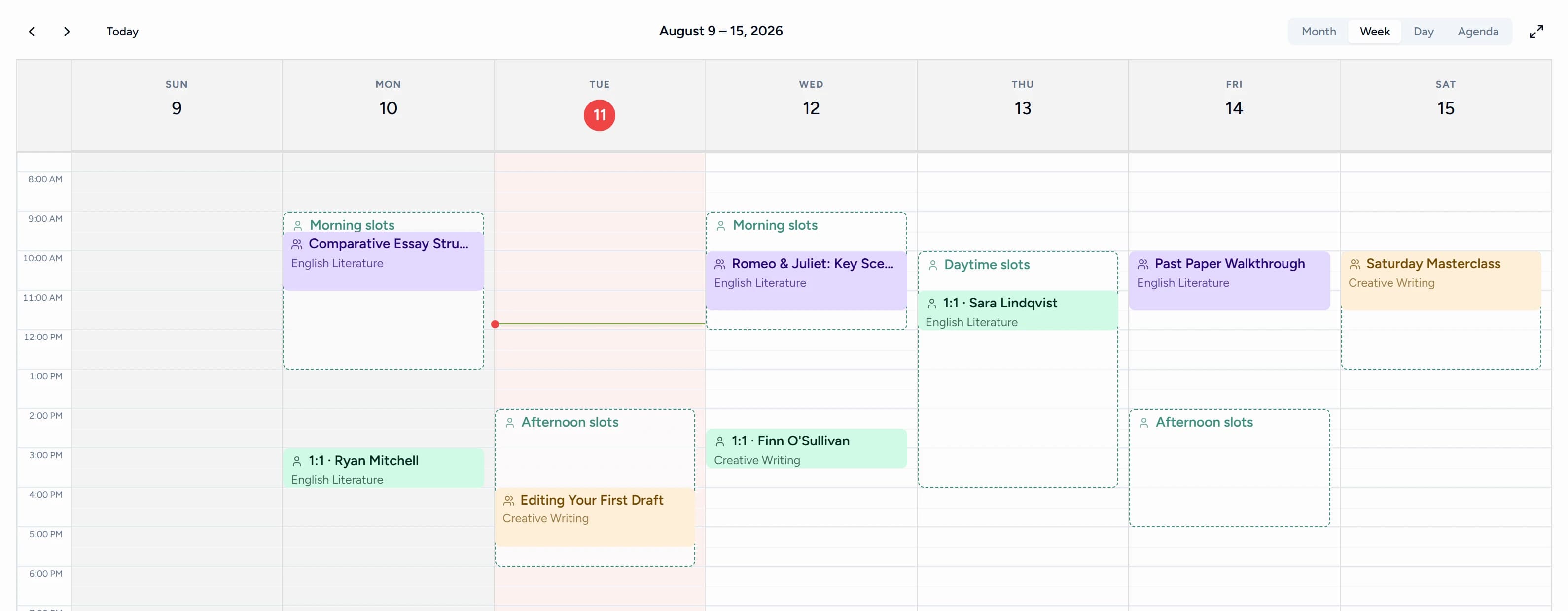
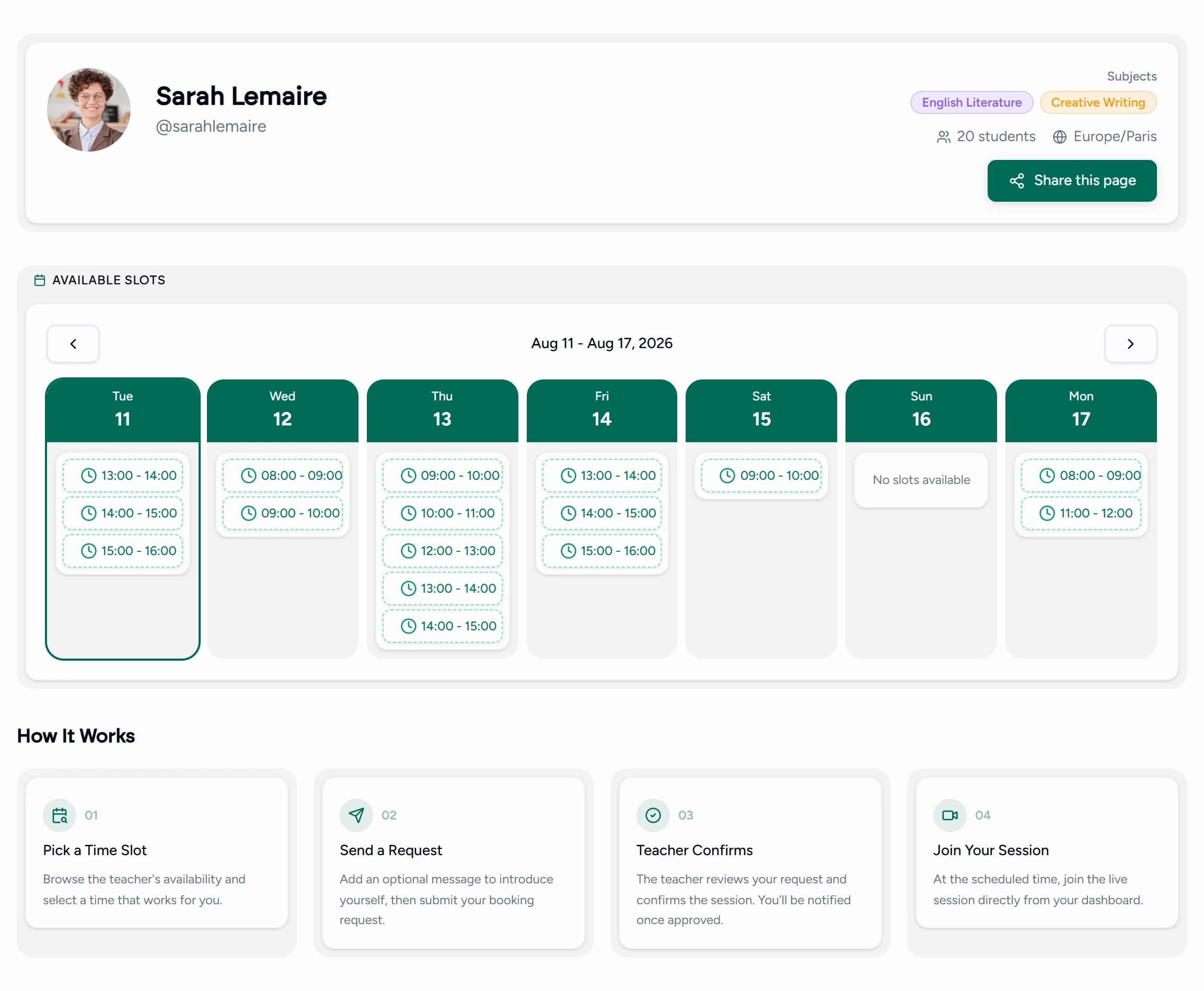
The same week, from both sides.
You open the hours. Students pick from them. Nobody negotiates over messages, and nothing gets double booked.
Everything your calendar needs to run itself.
Weekly availability templates
Define your available hours once per week. Repeats automatically every week, edit any time.
Block dates & exceptions
Need a day off? Add a date exception. Your calendar blocks it out; students can't book that day.
Buffer time rules
Add 15 or 30 minutes between sessions automatically. No more back-to-back sessions with no break.
Session limits
Set a maximum number of lessons per day or group sessions per week. Teamlilit enforces it.
Student self-booking portal
Students see your available slots and book directly, no WhatsApp, no back-and-forth emails.
Google Calendar sync
Every session you create in Teamlilit appears in your Google Calendar automatically, in real time.
Apple Calendar & Outlook
Subscribe to your Teamlilit schedule from Apple Calendar, Outlook, or any app that reads iCal feeds. New sessions show up automatically.
Automated session reminders
Students receive email reminders 24 hours and 1 hour before their session. You send nothing.
Reschedule & cancellation flow
Students can request reschedules from their portal. You approve or decline with one click.
No-show protection
Set a no-show grace period and late tolerance. Teamlilit tracks who arrived late or never showed, with your own message to students.
Minimum booking notice
Require students to book at least 24 (or 48) hours in advance. No last-minute surprises.
From setup to first booking in under 5 minutes.
Set your weekly template
Choose which days and hours you're available. Add buffer time and session limits. Takes 3 minutes.
Students book themselves
Share your booking link. Students pick a slot from your live availability. No message needed.
Your calendar updates automatically
The session appears in Teamlilit and syncs to Google Calendar. A reminder goes to the student. Done.
I used to spend every Sunday rebuilding my schedule for the week. Now I open Teamlilit on Monday morning and everything is already there.
Beta user
Language tutor, 22 active students
This is what scheduling should feel like.
Without Teamlilit
With Teamlilit
Manually messaging students to check availability
Students book directly from your available slots, no messages needed
Rebuilding Calendly every time your schedule changes
Edit your weekly template once; it applies to every week automatically
Forgetting to send reminders and chasing no-shows
Email reminders sent 24h and 1h before every session, automatically
Checking Google Calendar separately from Calendly
One-way push to Google Calendar, always in sync
No visibility into how many sessions you've taught this week
Session counter on dashboard, daily limit enforced automatically
Where to next?
Scheduling is the start. Here's what comes after the booking.
Stop rebuilding your schedule every week.
Set your availability once and let Teamlilit handle the rest.
14-day free trial · No credit card required · Cancel anytime
