

Attendance tracking software that works while you teach
You finish a group session with 8 students. Three showed up. Two joined late. One left early. Now try to remember all that by the end of the day, or worse, by the end of the week. Teamlilit tracks attendance automatically so you never have to.
Your current stack

Why attendance tracking matters for tutors
It's your proof of work
When a parent asks "did my child attend?", when a student disputes a missed session, when you need to justify your fees: attendance records are your evidence.
It reveals patterns
Regular no-shows? Students who always leave early? Attendance data tells you who's engaged and who's dropping off before they actually quit.
It saves time
Manual attendance tracking, marking names in a spreadsheet after every session, adds up. Across 20 sessions a week, that's hours of admin you shouldn't be doing.
How Teamlilit tracks attendance
Automatic join/leave detection
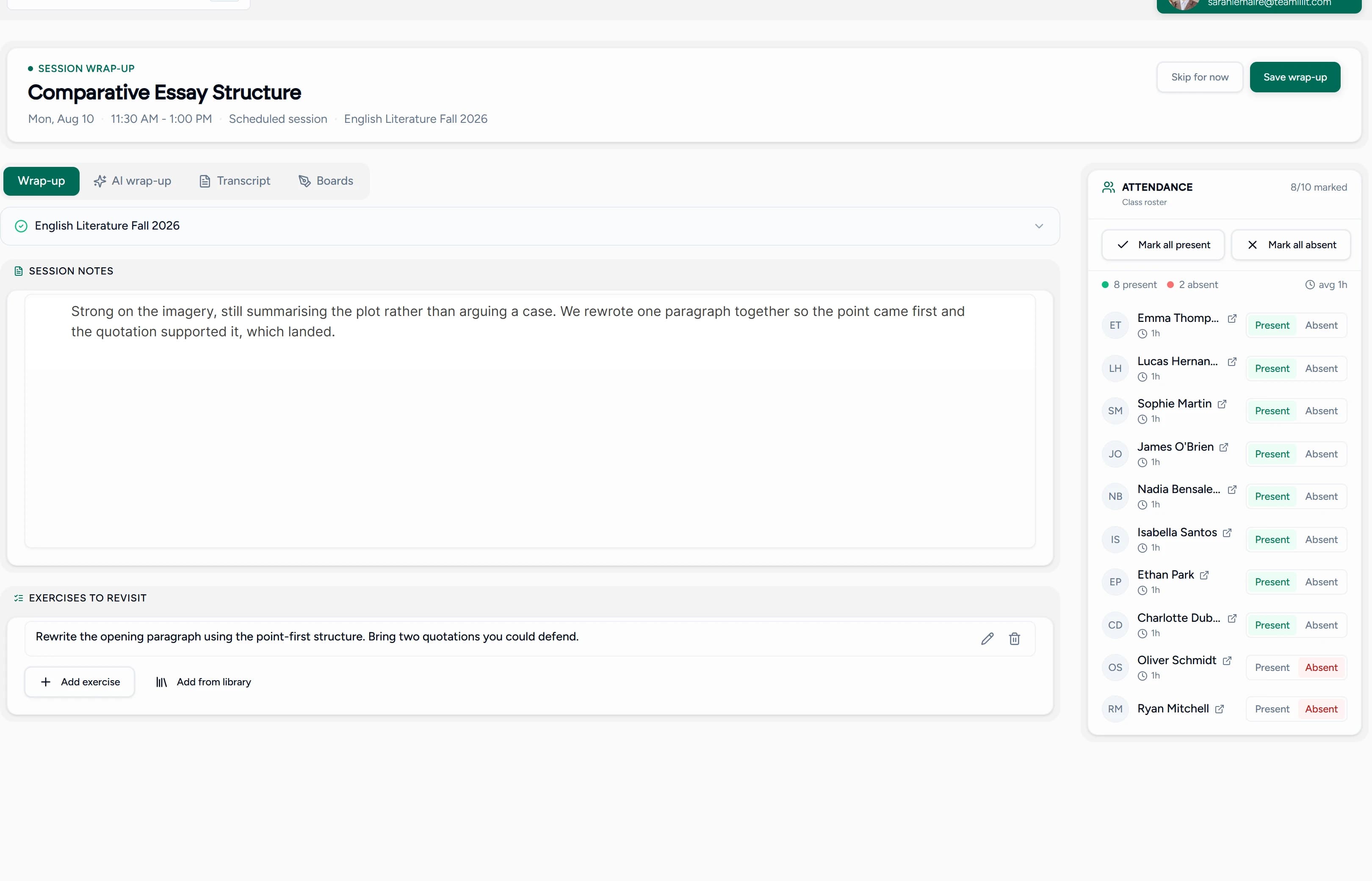
When a student enters the live classroom, it's recorded. When they leave, it's recorded. No clicks, no manual marking, no "did I forget someone?"
Per-student attendance history
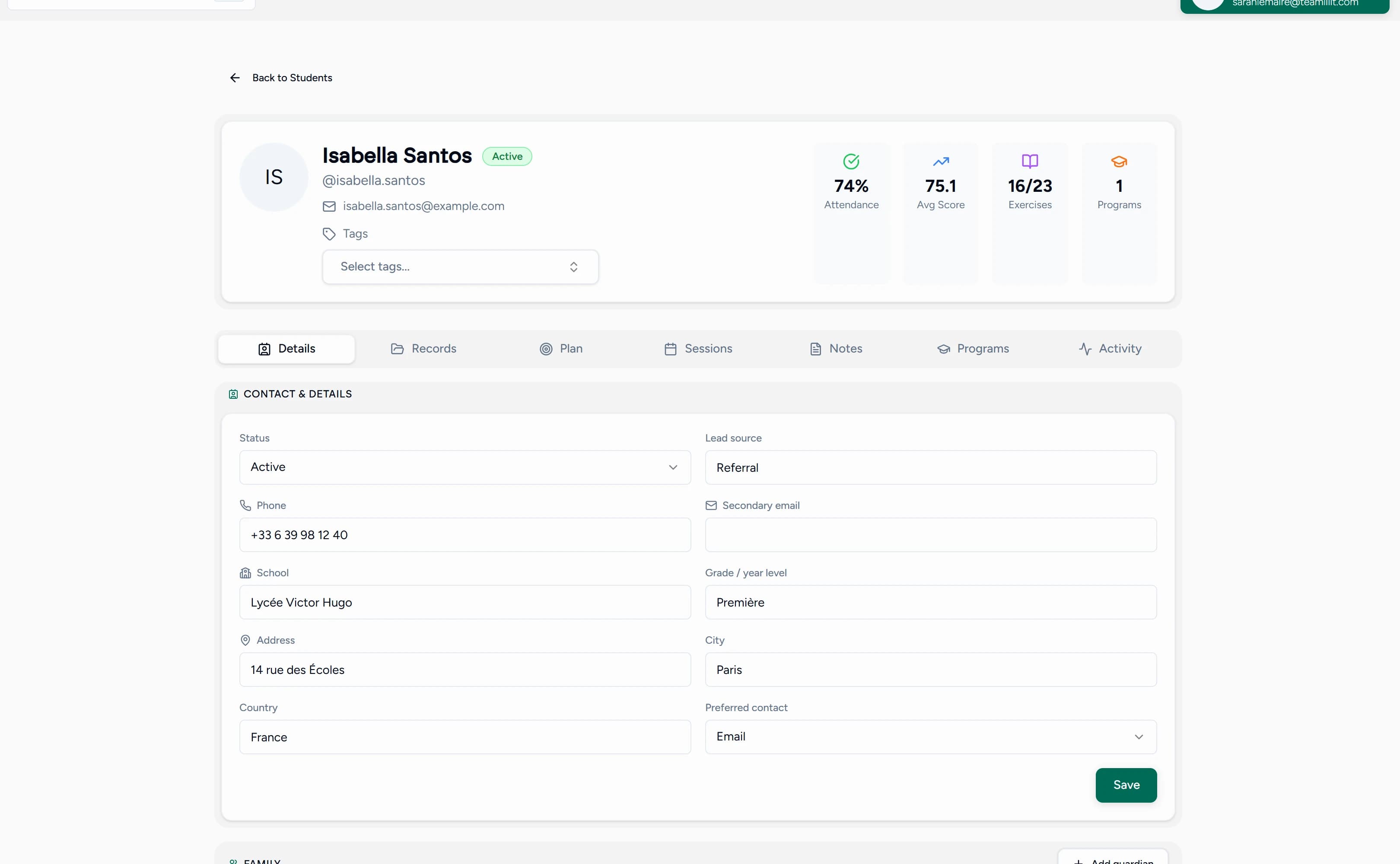
Every student's profile shows their complete attendance record: which sessions they attended, which they missed, across all classes and groups.
Per-session attendance view
After any session, see the full list: who was present, who was absent, with join and leave times.
Connected to everything else
Attendance isn't isolated in a separate spreadsheet. It's connected to:
- Student profiles: see attendance trends per student
- Class/group records: see attendance patterns per group
- Session history: every session has its attendance data attached
Class attendance tracking software for tutors
Attendance gets harder the moment you teach more than one student at a time. A group class of 10 means ten join times, ten leave times, and ten attendance records per lesson. Teamlilit records the full roster for every class automatically: who was present, who was absent, who joined late.
Each group's record shows attendance patterns across all its sessions, and tutoring centres on the Academy plan for tutoring centres see class attendance across every tutor from one dashboard. Because attendance is built into the same tutor timetable software you use to schedule classes, there's nothing separate to reconcile.
A tutoring attendance sheet that fills itself in
A paper attendance sheet works for one class. A spreadsheet works for five. But every sheet has the same weakness: someone has to fill it in, after every single lesson, forever.
Teamlilit replaces the attendance sheet with a record that writes itself while you teach. Join and leave times are captured in the live classroom, the attendance record is attached to the session on your timetable, and each student's row is already on their profile by the time the lesson ends.
Still need a sheet for in-person lessons? Our free tutoring attendance sheet template generates an editable Excel tracker or a printable PDF in seconds.
Attendance and time tracking per student
Teamlilit doesn't just record who showed up. The time each student spends in a session is recorded alongside their attendance, so every lesson in a student's history shows how long they were actually in class.
Open any student profile and you'll see their sessions with the time spent in each one, across 1:1 lessons and group classes. That record is what you reach for when you're billing by the hour, sending parent reports, or checking how much of a lesson package a student has used. Our guide on how to invoice tutoring students based on attendance shows how those records turn into clear, defensible invoice lines.
Attendance answers who was there; the duration beside it answers for how long, which is the number an hourly invoice is actually built from. If billing by the hour is the reason you are tracking attendance at all, tutor time tracking software is the same record viewed from the billing side, and the free tutoring hours tracker totals a month of them without an account. For completed registers covering the awkward cases, see our attendance record examples for private lessons and groups.
Before and after
| Before (manual) | After (Teamlilit) |
|---|---|
| Forget to mark attendance | Automatic, always recorded |
| Spreadsheet per class | One dashboard for everything |
| No student history | Full per-student records |
| "Who was in Tuesday's class?" | Click and see |
| End-of-month reporting: chaos | Instant attendance data |
Who needs this
- Solo tutors with 10+ students who lose track of attendance
- Academy owners who need attendance records across multiple tutors
- Language schools with recurring weekly group classes
- Tutors billing per session who need proof of attendance
- Corporate trainers reporting to HR on employee participation
Frequently asked questions
What is class attendance tracking software?
Class attendance tracking software records who attended each class, when they joined, and when they left, without manual roll calls. For tutors, it replaces paper attendance sheets and spreadsheets: every 1:1 lesson and group class gets an attendance record automatically, tied to each student's history.
How do tutors keep track of attendance?
Most tutors start with a paper sheet or a spreadsheet, which works until the schedule grows. Attendance tracking software does it automatically: when a student joins a live session, their presence is recorded with join and leave times, and the record lands on their profile. No marking names after every lesson.
Can I track attendance for group classes?
Yes. Group sessions record attendance for every student in the class, so after each lesson you can see who was present, who was absent, and who joined late. Each group's history shows attendance patterns across all its sessions.
How does automatic attendance work?
When a student joins a live session, their join and leave times are recorded automatically via the classroom system. No manual input needed.
Can I see attendance history for a specific student?
Yes. Every student profile shows their complete attendance record across all sessions and classes.
What about students who join late or leave early?
Join and leave events are tracked with timestamps, so you can see exactly when each student was present.
Can I use this for in-person sessions too?
The automatic tracking works for online sessions. For hybrid setups, you can use the platform to record attendance alongside your in-person teaching.
Does Teamlilit track tutoring hours per student?
Yes. The time each student spends in a session is recorded alongside their attendance, and every student's profile shows the time spent on each of their sessions. That gives you a clear record for hourly billing, parent reports, and package tracking.
Is there a free tutoring attendance sheet template?
Yes. Our free attendance sheet generator creates an editable Excel tracker with automatic totals, or a print-ready PDF, from your class, students, and session dates, with no signup. It's a good fit for in-person lessons; for online sessions, Teamlilit records attendance automatically so there's no sheet to fill in.
Where the attendance record goes next
Attendance is rarely the end of the job. The chain it feeds is short: the register records who attended, the time tracked against each student turns that into hours, and invoicing turns the hours into a bill you review rather than rebuild. Each step reads the step before it, so nothing is typed twice and the invoice matches what was taught.
Stop tracking attendance by memory
Let the system do it. Focus on teaching, Teamlilit handles the rest. Attendance tracking is included in every plan. See pricing for details.
