

A board built for reactions, not slides
Draw the energy profile, mark up a photo of the student's practical write-up, and keep the past paper open on its own tab. All inside the session, all saved to the student's record.

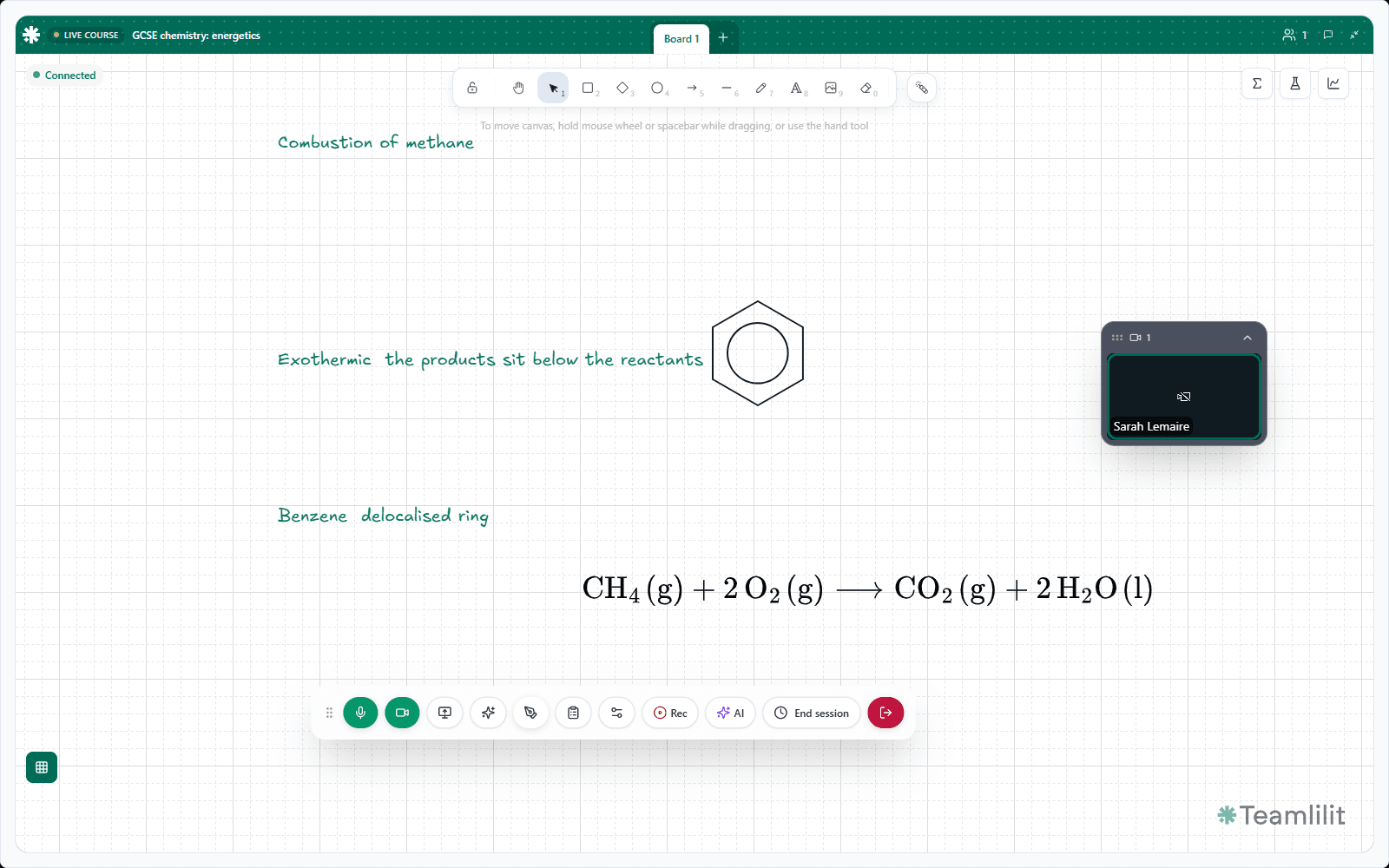
Exothermic: the products sit below the reactants

Click the tabs: this is the real board chrome
Chemistry does not fit in a chat window
- An energy profile takes ten seconds on paper and half a lesson to describe in words.
- The student's practical write-up arrives as a phone photo you cannot annotate.
- The past paper, the mark scheme and the diagram live in three different apps.
- Six weeks later nobody can find what you actually said about equilibrium.
Chemistry teaching is visual and it is cumulative. The lesson needs a surface you can draw on and a record that survives the term.
The diagram, the working and the paper in one session
Draw reaction pathways and energy profiles straight on the canvas. Put a photo of the student's handwritten mechanism beside them and annotate it with the same pens.
Every board saves with the session and sits on the student record, so a question in March about what you covered in November has an answer.
What the board gives a chemistry teacher
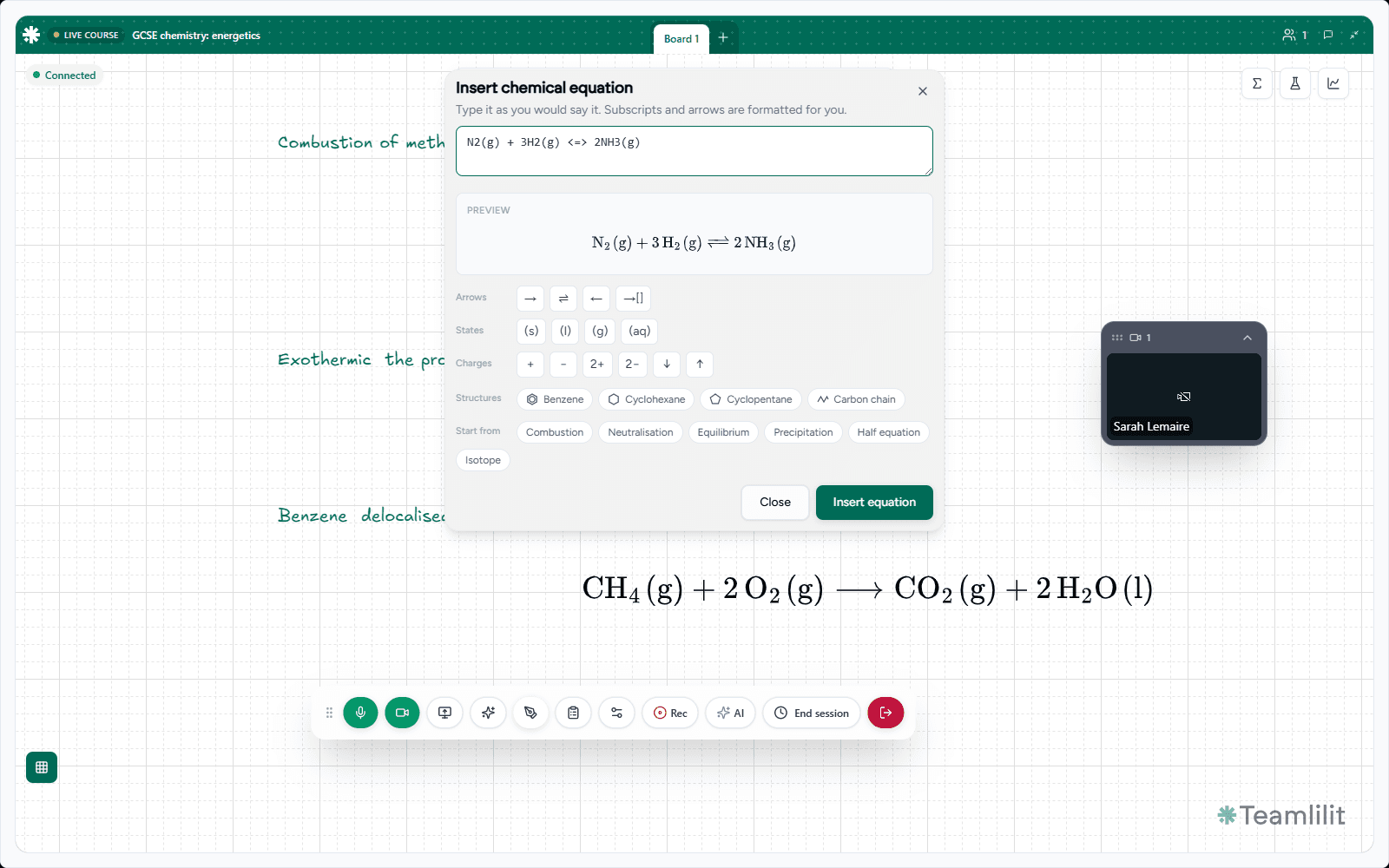
Equations and ring structures
Type an equation the way you would say it, 2H2 + O2 -> 2H2O, and it lands properly typeset: subscripts, state symbols, equilibrium arrows, charges, precipitates and isotopes. Benzene, cyclohexane, cyclopentane and carbon chains drop on from the same menu as editable shapes you can hang substituents off.
Curves for rates and titrations
Plot functions on shared axes for rate curves and titration shapes, or embed the Desmos tools when the lesson wants a live sandbox.
Annotate the practical work
Drop a photo of a handwritten mechanism or lab write-up onto the canvas and mark it up with the drawing tools, exactly as you would on paper.
Grid for plotting
Toggle graph paper behind the canvas for plotting and for keeping structural diagrams tidy. Each person controls it for their own view.
Students at the board
Bring a student on stage and let them draw the mechanism themselves. You choose who has the pen, and when.
A board per topic
Keep the mechanism, the energy profile and the practice questions on separate boards inside one session, prepared before the lesson starts.
Written notes beside the board
A text page for definitions and method steps, written by you during the lesson while the student follows along.
Past papers in the session
Open a PDF, image or slide deck on its own tab so the paper is in the lesson rather than in an email. To mark it up, place it on the canvas as an image.
It all lands on the record
Boards, notes and attendance sit on the student's profile, so revision plans are built from what actually happened rather than from memory.
The board in a real lesson
Captures from the live session board.
How a chemistry lesson runs on it
Set the boards up
Before the lesson, put the mechanism, the energy profile and the practice questions on their own boards, and attach the past paper.
Teach on the canvas
Draw the pathway, annotate the student's photographed working, and bring them on stage to try the next mechanism themselves.
Keep the record
Boards and notes save to the session and to the student's profile, so revision in the spring is built from the autumn's lessons.
Marking up a photo of a student's mechanism on the same board I drew the pathway on is the thing I could never do over a video call before.
Beta user
A-level chemistry tutor
A video call and a camera roll, against one session
Video call plus attachments
Teamlilit
The mechanism described out loud because there is nowhere to draw it
Drawn on a shared canvas the student can watch and copy
The write-up sits in a photo you cannot annotate
The photo goes on the canvas and is marked up with the drawing tools
Past paper emailed before the lesson and lost during it
The paper open on its own tab inside the session
Notes typed into a chat that disappears when the call ends
A text page in the session, saved to the student's record
No way to know what was covered in November
Every board and note kept on the student profile, by date
Teach maths as well?
It is the same board, and the admin side is shared across both.
Run your next chemistry lesson on it
Start a 14-day free trial and set your first boards up before the lesson.
14-day free trial. No credit card required. Cancel anytime.
